1
2
Chapter 2
LOADING PAPER
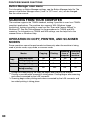
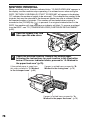
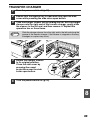
The tray location indicator will blink when there is no paper in the selected paper
tray, or when the selected paper tray is not closed or is improperly closed.
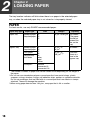
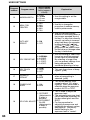
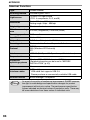
PAPER
For best results, use only SHARP recommended paper.
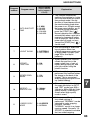
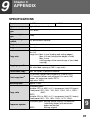
Paper tray type
Paper type
Size
Weight
Capacity
Paper tray
Standard paper A4
Recycled paper B5
A5
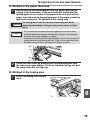
56 g/m2 to 80 g/m2 250 sheets *1
(The paper
should not
exceed the
line on the
tray)
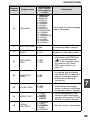
Bypass tray
Standard paper A4
Recycled paper B5
A5
Thick paper
B6
Transparency A6
film/Labels
Letter
Legal
Invoice
56 g/m2 to
80 g/m2
50 sheets *1
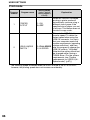
52 g/m2 to
128 g/m2 *3
Load one
sheet at a
time in the
bypass tray.
Envelopes *2
Monarch
Commercial 9
Commercial 10
*1 The number of sheets of paper that can be loaded varies depending on the weight of
the paper.
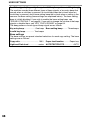
*2 Do not use non-standard envelopes or envelopes that have metal clasps, plastic
snappers, strings, windows, linings, self-adhesive strips, patches or synthetic materials.
Do not use envelopes that are filled with air or envelopes that have labels or stamps
attached. These will damage the machine.
*3 When using paper heavier than 104 g/m2, use paper that is A4 or smaller.
18