1
Continued
I KoIo,T:II I_[L'V_'I,,']"J:(I,] 11[e][I,]: I:1"J1:1:Is] :| I :!_T_ [
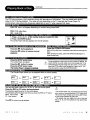
This Combo Player allows you to locate consecutive
chapters or tracks.
Press the SKiP INN or 144 button repeatedly to display the requested chapter or track
The Combo Player starts playback from the selected chapter or track.
HOW to locate preceding chapters or tracks
• When you press the SKIP INN button, the Combo Player startsplayback from the beginning of the preceding chapter or
track.
How to locate succeeding chapters or tracks
• When you press the SKIP _
button,the Combo Player startsplayback from the beginning of the succeedingchapter or
track.
On somediscs the titles may not displaythe sub-dividedchapters.
II I_s_lf'_lI I _[€11_'!111111
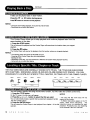
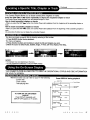
You also can locate a specific title by directly selecting a title number.
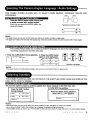
1. Press SEARCH button during playback.
The menu will appear.
2. Press direction buttons and numbers to select the title and chapter you want.
3. Move the cursor to select Audio, Subtitle, Angle, TT Time, CH Time, Repeat, Time Disp..
NOTICE
• The displays may vary depending on the discs.
• You may experience a difference in TITLE'or MENU display.
THE COMBO PLAYER ALLOWS
ON YOUR TV SCREEN.
YOU TO VIEW THE
OPERATIONAL
STATUS
AND
DISC
INFORMATION
[Id -"I _e] [41_[egl l: I _[s] "..1:1
:!±_lI [el _r_,lI[,,._1F*JI
n,_
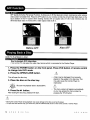
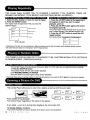
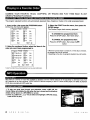
With this function you can view on your TV the following:
-Current title
-Track number
Press DISPLAY during playback
Current Chapter
-Total playing time
]3tie
iI_-a
E _ Current i tIe
ed
Total Chapter
Totat TEtle
TT m/i2
CHoo6i0_,
o:o2:2o
]3tie Remain
TO TURN OFF THE ON-SCREEN
DISPLAY
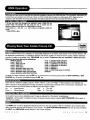
Press DISPLAY repeatedly until
DISPLAY OFF appears on TV screen.
T£
01112
CH
00_039
0:18:50
T
Chapter Elapsed
TT
01/12
CH
00_039
0:03:50
f
CTTh
oalPtler Re CrnHai_039
__
A
O
V
-
3
8
0
0
Display
0:1040
Off
A
P
E
X
D
I
G
I
T
A
L
17