1
Installation & Setup Guide
Palette VL Lighting Control Console
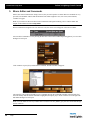
• Go to the Control Panel to change your Screen Saver. Changing the Settings of "My Pictures Slideshow" allows
you to point to your own directory of images that you place on the hard drive.
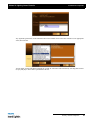
• Create a chase easily by selecting a range of cues' ACTIONs with the blue box, press [EDIT] and select "Follow
After Fade." Then select the NEXT CUE to be linked to the first.
• When controlling moving lights, group multiple attributes together and control them simultaneously by holding
down combinations of [S1-S4] and rolling the level wheel.
• Palettes can be nested. If you build Position A from raw values, then build Position B using Position A, updating
Position A will affect Position B.
• You can Flip moving head channels easily by pressing [TOOLS] when Flip has been selected as the current tool..
Do this and update the cue when the light 'took the long way around' when running cues.
78