1
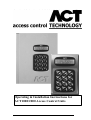
ACT1000/2000 Operating Instructions
Software Version 3.23-00
Operating Instructions for
ACT1000/2000 Access Control Units
Software Version: 3.23-00
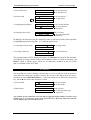
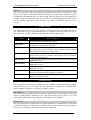
All user functions are accessed via two six-digit codes. The first code is for the Operator who
is responsible for the day-to-day administration of the system, adding and deleting users,
setting names and assigning time-zones etc. The second code is for the Installer who
performs the initial configuration of the system and decides on communications settings,
interfaces, and modes of operation.
Operator
Default Codes
123456
Installer
999999
Menu System
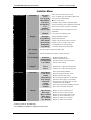
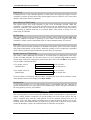
All user functions are accessed via a menu system. The menu (or submenu) title appears on
the top line of the display. The bottom line contains the current item in the menu. The three
keys on the bottom row of the keypad are used for navigation:
✘ Quit to previous menu.
Menu Navigation Keys
✔ Select item or Submenu
0 Next menu item
Text Entry
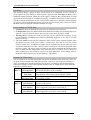
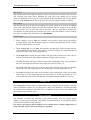
Textual descriptions (user names etc.) are entered via a simple text entry system. Each of the
digits 1-9 may be used to enter letters, numbers or symbols according to the table below.
Pressing the required digit once will bring up the first letter in that group. Subsequent presses
will step through the group and then back to the first letter. Pressing the 0 key advances to the
next character and pressing the ✘ key moves back to the previous character. The ✔ key
accepts the currently displayed text. If the cursor is at the first location in the display,
pressing the ✘ key gives the option to cancel all the displayed text.
1
4
7
✘
abcABC1
jklJKL4
stuvSTUV7
Previous Character
2
5
8
0
Text Entry Keys
defDEF2
mnoMNO5
wxyzWXYZ8
Next Character
Page 1 of 32
3
ghiGHI3
6
pqrPQR6
9
SPC - & . + ’ / 9 0
✔ Accept displayed text