1
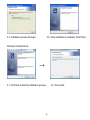
3.3. Installation process will begin.
3.4. Once installation is complete. Click Finish.
3.5. Take out the installation disk and restart the computer.
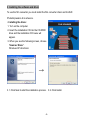
• Installing the software
1. Insert the installation CD into the CD-ROM drive and the installation CD menu should appear.
2. When you see the following screen, choose “Arcsoft Software Suite” to install the software.
-7-