1
EP10 Time Recorder User Guide
Set up Functions
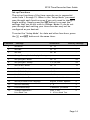
The set up functions of the time recorder are in sequential
order from 1 through 15. When in the „Setup Mode‟ you must
pass through each function even if you only need to change a
single setting. Simply press the SET button to accept the
settings that you do not wish to change. Note: If you do not
pass through each setting your time recorder may not be
configured as you desired.
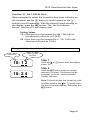
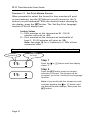
To enter the „Setup Mode‟ for date and other functions, press
the
Function
-
and SET buttons at the same time.
Settings
Selections
Factory Settings
1
Set Month
01 – 12
-
2
Set Date
01 – 31
-
3
Set Year
00 – 99
-
4
Change Factory Default Daylight Savings
y–n
n
5
Set Spring DST Month
00 – 12
03
6
Set Spring DST Sunday
1,2,3,4,Last
02
7
Set Fall DST Month
00 – 12
11
8
Set Fall DST Sunday
1,2,3,4,Last
01
9
Set 12/24 Hr Display
12 / 24
12
10
Set 12/24 Hr Print
12 / 24
12
11
Set Print Minute Format
1-Mins/ 2- 1/100s of Hour
1
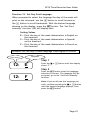
12
Set Day of Week Print Language
English, French, Spanish
E
13
Set Print Intensity
1–9
5
14
Confirmation Beep
n-Disabled, y-Enabled
n
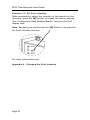
15
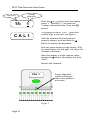
TruAlign Calibration/
0-No, 1-Yes,
0
Print Head Test
2 – 9 Print Head Test
Page 14