1
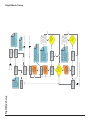
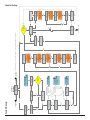
Flight Mode Setup
FMA Direct
13
ENTER/
BACK
No
ENTER
ENTER
F.Mode 2 Rm=100%
>Not Assigned
ENTER/BACK
Move TX Remote to
Flight Mode 2 position,
or press ENTER.
Yes
Does TX Remote
support 2 Flight
Modes and OFF?
ENTER
F.Mode 1 Rm=xx%
>Not Assigned
ENTER/BACK
Move TX Remote to
Flight Mode 1 position,
or press ENTER.
OFF Remote=0%
AutoTrim? > x°
ENTER/BACK
Move TX Remote
to OFF position,
or press ENTER.
Move REMOTE to
Change Screens
ENTER/BACK
Change Remote
On/Off on TX? >N
ENTER/BACK
Enable Remote
On/Off?>N
Enable Remote
On/Off?>Y
ENTER/BACK
Flight Mode
Setup?>Y
INC/DEC
ENTER
F.Mode 2 Rm=100%
>Level Flight
*Vertical Hover and Knife Edge.
Assigns aerobatic orientation to Flight
Mode 2. Some orientations require
Vertical Sensor* and may not appear.
Some orientations depend on aircraft
type and may not appear.
ENTER
F.Mode 1 Rm=xx%
>Level Flight
*Vertical Hover and Knife Edge.
Assigns aerobatic orientation to Flight
Mode 1. Some orientations require
Vertical Sensor* and may not appear.
Some orientations depend on aircraft
type and may not appear.
If “Yes,” TX Remote can be used
to turn Co-Pilot on/off and select
Flight Mode(s) during flight.
Requires dedicated channel and
switch, slider or knob.
INC/DEC
INC/DEC
If 3D password
accepted in Quick
Setup
F.Mode 2 Rm=100%
>Vertical Hoverx
>Knife Edge L DN
>Knife Edge R DN
>Level Flightxxx
If 3D password
accepted in Quick
Setup
F.Mode 1 Rm=xx%
>Inverted Flight
>Vertical Hoverx
>Knife Edge L DN
>Knife Edge R DN
“Remote On/Off Setup”
“Remote On/Off Setup”
Co-Pilot learns about TX Remote
used to control Co-Pilot.
INC/DEC to set AutoTrim to 1-9 or OFF.
AutoTrim keeps CPII on a little bit to prevent
trim changes when stabilization is switched
between ON and OFF.
ENTER/BACK
INC/DEC
ENTER/BACK
INC/DEC
INC/DEC
INC/DEC
“Preferences” or Main Menu (depending on how accessed)
ENTER
Flight Mode
Setup COMPLETE
ENTER
Only LEVEL Fligt
w/o RemoteOn/Off
If “No,” TX Remote can’t
be used to turn Co-Pilot
on/off and select Flight
Mode(s). Co-Pilot is on
for entire flight.
“Preferences”
or
“Quick Setup”
ENTER
ENTER
Flight Mode Setup
Co-Pilot II reference manual