1
2.
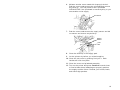
Press down on the exit cover tabs to open the exit
cover on the front of the printer.
3.
Feed the backing paper over the peel bar.
Peel
Bar
Low er
Opening
4.
Feed the backing paper through the lower opening of
the exit cover. Close the exit cover. Pull down firmly
on the backing paper to remove any slack.
Tear
Edge
Backing
Paper
6