1
4.
The factory default values are 9600 Baud, no
parity, 8 bit data frame, 1 stop bit, and DTR flow
control (9600, N, 8, 1, DTR). Set the
communication values on the printer to match
those at the host.
The printer also has a USB (Universal Serial Bus)
Version 2.0 communications port, which is
compatible with Version 1.1. Drivers are available
on our Web site for a variety of operating systems.
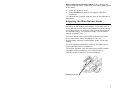
Turn on the printer. Press ( I ) to turn on and ( O ) to
turn off the printer.
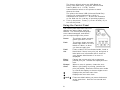
Using the Control Panel
The control panel has a two-line LCD
display, two status lights, and five
buttons. The control panel displays
error codes/messages, and allows
you to setup/configure the printer.
Power:
The printer shows a steady
green light when it is on.
Fault:
The printer shows a steady
amber light when it is out of
labels or ribbon, or when
you have a supply jam.
Feed/
Cut:
Prints a label in the on-demand mode, feeds a
blank label if there is no print job, and prints a
label with error information that is useful to
your System Administrator if an error is
displayed.
Enter/
Pause:
Pauses the current print job or resumes a
paused print job. Selects the displayed menu
item.
Escape/
Clear:
When an error is present, clears the error.
When a job (batch) is printing, cancels the
print job (batch). Enters the offline menu mode
or returns the display to the next higher menu.
Displays the previous menu item.
Displays the next menu item.
and
2
Prints test labels when you press the buttons
at the same time. Hold for one second and
release.