1
Note:
8.
9.
10.
11.
12.
13.
14.
15.
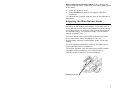
Make sure the “Monarch This End Out” writing is
facing out. The ribbon roll only fits on the reel one
way.
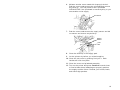
Carefully feed the ribbon under both ribbon rollers and
printhead.
Align the ribbon and make sure it is straight and
centered throughout the path.
Tape the ribbon to the take-up core. Do not tape the
ribbon to the take-up reel.
Rotate the take-up core until the leader is past the
printhead.
Remove any slack in the ribbon by turning the take-up
reel clockwise.
Hold the printhead assembly by the printhead tab while
pressing down on the printhead release.
Close the printhead by pressing down on the thumb
well until you hear it click into place. Close the cover.
Press Feed/Cut several times to feed at least three
labels/tags to properly position the supply and the
ribbon.
Clearing Jams
When you are printing and a jam occurs, the Fault light on
the printer's front panel blinks.
1.
2.
3.
4.
5.
Turn off the printer and open the cover and printhead
assembly.
If necessary, remove the label roll and ribbon.
Remove the jammed labels and reload the label roll.
Close the printhead assembly and turn on the printer.
Press Feed/Cut several times to feed at least three
labels/tags to properly position the supply and the
ribbon.
Cleaning
You must clean the printhead as described below to
maintain printhead life.
Caution:
Do not use sharp objects to clean the
printhead or touch the printhead. This may
damage the printhead and require a service
charge.
The rate and frequency at which you print determines how
often you must clean the printer.
9