1
microHAM © 2010 All rights reserved
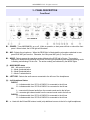
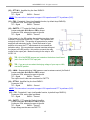
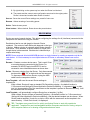
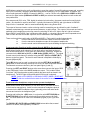
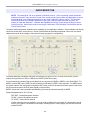
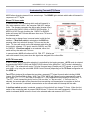
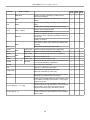
B6 – RIGHT EAR: Selects the audio source connected to the right ear of the headphones.
(3) – Right Headphone Status
RADIO1:
A – indicates audio from VFO A of RADIO1 is connected to the right ear
B – indicates audio from VFO B of RADIO1 to connected to the right ear
SC:
L – connects left channel audio from the unused sound card to the right ear
R – connects right channel audio from the unused sound card to the right ear
RADIO2:
A – indicates audio from VFO A of RADIO2 is connected to the right ear
B – indicates audio from VFO B of RADIO2 is connected to the right ear
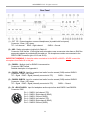
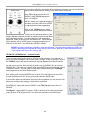
B7 – RADIO1: Disables automatic headphone switching if it was enabled (switch to manual mode) and
connects both ears to RADIO1. Selecting the VFO connected to each ear is accomplished by
holding the RADIO 1 button pressing the LEFT EAR (B4) and RIGHT EAR (B5) buttons. The
selection will be saved in memory. By default the left ear is connected to VFO A (left channel) and
the right ear is connected to VFO B (right channel).
B8 – BOTH: Disables automatic headphone switching if it was enabled (switch to manual mode) and
connects one ear to each radio. Selecting the VFO connected to each ear is accomplished by
holding the BOTH button and pressing the LEFT EAR (B4) and RIGHT EAR (B5) buttons. The
selected assignment will be saved in memory. By default the left ear is connected to VFO A (left
channel) of RADIO1 and the right ear is connected to VFO A (left channel) of RADIO2
B9 – RADIO2: Disables automatic headphone switching if it was enabled (switch to manual mode) and
connects both ears to RADIO2. Selecting the VFO connected to each ear is accomplished by
holding the RADIO2 button and pressing the LEFT EAR (B4) and RIGHT EAR (B5) buttons. The
selection will be saved in MK2R memory. By default the left ear is connected to VFO A (left
channel) of RADIO2 and right ear is connected to VFO B (right channel) of RADIO2
Pressing the RADIO1 (B7) and RADIO2 (B9) buttons at the same time enables automatic
headphone switching (AUTO mode). If enabled, the yellow AUTO light above the BOTH button will
be lit. Lights above the RADIO1 (B7) and RADIO2 (B9) buttons indicate receive focus. Headphone
switching is based on the configuration options and application control signals described later.
NOTE: These buttons - RADIO1 (B7), BOTH (B8) and RADIO2 (B9) - are used for headphone
control only and do not control transmit focus (select active transmitter).
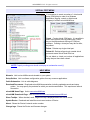
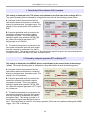
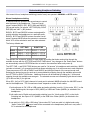
B10-B13 – FUNCTIONS F1-F4: Store/Recall four independent hardware configurations or “scenarios.”
Pressing one of these buttons recalls a configuration. Pressing and holding a button stores the
current state of MK2R/MK2R+ in that “memory.” A light will illuminate adjacent to the active
configuration.
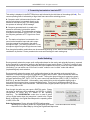
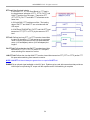
B14 – RADIO1 TRANSMIT FOCUS: Selects transmission on RADIO1 and disables automatic control of
transmit focus if it was enabled.
B15 – RADIO2 TRANSMIT FOCUS: Selects transmission on RADIO2 and disables automatic control of
transmit focus if it was enabled.
The lights below the RADIO buttons indicate which radio is selected (has focus).
8