1
4
Troubleshooting
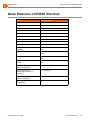
Quick Reference of IP930D Shortcuts
Quick Reference of IP930D Shortcuts
Task
Enter this code
Park a call
*11 followed by the extension
Unpark a call
*12 followed by the extension
Pick up a remote extension
*13 followed by the extension
Pick up a night bell
*14 followed by the extension
Use the intercom
*15 followed by the extension
Barge in
*16 followed by the extension
Silent monitor
*17 followed by the extension
Toggle hunt group status
*18 followed by the extension
Whisper page
*19 followed by the extension
Change the call handling mode and
forwarding
Menu button, 2 (Voicemail), password,
#72
Change extension Assignment
Menu button, 2 (Voicemail), password,
#731
Unassign extension assignment
Menu button, 2 (Voicemail), password, #
732
Assign extension to external
number
Menu button, 2 (Voicemail), password, #
733
Transfer a call (if OfficeAnywhere
feature is configured)
**, destination, ##
Conference a call (if
OfficeAnywhere feature is
configured)
**, destination, **
Hold a call (if OfficeAnywhere
feature is configured)
**
Hang up (if OfficeAnywhere feature
is configured)
##
ShoreTel IP Phone 930D
Handset User Guide
55