1
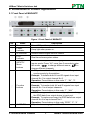
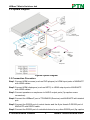
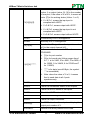
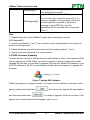
HDBaseT Matrix Switchers 4x4 With the front control panel, the switcher could be control directly and rapidly by pressing the buttons under below format. “Input Channel” + “AV” + “Output Channel” “Input Channel”: Fill with the number of input channel to be controlled. “Output Channel”: Fill with the number of output channels to be controlled. 2.2 Rear Panel of MHD44TP Figure 2 Rear Panel of MHD44TP No. Name ① IR ALL IN ② HDMI INPUTS ③ IR OUT ④ OUTPUTS Description IR control signal input port, connect with IR receiver, pass through to all the HDBaseT ports to control the remote devices. Type A female HDMI connectors. Connect with IR transmitter, to send out the IR signal from the HDBaseT port. These IR OUTs make up a IR matrix with the IR INs on the HDBaseT receivers, and all can be switched synchronously with the AV signal, or separately switching. IR IN: Connect with IR receiver, fixed IR input for the output, cannot be switched. It makes up an IR transmission with the IR OUT on the corresponding HDBaseT receiver. HDMI: Split HDMI output for local monitoring. COAX: HDMI de-embedded digital audio output. HDBaseT: Works with receivers using HDBaseT technology, such as TPHD402R, TPHD402PR. It can PTN Electronics Limited 3 www.PTN-electronics.com