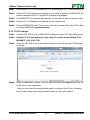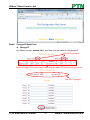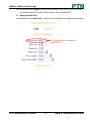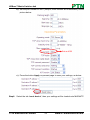
1
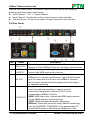
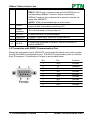
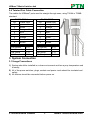
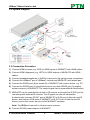
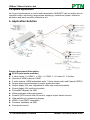
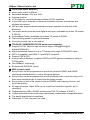
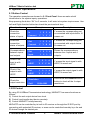
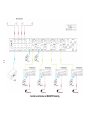
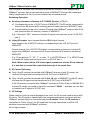
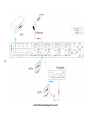
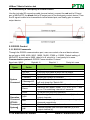
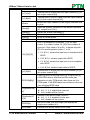
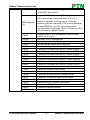
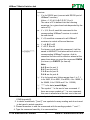
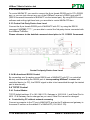
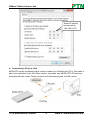
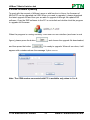
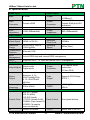
User Manual MHD44TP PTN HDBaseT Matrix Switcher 4x4 All Rights Reserved Version: MHD44TP20131.0 www.PTN-electronics.com HDBaseT Matrix Switcher 4x4 NOTICE: Please read this user manual carefully before using this product. This manual is only for operation instruction only, not for any maintenance usage. The functions described in this version are updated till May 2013. Any changes of functions and parameters since then will be informed separately. Please refer to the dealers for the latest details. This manual is copyright PTN Electronics Limited. All rights reserved. No part of this publication may be copied or reproduced without the prior written consent of PTN Electronics Limited. All product function is valid till 2013-05-29. Update History Version 1.0 Date 2013.05.29 PTN Electronics Limited Update Content First version. www.PTN-electronics.com HDBaseT Matrix Switcher 4x4 Table of Contents 1. Introduction .................................................................................................................1 1.1 Introduction to MHD44TP .................................................................................. 1 1.2 Features ............................................................................................................ 1 1.3 Package Contents ............................................................................................. 1 2. Product Appearance of MHD44TP ..............................................................................2 2.1 Front Panel ........................................................................................................ 2 2.2 Rear Panel......................................................................................................... 3 2.3 Connection with RS232 Communication Port .................................................... 4 2.4 Twisted Pair Cable Connection .......................................................................... 5 3. System Connection .....................................................................................................5 3.1 Usage Precautions ............................................................................................ 5 3.2 System Diagram ................................................................................................ 6 3.3 Connection Procedure ....................................................................................... 6 3.4 System Applications .......................................................................................... 7 4. Application Solution ....................................................................................................7 5. System Operations .....................................................................................................9 5.1 Button Control.................................................................................................... 9 5.2 IR Control .......................................................................................................... 9 5.2.1 Usage of IR Remote .............................................................................. 10 5.2.2 IR Operations ........................................................................................ 10 5.3 RS232 Control ................................................................................................. 14 5.3.1 RS232 Commands ................................................................................ 14 5.3.2 Control MHD44TP ................................................................................. 18 5.3.3 Control 3rd-Party Device from Local...................................................... 18 5.3.4 Bi-directional RS232 Control .................................................................18 5.4 TCP/IP Control................................................................................................. 18 5.4.1 Control Modes ....................................................................................... 18 5.4.2 TCP/IP Settings ..................................................................................... 20 5.5 USB Firmware Updating .................................................................................. 24 6. Specification ............................................................................................................. 25 7. Panel Drawing .......................................................................................................... 26 8. Troubleshooting & Maintenance ............................................................................... 26 9. Safety Operation Guide ............................................................................................ 27 10. After-sales Service ..................................................................................................28 PTN Electronics Limited www.PTN-electronics.com HDBaseT Matrix Switcher 4x4 1. Introduction 1.1 Introduction to MHD44TP MHD44TP is a 4x4 HDBaseT matrix switcher, including 4 HDMI inputs, 4 HDBaseT outputs, 2 local HDMI outputs, 4 de-embedded stereo audio & 4 de-embedded digital audio outputs. It enables cross-point switching from any input to any output, and supports high resolution 1080P, HD3D. The HDBaseT output can works with TPHD402PR, to transmit HDMI, IR, RS232 and POE over a Cat5e/Cat6 cable. And its transmission distance can up to 60 meters. 1.2 Features HDTV compatible with High Definition Transmission resolution up to 1920*1200@60Hz, supports 1080P@24Hz, 3D. HDCP Compliant and DVI compatible, supporting HDMI 1.4a & DVI1.0. Powerful EDID&HDCP management. HDBaseT outputs, to transmit HDMI, IR&RS232 to 60 meters long distance over a Cat5E/6 cable. POE supports, provides power for all the receivers connected to HDBaseT outputs. Supports multiple control ways, including front panel, RS232, IR and optional TCP/IP control (works with PTNET). IR OUT signal switching follow with video signal, also can be broken away from video switching. Supports remote control from receiver by IR&RS232. Supports centralized IR control to control all the remote display devices. Supports PCM, Dolby, and DTS5.1 surround. LCD indicator shows connection status, switching status, HDCP status, and output resolution. 1.3 Package Contents 1 x MHD44TP 2 x Mounting ears 1 x Power adapter (DC48V) 1 x IR remote 1 x Power cord 1 x RS232 cable 1 x CAT5e twisted pair 1 x IR converting cable 8 x Captive screw connectors 4 x Plastic cushions 1 x User manual Notes:Please confirm if the product and the accessories are all included, if not, please contact with the dealers. PTN Electronics Limited 1 www.PTN-electronics.com HDBaseT Matrix Switcher 4x4 2. Product Appearance of MHD44TP 2.1 Front Panel No. ① ② ③ ④ Name Firmware Power Indicator IR Receiver LCD Indicator ⑤ INPUTS/ Menu buttons ⑥ Function buttons ⑦ OUTPUTS Description Micro USB port for update firmware. Keep light when power on. Receive control signal from IR remote. Real-time shows system status. Normal mode: Input buttons, ranging from "1" to "4". Inquire mode: Press “AV” more than 3 seconds to enter this mode. to change different menus, to change different channels. AV synchronal button: To transfer AV and IR signal (from IR OUT port) synchronously by the switcher. Note: The IR OUT port number is corresponding with HDMI INPUTS port number as default. Example: To transfer both AV and IR signals from input channel No.1 to output channel No.3. Operation: Press buttons in this order “1”, “AV”, “3”. ALL outputs button: To transfer one input to all outputs. Example: To transfer both AV and IR signals from input channel No.1 to all output channels. Operation: Press buttons in this order “1”, “ALL” EDID management button: manually capture and copy the EDID data from output device to input port. Example: To capture and copy the EDID data from output channel No.4 to input channel No.2. Operation: Press buttons in this order “EDID”, “2”, “4” Press button “2” in INPUTS area, “4” in OUTPUTS area. Output buttons, ranging from "1" to "4". PTN Electronics Limited 2 www.PTN-electronics.com HDBaseT Matrix Switcher 4x4 With the front control panel, the switcher could be control directly and rapidly by pressing the buttons under below format. “Input Channel” + “AV” + “Output Channel” “Input Channel”: Fill with the number of input channel to be controlled. “Output Channel”: Fill with the number of output channels to be controlled. 2.2 Rear Panel No. Name ① IR ALL IN ② HDMI INPUTS ③ IR OUT ④ OUTPUTS Description IR control signal input port, connect with IR receiver, pass through to all the HDBaseT ports to control the remote devices. HDMI input ports, 4 in total, type A female HDMI connector, connect with HDMI input source devices. Connect with IR emitter, to send out the IR signal from the HDBaseT port of the far-end Receiver. These IR OUTs make up an IR matrix with the IR INs on the HDBaseT receivers, and all can be switched synchronously with the AV signal, or separately switching. IR IN: Connect with IR receiver, fixed IR input for the output, cannot be switched separately. It makes up an IR bi-directional transmission with the IR OUT on the corresponding HDBaseT receiver. HDMI: HDMI output port, connect with HDMI output devices. To split HDMI output for local monitoring. COAX: HDMI de-embedded digital audio output. HDBaseT: Works with receivers using HDBaseT technology, such as TPHD402R, TPHD402PR. It can pass through AV, IR and RS232 signal to 60m distance. Meanwhile, it can PTN Electronics Limited 3 www.PTN-electronics.com HDBaseT Matrix Switcher 4x4 ⑤ RS232 ⑦ ⑧ ⑨ Power Indicator 48V DC GROUND TCP/IP ⑩ IR EYE ⑥ provide power for the receivers which support POE. RS232: RS232 port to communicate with the RS232 port on corresponding HDBaseT receiver. When controlled by HDBaseT receiver, the communication protocol must be the same with MHD44TP. AUDIO: HDMI de-embedded stereo audio output The serial port for unit control, 9-pin female connector, connects with control device such as a PC. Turn red and keep on when power on. Connect with 48V DV power adaptor. Connect to grounding, make the unit ground well. TCP/IP port for unit control, optional function. Connect with extended IR receiver, use the IR remote to control MHD44TP. 2.3 Connection with RS232 Communication Port Except the front control panel, MHD44TP can be controlled by far-end control system through the RS232 communication port. This RS232 communication port is a female 9-pin D connector. The definition of its pins is as the table below. No. 1 2 3 4 5 6 7 8 9 PTN Electronics Limited 4 Pin Function N/u Tx Rx N/u Gnd N/u N/u N/u N/u Unused Transmit Receive Unused Ground Unused Unused Unused Unused www.PTN-electronics.com HDBaseT Matrix Switcher 4x4 2.4 Twisted Pair Cable Connection The cables for HDBaseT ports must be straight-through ones, using T568A or T568B standard. TIA/EIA T568A Pin Cable color 1 green white 2 green 3 orange white 4 blue 5 blue white 6 orange 7 brown white 8 brown 1st Ground 2nd Ground 3rd Group 4th Group 4--5 3--6 1--2 7--8 TIA/EIA T568B Pin Cable color 1 orange white 2 orange 3 green white 4 blue 5 blue white 6 green 7 brown white 8 brown 1st Ground 2nd Ground 3rd Group 4th Group 4--5 1--2 3--6 7--8 3. System Connection 3.1 Usage Precautions 1) System should be installed in a clean environment and has a prop temperature and humidity. 2) All of the power switches, plugs, sockets and power cords should be insulated and safety. 3) All devices should be connected before power on. PTN Electronics Limited 5 www.PTN-electronics.com HDBaseT Matrix Switcher 4x4 3.2 System Diagram 3.3 Connection Procedure 1) Connect HDMI sources (e.g. DVD) to HDMI inputs of MHD44TP with HDMI cables. 2) Connect HDMI displayers (e.g. HDTV) to HDMI outputs of MHD44TP with HDMI cables. 3) Connect speakers/earphones to AUDIO output ports (3p captive screw connectors). 4) Connect the HDBaseT port of HDBaseT receiver and MHD44TP with twisted pair. 5) Connect the RS232 port (9 pin female D) of MHD44TP with control device, e.g. PC. 6) Connect the RS232 port of controlled device to any other RS232 port (3p captive screw connector) of MHD44TP. The control signal can be transmitted bi-directionally. 7) MHD44TP can be controlled by its built-in IR receiver or through the IR EYE port by connecting with external IR receiver. The IR signal can also be transmitted bi-directionally (connect IR OUT port of MHD44TP to IR IN port of other far-end IR device, and connect IR IN ports of MHD44TP to IR OUT port of other far-end IR device), and in this mode, we can control MHD44TP remotely. Note: The IR IN port has built-in infrared carrier receiver. 8) Connect DC48V power adaptor to MHD44TP. PTN Electronics Limited 6 www.PTN-electronics.com HDBaseT Matrix Switcher 4x4 3.4 System Applications As its good performance in control and transmission, MHD44TP can be widely used in computer realm, monitoring, large screen displaying, conference system, television education and bank securities institutions etc. 4. Application Solution Product Assortment Description: ① SC61D (mini scaler switcher) 6 video Inputs: 2 x HDMI, 1 x VGA, 1 x YPbPr, 1 x C-video & 1 x S-video. Upscale to HDMI output at 1080P. 3 audio outputs: HDMI embedded audio, 3.5mm stereo audio and Coaxial (SPDIF). Output resolutions selectable to assure preferred output. Output display H/V size: adjustable to settle any overscale problem. Output display H/V position moveable. Picture/MP3 display via USB. Video parameter setting and preset. Powerful OSD function with full control, support output freeze function Ultra-switching for instaneous display. HDMI1.3 and HDCP compatible. Firmware updatable via USB. Front panel lockout. PTN Electronics Limited 7 www.PTN-electronics.com HDBaseT Matrix Switcher 4x4 ② PA3V (40W power amplifier) Mono audio output at 40Watt. Switchable between 70V and 100V. Ducking function. 16 ID codes for controlling between different PA3V amplifiers. 3-level MIC input, supports condenser microphone, dynamic microphone and wireless microphone. MIC port can support balance/unbalance signal, suppress the external noise effectively. Two stereo audio inputs and one digital audio input, switchable by button, IR remote & RS232. Volume/Bass/Treble controllable by buttons, IR remote & RS232. Fast switching speed for good performance. Convection cooler, fan is not needed. ③ TPHD402P (HDMI/IR/RS232 POE twisted pair extender) Support Full HD: Delivers high resolution image (1080p@60Hz@48 b/pixels/3D/4Kx2K). Max transmission distance is up to 70 meters over single CAT5e/CAT6 cable. HDTV Compatible, use HDMI 1.4 and HDCP compliant. Support POE & CEC. Connect with a displayer to transmit EDID and HPD signals constantly by using a CAT5e cable. Use HDBaseT technology. Bi-directional RS232/IR control. ④ WP8 (control panel) Every button can be programmed to send the bi-direction RS232 and RS485 commands simultaneously to control third party devices. Every button can be programmed to send the infrared code, control the relay, to let them work simultaneously to control the third party devices. Every button is built in the infrared code and RS232 code learning function, and baud-rate setting. ID looping function. 99pcs WP8 can be looped and controlled together, by ID identifying. Programmed by USB or RS232, working with PTN PC software (PS-WP). Crystal and backlit buttons with easy user-friendly customizable changeable labels. The backlit brightness is controllable. Dimension: 11.4cm long and 7cm wide. PTN Electronics Limited 8 www.PTN-electronics.com HDBaseT Matrix Switcher 4x4 5. System Operations 5.1 Button Control The operation examples are showed in 2.1 Front Panel. Here we make a brief introduction to the system inquiry operations. Keep pressing the button “AV” for 3 seconds, it will enter into system inquire menu. Use Left and Right direction button two check the previous/next item. Function Items Check the connection status of inputs Check the connection status of outputs Correspondence between inputs and outputs Check if the input is with HDCP Check if the output is with HDCP Check the output resolution Example Description In 1 2 3 4 Connect Y Y Y Y Out 1 2 3 4 Connect Y Y N N Out 1 2 3 4 Input 1 2 3 3 In 1 2 3 HDCP Y Y Y N Out 1 HDCP Y Y Y N 2 3 Resolution Out 1 1920x1080 4 4 Y means the corresponding port is connected with input device, N means not. Y means the corresponding port is connected with output device, N means not. Shows the correspondence between the 4 inputs and 4 outputs. Y means the input signal is with HDCP, N means not. Y means the output signal is with HDCP, N means not. Use the UP and DOWN direction button to check all the 4 output resolutions. 5.2 IR Control By using IR & HDBaseT transmission technology, MHD44TP has some functions as follows: 1) Control far-end output device from local. 2) Control local input/output device remotely. 3) Control MHD44TP locally/remotely. MHD44TP can be controlled by its built-in IR receiver or through the IR EYE port by connecting with extended IR receiver, or even can be controlled remotely by a far-end IR device through the twisted pair. PTN Electronics Limited 9 www.PTN-electronics.com HDBaseT Matrix Switcher 4x4 5.2.1 Usage of IR Remote Standby button, press it to enter in standby mode. Input channels, range from 1~4, IR signal switched following HDMI signal correspondingly. Menu buttons, AV and ALL buttons have the same function as the front panel. THROUGH: To transfer the signals directly to the corresponding output channels Example: Press “3”, “THROUGH”, the result will be IN 3OUT 3. Press “ALL”, “THROUGH”, the result will be: 11, 22, 33, 44 Output channels, range from 1~4. Each channel has 1 IR IN, 1 COAX, 1 HDBaseT, 1 RS232, and 1 AUDIO outputs, and channel No.1 & No.2 has 1 HDMI output. 5.2.2 IR Operations 1) IR Matrix Switching The 4 “IR OUT” ports make up a 4x4 IR matrix with the “IR IN” ports of the far-end receivers. See as below: PTN Electronics Limited 10 www.PTN-electronics.com 11 Control Local Devices or MHD44TP Remotely HDBaseT Matrix Switcher 4x4 The IR signal is received from corresponding remote controller, then transferred to HDBaseT receiver, then to corresponding zone of MHD44TP through the twisted pair, finally transferred to IR OUT port and received by controlled device. Switching Operation: a) Sending command, reference to 5.3 RS232 Control: [x1]R[x2]. x1: Corresponding to the 4 IR OUT ports of MHD44TP, The IR emitter connected to this port can be placed at IR receiving area of output device or MHD44TP itself. x2: Corresponding to the zone (receive IR signal from HDBaseT receiver with IR IN port connects with IR receiver) number of MHD44TP. E.g.: Command “3R2.” means to transfer IR signal received from zone 2 to IR OUT port 3. b) Using IR remote: Input channelbutton IROutput channel Input channel: the 4 INPUTS buttons, corresponding to the 4 IR OUT ports of MHD44TP. Output channel: the 4 OUTPUTS buttons, corresponding to the zone (receive IR signal from HDBaseT receiver with IR IN port connects to IR receiver) number of MHD44TP. E.g.: Press buttons “3”, “IR”, “1” in order, “3” in OUTPUTS area, “1” in INPUTS area, to transfer IR signal received from zone 3 to IR OUT port 1. Note: When switch all the 4 IR input signal channels to a same IR out channel, it is not able to control the controlled device(s) at the same time. 2) IR Carrier Enforcing a) Only if the IR receiver connected with HDBaseT receiver is with IR carrier, the received IR signal can be transferred to IR OUT port of MHD44TP. b) Only if the IR receiver connected with IR ALL IN port of MHD44TP is with IR carrier, the received IR signal can be transferred to IR OUT port of MHD44TP. If the IR receiver connected with HDBaseT receiver or IR ALL IN port of MHD44TP is not with IR carrier, you need to send the command “%0901.”, and then you are able to transfer the IR signal to IR OUT port. 3) IR Settings When need to control a remote displayer from local, the IR receiver used must be with IR carrier. The IR signal is transferred to the corresponding zone connected with the HDBaseT receiver which is connected with the IR emitter. When the IR receiver is connected to IR ALL IN port, the IR signal can be finally transferred to all the 4 IR emitters connected with HDBaseT receivers. As the figure below: PTN Electronics Limited 12 www.PTN-electronics.com 13 Control Remote Displayer from Local HDBaseT Matrix Switcher 4x4 4) Controlled by a Third-party IR Control Device Use the included IR converting cable (see as below), connect the red end to IR input port of MHD44TP, the black end to IR output port of the third-party control device. Then the IR signal is able to be transmitted via the twisted pair, and finally gets to remote output device. 5.3 RS232 Control 5.3.1 RS232 Commands Through the RS232 communication port, user can control a far-end device whose bound rate is 2400, 4800, 9600, 19200, 38400, 57600 or 115200. Default setting of MHD44TP: bound rate is 9600, data bit is 8, stop bit is 1 and parity bit is none. Communication protocol: RS232 Communication Protocol Baud rate: 9600 Data bit: 8 Stop bit: 1 Parity bit: none Command Command Functions Types Codes /*Type; Inquire the models information. /%Lock; Lock the front panel buttons on the Matrix. /%Unlock; Unlock the front panel buttons on the Matrix. /^Version; Inquire the version of firmware System Turn off the feedback command from the com port. It /:MessageOff; Command will only show the “Switch Ok”. /:MessageOn; Turn on the feedback command from the com port. Switch to the “demo” mode, 1->1, 2->2, 3->3 … and Demo. so on .The switching interval is 2 seconds. Undo. To cancel the previous operation. Transfer signals from the input channel [x] to all [x]All. output channels Operation Transfer all input signals to the corresponding output Command All#. channels respectively. (PTN2.0 Command All$. Switch off all the output channels. System) Transfer signals from the input channel [x] to the [x]#. output channel [x]. PTN Electronics Limited 14 www.PTN-electronics.com HDBaseT Matrix Switcher 4x4 [x]$. [x1] V[x2]. [x1] B[x2]. Status. Save[X]. Recall[Y]. Clear[Y]. PWON. PWOFF. /%[Y]/[X]:[Z]. Switch off the output channel [x]. Transfer the AV signal from the input channel [x1] to the output channel [x2]. Transfer the AV and IR signal from the input channel [x1] to the output channel [x2]. Inquire the input channel to the output channels one by one. Save the present operation to the preset command [X], ranges from 0 to 9. Recall the preset command [Y]. Clear the preset command [Y]. Work in normal mode. Enter into standby mode. HDCP management command. [Y] is for input (value: I) or output (value: O). [X] is the number of one port, if the value of X is ALL, it means all ports. [Z] is for working status (value: 1 or 0). Y=I & Z=1, means the input port is compliant with HDCP. Y=O & Z=1, means output with HDCP. Y=I & Z=0, means the input port is not compliant with HDCP. Y=O & Z=0, means output without HDCP. [x1] R[x2]. EDIDH[x]B[y]. DigitAudioON[ x]. DigitAudioOF F[x]. EDIDG[x]. EDIDMInit. PTN Electronics Limited Transfer the IR signal from the input channel [x1] to the output channel [x2]. Copy the EDID from output port [x] to input port [y]. If the EDID data is effective and the audio part supports not only PCM mode, then force-set it to PCM mode. If the EDID data is not effective, then set it as initialized EDID data. Enable HDMI audio output of port x. X=1, 2, 3, 4, enable this one port. X=5, enable all the 4 ports. Disable HDMI audio output of port x. X=1, 2, 3, 4, disable this one port. X=5, disable all the 4 ports. Get EDID data from the output and display the output port number of X. Recover the factory default EDID data. 15 www.PTN-electronics.com HDBaseT Matrix Switcher 4x4 EDIDM[X]B[Y] . Manually EDID switching. Copy the EDID data of output[X] to the input[Y]. Upgrade EDID data via the RS232 port EDIDUpgrade [x]. %0801. %0800. %0900. %0901. %0911. %9951. %9952. %9953. %9954. %9955. %9956. %9957. %9958. %9961. %9962. %9963. %9971. %9972. %9973. %9974. %9975. %9976. PTN Electronics Limited [X] is for input port, when the value of X is 5, it means to upgrade to all input ports. When the switcher gets the command, it will show a message to send EDID file (.bin file). Operations will be canceled after 10 seconds. (Note 1) Please cut off all connections of HDBaseT ports. Automatically HDCP management. Input is with HDCP, so is output. Manually HDCP management. Set as infrared carrier following mode. Set as infrared carrier enforcing mode. Reset to factory default. Check the command sent by port 1 when PWON. Check the command sent by port 2 when PWON. Check the command sent by port 3 when PWON. Check the command sent by port 4 when PWON. Check the command sent by port 1 when PWOFF. Check the command sent by port 2 when PWOFF. Check the command sent by port 3 when PWOFF. Check the command sent by port 4 when PWOFF. Check the system locking status. Check the status while in standby mode. Check the working mode of infrared carrier. Check the connection status of the inputs. Check the connection status of the outputs. Check the HDCP status of the inputs. Check the HDCP status of the outputs. Check the switching status. Check the output resolution. 16 www.PTN-electronics.com HDBaseT Matrix Switcher 4x4 Set communication between PC and HDBaseT receiver. ① Y is for RS232 port (connect with RS232 port of HDBaseT receiver) Value = 1,2,3,4,5,A,B,C,D,E,F,G or H The value of Y is defined into the following meanings (in a given baud rate depended by the value of X): a. Y = 1, 2, 3 or 4, send this command to the corresponding HDBaseT receiver to control far-end device. b. Y = 5, send this command to all HDBaseT receivers to control all far-end devices. /+[Y]/[X]:******. c. Y = A, B, C or D d. Y = E, F, G or H For items c or d, send this command, it will be saved to MHD44TP but taken without action to corresponding HDBaseT receiver. And its command function will be effective almost at the same time when you send the command PWON (for item c) or PWOFF (for item d). Note: A & E are for port 1. B & F are for port 2. C & G are for port 3. D & H are for port 4. ② X is for bound rate (Value ranges from 1 to 7, 1 is for 2400, 2 for 4800, 3 for 9600, 4 for 19200, 5 for 38400, 6 for 57600 and 7 for 115200) ③ ***** is for data (max 48 Byte) ④ The symbol “.” is the end of one command. If there are some symbols of “.” in one command, this case is allowed and the last one is the end. Note: 1. Please disconnect all the twisted pairs before sending command EDIDUpgrade[X]. 2. In above commands, “[”and “]” are symbols for easy reading and do not need to be typed in actual operation. 3. Please remember to end the commands with the ending symbols “.” and “;”. 4. Type the command carefully, it is case-sensitive. PTN Electronics Limited 17 www.PTN-electronics.com HDBaseT Matrix Switcher 4x4 5.3.2 Control MHD44TP To control MHD44TP, you need to connect the 9 pin female RS232 port to PC’s RS232 port, or you can just connect any one of the HDBaseT receiver’s RS232 port with PC (RS232 command transmits to MHD44TP via the twisted pair). By using RS232 control software and setting right baud rate, you are able to control MHD44TP then. 5.3.3 Control 3rd-Party Device from Local Connect the 9 pin female RS232 port of MHD44TP with PC, by using the RS232 command “/+[Y]/[X]:******.”, you are able to control the 3rd-party device connected with the HDBaseT receiver. Please reference to the detailed command description in 5.3.1 RS232 Commands. Control 3rd-party Device from Local 5.3.4 Bi-directional RS232 Control By connecting one 3p captive screw RS232 port of MHD44TP with PC (or controlled device), and connecting the RS232 port of corresponding HDBaseT receiver with controlled device (or PC), the RS232 signal is able to be transmitted through the twisted pair bi-directionally. 5.4 TCP/IP Control 5.4.1 Control Modes TCP/IP default settings: IP is 192.168.0.178, Gateway is 192.168.0.1, and Serial Port is 4001. IP & Gateway can be changed as you need, Serial Port cannot be changed. Controlled by PC without network accessing Connect a computer to the TP port of MHD44TP, and set its IP address and gateway to the same IP section as the default IP of MHD44TP (192.168.0.178). PTN Electronics Limited 18 www.PTN-electronics.com HDBaseT Matrix Switcher 4x4 Same IP section but cannot be 192.168.0.178 Controlled by PC(s) in LAN MHD44TP can be connected with a router to make up a LAN with the PC(s), this make it able to be controlled in a LAN. When control, just make sure MHD44TP’s IP section is the same with the router. Please connect as the following figure for LAN control. PTN Electronics Limited 19 www.PTN-electronics.com HDBaseT Matrix Switcher 4x4 Step1. Connect the TCP/IP port of MHD44TP to Ethernet port of PC with twisted pair. Step2. Set the PC’s IP address and gateway to the same IP section as MHD44TP. Do please remember the PC’s original IP address and gateway. Step3. Set MHD44TP’s IP address and gateway to the same IP section as the router. Step4. Set the PC’s IP address and gateway as the original one. Step5. Connect MHD44TP and PC(s) to the router. In the same LAN, each PC is able to control MHD44TP asynchronously. 5.4.2 TCP/IP Settings Step1. Connect the TCP/IP port of MHD44TP to Ethernet port of PC with twisted pair. Step2. Set the PC’s IP and gateway to the same IP section as the default IP of MHD44TP (192.168.0.178). Step3. Enter the 192.168.0.178 to the Internet Explore, you will see the LOGIN page as below: Step4. Enter the password “88888”, and you can only press the Login button, not the Enter key on your keyboard. Then you can enter the configuration page to configure the IP port, including the IP reset, Serial reset and password reset etc. As picture below: PTN Electronics Limited 20 www.PTN-electronics.com HDBaseT Matrix Switcher 4x4 Step5. Change IP/Serial Port Change IP a) Select the tab “system info”, and then you are able to change the IP. DO NOT change it Enter into right IP for each item, better has the same IP section with the router DO NOT change it PTN Electronics Limited 21 www.PTN-electronics.com HDBaseT Matrix Switcher 4x4 b) Press the button Apply to save your settings. Then the PC(s) in this LAN (connected with this router) will be able to control MHD44TP. Change Serial Port a) Select the tab “serial info”, and then you are able to change the serial port. The baud rate is the same as MHD44TP’s PTN Electronics Limited 22 www.PTN-electronics.com HDBaseT Matrix Switcher 4x4 b) Set the port number to 4001 (unique, other number are unavailable), as the picture below: Set as 4001 c) Press the button Apply on present page to save your settings, as below: Step6. Select the tab “reset device”, then your settings will be loaded onto MHD44TP. PTN Electronics Limited 23 www.PTN-electronics.com HDBaseT Matrix Switcher 4x4 5.5 USB Firmware Updating To meet with the request of different users or add function in future, the firmware of MHD44TP can be upgraded via USB. When you need to upgrade it, please download the latest upgrade file and then you are able to upgrade it through the update EXE software. Copy the EXE software to the PC in controlled and double chick the program to upgrade the firmware. When the program is running normally, it will enter into the interface (as shown in next figure), please press the button and then press the button and choose the upgrade file downloaded, . It is ready to upgrade. When all are done, it will appear with a window shows the message Update success. Note: The COM number connected with PC is available only when in 1 to 9. PTN Electronics Limited 24 www.PTN-electronics.com HDBaseT Matrix Switcher 4x4 6. Specification Video Input Video Output Input 4 HDMI Output Input Connector Female HDMI Output Connector Input Level T.M.D.S. 2.9V/3.3V Input 100Ω (Differential) Impedance Video General Gain 0 dB Video Signal HDMI (or DVI-D) Resolution Range Transmission Distance EDID Management HDCP Audio General Up to 1920 x 1200 or 1080P@60Hz Output Level Output Impedance Bandwidth Maximum Pixel Clock Switching Speed 2 HDMI 4 HDBaseT Female HDMI Female RJ45(with LED indicators) T.M.D.S. 2.9V/3.3V 100Ω (Differential) 6.75Gbit/s 165MHz 200ns (Max.) 60m with POE In-built EDID data and manual EDID management Supports HDCP 1.3, auto and manual HDCP management. Output Signal Stereo audio Digital audio Output Connector 4 3p captive screw connectors 4 Coax (RCA) Stereo Output Earphone output distortion: 0.1% 32Ω/70mW@1KHz, 0.1% 16Ω/105mW @1KHz Coax Output Supports PCM, Dolby, DTS 5.1 CMRR >90dB @20Hz ~ 20KHz Panel Control Front panel buttons TCP/IP Works with PTNET2.2 Frequency 20Hz~20KHz Response Control Parts 4 IR OUT (green) 4 IR IN (black) 1 IR EYE (black) Control Ports 1 TCP/IP (female RJ45) 1 RS232 (9 pin female D) 4 RS232 (3p captive screw connectors) IR Default IR remote PTN Electronics Limited 25 www.PTN-electronics.com HDBaseT Matrix Switcher 4x4 Extend IR EYE Control General Power Supply Temperature Case Dimension Input: 100VAC ~ 240VAC, 50/60Hz Output:DC48V,1.6A -20 ~ +70℃ W483 x H44 x D235mm (1U high, full rack wide) Power Consumption 48W Humidity 10% ~ 90% Product Weight 1.8Kg 7. Panel Drawing 8. Troubleshooting & Maintenance 1) When there is a color losing or no video signal output, maybe the cables have already broken or haven’t been connected well. 2) When EDID management does not work normally, probably the HDMI cable is broken at the output end. 3) When switching, there is a blank screen on the displayer, maybe the displayer does not support the resolution of the video source. Switch again or manage the EDID data manually to make the resolution of the video source automatically compliant with the output resolution. 4) When user cannot control the switcher by computer through its COM port, please check the COM port number in the software, and make sure the COM port is in good condition and the communication protocol is correct. 5) When switching , there is no output image: Check if there is any signal at the input. Check if there is any signal at the output. If there is no signal input/output, maybe the input/output cables broken or the connectors loosen, please change for another cable. Check if the output port number is the same with the controlled one. PTN Electronics Limited 26 www.PTN-electronics.com HDBaseT Matrix Switcher 4x4 If it is still the same after the above checking, maybe there is something wrong in the switcher. Please send it to the dealer for repairing. 6) If the static becomes stronger when connecting the video/audio connectors, it probably due to bad grounding, please check the grounding and make sure it connected well; otherwise it would damage the switcher. 7) If the switcher cannot be controlled through the RS232 port, front panel buttons or by the IR remote, the unit may have already been broken. Please send it to the dealer for repairing. 9. Safety Operation Guide In order to guarantee the reliable operation of the equipments and safety of the staff, please abide by the following proceeding in installation, using and maintenance: 1) The system must be earthed properly. Do not use two blades plugs and ensure the alternating power supply ranged from 100v to 240v and from 50Hz to 60Hz. 2) Do not put the switcher in a place of too hot or too cold. 3) As the power generating heat when running, the working environment should be maintained fine ventilation, in case of damage caused by overheat. 4) Cut off the general power switch in humid weather or left unused for long time. 5) Before following operation, ensure that the alternating current wire is pull out of the power supply: Take off or reship any components of the equipment. Take off or rejoin any pin or other link of the equipment. 6) As to non-professional or without permission, please DO NOT try to open the casing of the equipment, DO NOT repair it on your own, in case of accident or increasing the damage of the equipment. 7) DO NOT splash any chemistry substance or liquid in the equipment or around. PTN Electronics Limited 27 www.PTN-electronics.com HDBaseT Matrix Switcher 4x4 10. After-sales Service 1) If there appear some problems when running MHD44TP, please check and deal with the problems reference to this user manual. Any transport costs are borne by the users during the warranty. 2) You can email to our after-sales department or make a call, please tell us the following information about your cases. Product version and name. Detailed failure situations. The formation of the cases. 3) We offer products for all three-year warranty, which starts from the first day you buy this product (The purchase invoice shall prevail). 4) Any problem is same with one of the following cases listed, we will not offer warranty service but offer for charge. Beyond the warranty. Damage due to incorrectly usage, keeping or repairing. Damage due to device assembly operations by the maintenance company non-assigned. No certificate or invoice as the proof of warranty. The product model showed on the warranty card does not match with the model of the product for repairing or had been altered. Damage caused by force majeure. Remarks: For any questions or problems, please try to get help from your local dealer, or to email PTN at: [email protected]. PTN Electronics Limited 28 www.PTN-electronics.com www.PTN-electronics.com PTN Electronics Limited Tel: +86-755-2846 1819 Fax: +86-755-8471 7796 Email: [email protected] Website: www.PTN-electronics.com