1
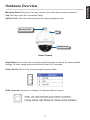
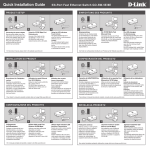
Mounting Point:This part of the cap is used to mount the dome camera enclosure.
Cap:This cap covers the Connection Panel.
Optical Cover:This clear dome protects the camera apparatus from.
Mounting Point
Cap
Optical Cover
Dome Camera
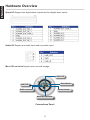
Reset Button:The button can be used to reset the system or restore the factory default
settings. To reset, simply press and hold the button for 10 seconds.
Power Socket:This is 3 pin socket accepts the power cable.
RJ45 connector:Connect you category 5 ethernet cable to this port.
3
ENGLISH
Hardware Overview