1
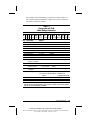
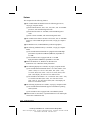
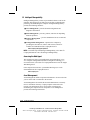
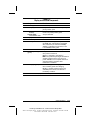
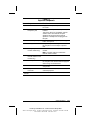
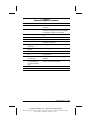
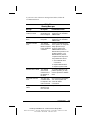
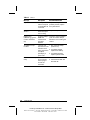
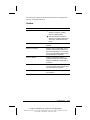
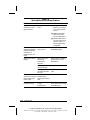
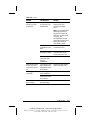
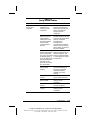
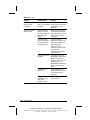
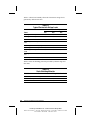
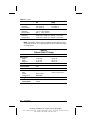
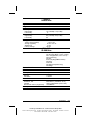
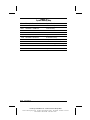
Table 2-16
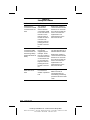
Solving PC Card Problems
Problem
Possible Cause
Solution
Computer does not
beep when a PC
Card is inserted.
PC Card is not
inserted properly.
Try reinserting the card.
Ensure that the PC Card
is inserted in the correct
orientation. Insert the
card gently to prevent
damage to the pins.
Speakers are turned
off or volume is
turned down.
Adjust the volume control
on the computer.
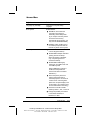
PC Card or card
Check the list of PC
driver is not PCMCIA Cards tested successfully
compliant.
in Compaq PC Card
platforms.
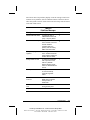
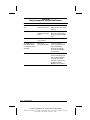
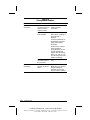
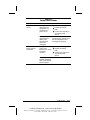
Computer beeps only The computer beeps
once when a PC
once to indicate that
Card is inserted.
a PC Card is
recognized but not
properly configured.
Before a new PC Card
can be used, it may be
necessary to perform an
initial setup procedure.
Follow the PC Card
manufacturer's
instructions for formatting
a hard drive card or
installing
PC Card-specific drivers
for a network card.
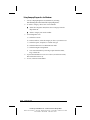
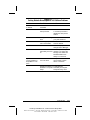
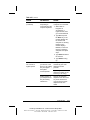
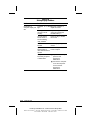
Network PC Card
does not work.
Necessary drivers
are not installed
(turned on).
Refer to the instructions
that came with the PC
Card or contact the
vendor for information on
installing the correct
drivers.
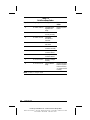
PC Card is not fully
inserted or is upside
down.
Ensure the PC Card is
inserted correctly.
Continued
Troubleshooting
COMPAQ CONFIDENTIAL - NEED TO KNOW REQUIRED
Writer: David Calvert Saved by: The Integrity Group Saved date: 10/26/00 11:45 AM
Part Number: 128679-006 File name: Ch02
2-33