1
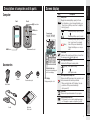
Computer
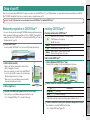
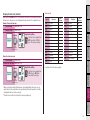
Icon
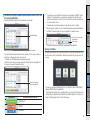
Battery icon
Displays the remaining battery capacity in 5 levels.
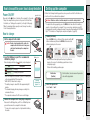
*For information on how to charge the battery, see
“How to turn on/off the power / how to charge the
battery” (page 5).
Back
Power button
MENU button
(Light up) Remaining battery capacity is large.
Remaining battery capacity is small.
(Flash)
Pace arrow
Indicates if the current speed is faster or slower than
the average speed. ( Faster, Slower)
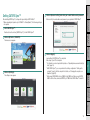
Accessories
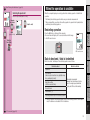
Selected data icon
Bracket
Dial
Bracket rubber pad
Bracket band
Dot display
Displays mainly the clock.
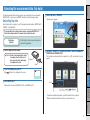
GPS signal is strong.
GPS signal is weak.
Speed unit
Flashes while speed measurement is in progress.
Daylight saving time icon
*For information on how to set the daylight saving time,
see “Changing the computer configuration” (page 20).
Others
Cradle
Changing the
computer configuration
GPS signal non-receiving icon
Flashes when GPS signal cannot be received. In such
status, measurement cannot be performed.
*When such status lasts for 10 minutes, the computer turns off the power automatically.
(Auto power off)
Uploading the measurement data
Indicates the data displayed
on the lower display.
(Light up)
Setup of your
PC
GPS signal receiving icon
Indicates the GPS signal receiving status.
How to use the
computer
Contact
MODE button
Remaining battery capacity is nearly
zero. In such case, the computer
turns off the power automatically.
Charge the battery as soon as possible.
Setting up the
computer
Current speed
0.0 (3.0) - 105.9 km/h
[0.0 (2.0) - 65.9 m/h]
AC button
Description
How to install the
unit on your bicycle
Front
Introduction
Screen display
Description of computer and its parts
Quick start
Yellow card
3