1
Room Design Recommendations
(continued)
Collaborative Tools
“The usual and customary tools in their usual and
customary format.”That’s the ideal that creates
the most effective collaboration. An ideal design
would include standard in-room collaboration tools
(whiteboards, laptops, etc) and integrate them so
they can just as easily be used during video meetings.
VidyoPanorama can easily integrate with local
laptop (connected by VGA) and transmit the
information to a dedicated data collaboration
monitor(s) at the remote site. If your organization
works extensively with hand-generated graphics
on a whiteboard, working with someone on
the other end using an interactive whiteboard
will optimize your virtual workflow. A number
of additional tools can be incorporated into a
telepresence environment for organizations that
need more sophisticated collaboration capabilities:
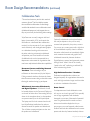
Document Cameras and Ceiling Mounted
Visualizers These technologies let you
collaborate on documents and physical objects.
Ceiling-mounted visualizers eliminate the clutter
that a document camera sitting on the table creates
allowing for seamless sharing by participants.
Whiteboards, Interactive Whiteboards,
and Digital Flipcharts Whiteboards should
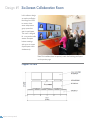
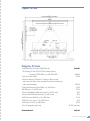
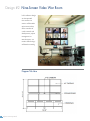
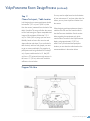
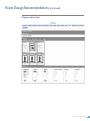
be located adjacent to the Panorama Displays, or
on the wall at either side of the meeting table (as
shown in the templates above), so that speakers
can present naturally to the local participants.
The laptop used for local content share should
have VidyoDesktop installed and its webcam
directed towards the speaker and whiteboard.
This will allow remote participants to also view
the speaker and whiteboard.
Optionally, whiteboards can be placed behind
the main participants so they can be easily
accessed and captured by the primary camera.
You can set up a camera preset with a tight shot
of the whiteboard to quickly share its contents.
Interactive white-boards can immediately digitize
work, annotate documents and graphics, and
whiteboard interactively between locations.
Digital flipcharts capture hand-generated content
through virtual “sheets” that can be virtually
“taped to the wall,” replicating a traditional flip
chart brainstorming session.
High Definition Encoders / Decoders
Dedicated encoder/decoder solutions are
designed especially for organizations that need to
work with high-resolution images, real-time video
or real-time visualization information.
Room Control
If a telepresence and visual collaboration room
isn’t easy to use, it won’t get used. This is especially
true in large organizations with hundreds,
thousands, or even tens of thousands of potential
users. The gold standard for control are menudriven, touch-sensitive displays that let you
pre-program your most frequently called remote
locations and make the collaborative tools, camera
presets, and other key features intuitively obvious.
VidyoPanorama Design Guide
17