1
Chapter 21: Scaler MegaCore Function
Parameter Settings
21–11
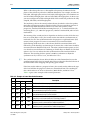
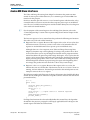
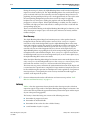
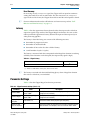
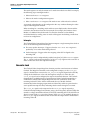
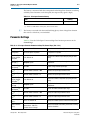
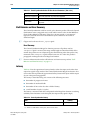
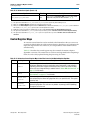
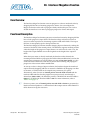
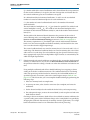
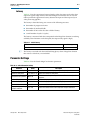
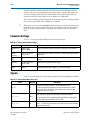
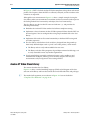
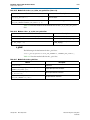
The latency is measured with the assumption that the MegaCore function is not being
stalled by other functions on the data path (the output ready signal is high).
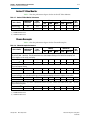
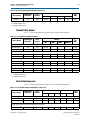
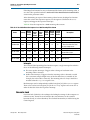
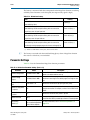
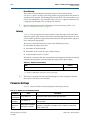
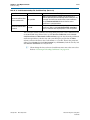
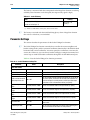
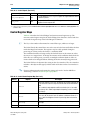
Table 21–3. Scaler Latency
Mode
Latency
Scaling algorithm: Polyphase
(N–1) lines +O
(cycles) (1)
Number of vertical taps: N
Note to Table 21–3:
(1) O refers to a small number of clock cycles, and is not of zero value.
1
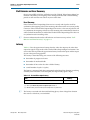
The latency associated with the initial buffering phase, when a MegaCore function
first receives video data, is not included.
Parameter Settings
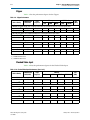
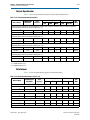
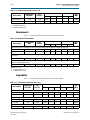
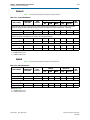
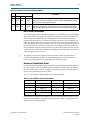
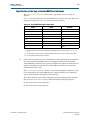
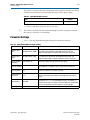
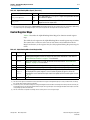
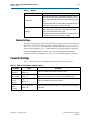
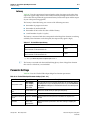
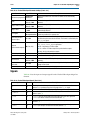
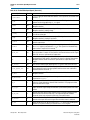
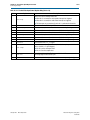
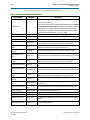
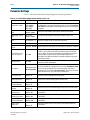
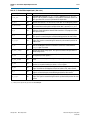
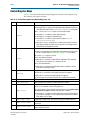
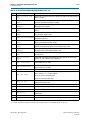
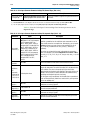
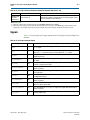
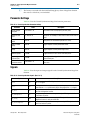
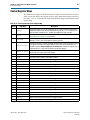
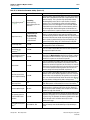
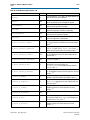
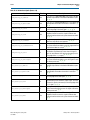
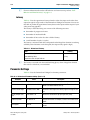
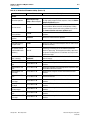
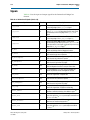
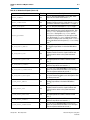
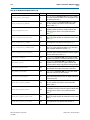
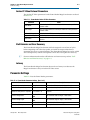
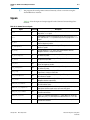
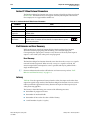
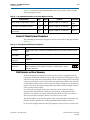
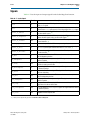
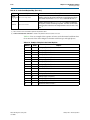
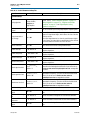
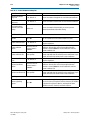
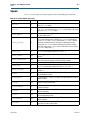
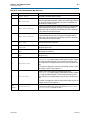
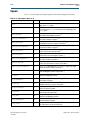
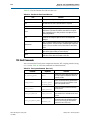
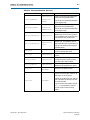
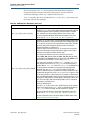
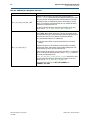
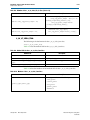
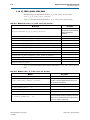
Table 21–4 to Table 21–6 list the Scaler MegaCore function parameters.
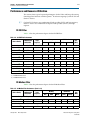
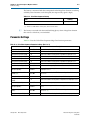
Table 21–4. Scaler Parameter Settings Tab, Resolution Page
Parameter
Value
Description
Run-time control of
image size
On or Off
Turn on to enable run-time control of the image size. When on, the
input and output size parameters control the maximum values.
When off, the Scaler does not respond to changes of resolution in
control packets.
Input image width
32–2600, Default = 1,024
Choose the required input width in pixels.
Input image height
32–2600, Default = 768
Choose the required input height in pixels.
Output image width
32–2600, Default = 640
Choose the required output width in pixels.
Output image height
32–2600, Default = 480
Choose the required output height in pixels.
Bits per pixel per color
plane
4–20, Default = 8
Choose the number of bits per pixel (per color plane).
Number of color planes
1–3, Default = 3
The number of color planes that are sent over one data
connection. For example, a value of 3 for R'G'B' R'G'B' R'G'B' in
serial.
Color planes transmission
Sequence, Parallel
format
The transmission mode used for the specified number of color
planes.
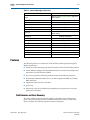
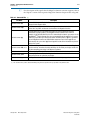
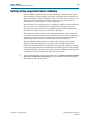
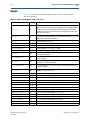
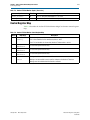
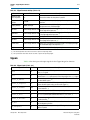
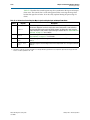
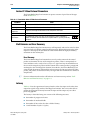
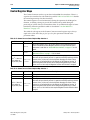
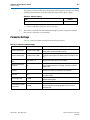
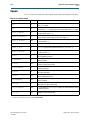
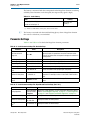
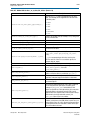
Table 21–5. Scaler Parameter Settings Tab, Algorithm and Precision Page (Part 1 of 2)
Parameter
Value
Description
Scaling Algorithm
Nearest Neighbor, Choose the scaling algorithm. For more information about these options,
Bilinear, Bicubic, refer to “Nearest Neighbor Algorithm” on page 21–1, “Bilinear Algorithm”
Polyphase
on page 21–2, and “Polyphase and Bicubic Algorithms” on page 21–3.
Number of vertical taps (1)
3–16, Default = 4
Specify the number of vertical taps.
Number of vertical phases
2, 4, 8, 16, 32,
64, 128, 256
Specify the number of vertical phases.
Number of horizontal
taps (1)
3–16, Default = 4
Specify the number of horizontal taps.
January 2013
Altera Corporation
Video and Image Processing Suite
User Guide