1
S-200
Section - 4 Appendix
Section - 4 Appendix
This section provides you with information to Factory Reset the S-200, Foot switch menu set-up, Specification page and a Program list
Resetting the S-200
The following Factory reset procedures all you to reset the S-200 from Utility menu or from power up.
Warning- All User program information will be deleted when the reset is performed
Utility Menu Factory Reset
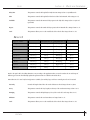
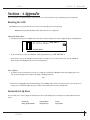
1. From Program mode, press the <Utility> button three times until you reach page three and the display will appear something like this:
Utility Menu
page 3 of 3
factory reset
FACT
USER
UTIL
EDIT
CHNG
LINK
MIDI
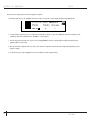
2. To proceed with the reset, press the <Param 2> and the display will now read: ARE YOU SURE ?
3. If you wish to reset, press the <Param 4> button and the S-200 will proceed to reset. If you wish to abort, press the <Param 3>
button and press the <Program> button to return to Program mode.
Power Up Reset
1. To perform a factory reset from power up on the S-200, simply press and hold the <Program> button while applying power to the
unit. An asterisk will appear in the top line of the display and will appear like this:
**
2. Now release the <Program> button and immediately press the <Config> button and the S-200 will proceed to reset. In the process of
resetting, the S-200 will briefly display the current software version number and then return to Program mode.
Footswitch Set-Up Menu
The S-200 allows you to custom configure the footswitch menu for use with the Digitech FS-300 footswitch to perform numerous functions
such as:
Program Up
Rotary Speaker On/Off
User Guide
Program Down
Delay Time Tap
Bypass
Repeat Hold
15