1
S-200
Section -2 Operation and Editing
Selecting Effect Configurations
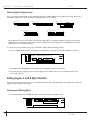
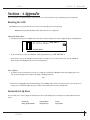
The S-200 provides you with five different effect configurations that allow you ultimate flexibility and versatility in effect routing. The five effect
configurations available in the S-200 are located in the Configuration menu and are as follows:
Configuration 1
L
eq
R ng
studio
Configuration 2
L
eq CHORUS
R ng
L
R
hall
L
R
Configuration 3
L
eq
R ng
chorus
hall
Stereo Inputs and Outputs (Series Effects)
Stereo Inputs and Outputs
L
R
Stereo Inputs and Outputs (Parallel Effects)
Configuration 4
L
ng eq chorus
hall
R ng eq
Configuration 5
L ng
chorus
eq
L
R
R ng
Dual Mono Inputs and Outputs (Parallel Effects)
eq
L
R
hall
Dual Mono Inputs and Stereo Outputs (Parallel Effects)
Effect Configuration 1 uses one effect module because both processing engines are combined for maximum processing power. This larger
module allows you to have longer delay times and more dense sounding reverbs. Effect configurations 2-5 use Dual-Engine effect modules
which allow you to use two effects per program.
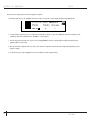
To select any one of these five different effect engine configurations, simply perform the following procedure:
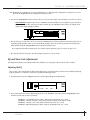
1. Press the <Config> button and the display will appear something like this, indicating that you are in the configuration select mode.
Configuration 1
L
R ng
eq
FACT
USER
UTIL
EDIT
CHNG
LINK
MIDI
L
R
Hall
2. Now simply turn the <Program/Data> wheel until the desired configuration (1-5) appears in the display.
3. Once the desired effect configuration has been selected, simply press the <Store> button to store the configuration change at the
desired program location.
Editing Engine A and B Effect Modules
Because of its processing power, the S-200 gives you two Engine Effect modules that are fully programmable. The following section explains the
simple procedure for Engine A and B editing.
Selecting and Editing Effects
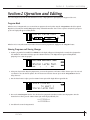
1. From Program mode, press the <Engine A/B> button and the display will appear something like this:
L
R ng eq
PREdLY
6
dECAY
HALL
dAMP
LEVEL
L
R
FACT
USER
UTIL
EDIT
CHNG
LINK
MIDI
User Guide