1
all.book Page 104 Thursday, March 6, 2003
3:57 PM
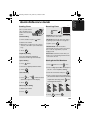
Messages and Signals
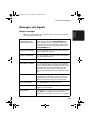
LOW INK
The cartridge is low on ink (approximately one
quarter of the ink remains).
MEMORY IS FULL
If faxes have been received to memory because
printing is not possible (an additional message will
indicate the problem), resolve the problem so that
printing can continue (see Substitute Reception to
Memory on page 63).
If you are attempting to transmit from memory, see If
the memory becomes full on page 54.
If you are copying, see If MEMORY IS FULL appears
on page 65.
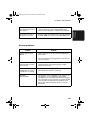
MEMORY PRINTING
The fax is preparing to or printing out a document
from memory.
NO # STORED
This appears if you attempt to search for an auto-dial
number when none have been stored.
OFF HOOK
This appears if you forgot to replace the handset after
using it to dial and send a fax. Replace the handset or
press the STOP key to clear the message.
ON HOOK DIAL
The SPEAKER key has been pressed and the fax
machine is waiting for you to dial.
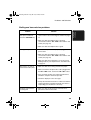
OUT OF INK
The cartridge is out of ink and must be replaced.
Faxes will be received to memory.
PAPER JAMMED
The printing paper is jammed. See page 107.
PRINTER ERROR
A printer error has occurred. Open the printer
compartment cover, make sure the print cartridge is
installed correctly, and then close the cover.
PRINTER ERROR/
CHECK PAPER
A paper jam may have occurred. Follow the
procedure on page 107 to clear the jam.
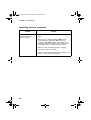
READY TO SEND
A document has been loaded and the fax machine is
waiting for you to begin faxing or copying.
104