1
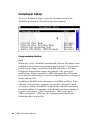
Memory Test Tick Sound
This option enables (turns on) or disables (turns off) the ticking
sound during the memory test.
Memory Parity Error Check
This option enables or disables parity error checking for system
RAM. The settings are Enabled (all system RAM parity is
checked) or Disabled (parity is checked only on the first 1 MB of
system RAM).
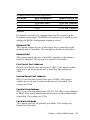
Hit <Del> Message Display
Disabling this option prevents the message
Hit <DEL> if you want to run Setup
from appearing when the system boots. The settings are Enabled or
Disabled.
Extended BIOS RAM Area
Specify in this option if the top 1 KB of the system programming
area beginning at 639 K or 0:300 in the system BIOS area in low
memory will be used to store hard disk information. The settings
are Top 1 K or 0:300.
Wait for <F1> If Any Error
WinBIOS POST runs system diagnostic tests that can generate a
message followed by:
Press <F1> to continue
If this option is enabled, WinBIOS waits for the end user to press
<F1> before continuing. If this option is disabled, WinBIOS
continues the boot process without waiting for <F1> to be pressed.
System Boot Up Num Lock
When On, this option turns off Num Lock when the system is
powered on so the end user can use the arrow keys on both the
numeric keypad and the keyboard.
40
SBC-400 User's Manual