1
RN Commands Version 4.25,
11/1/2007
Page 6 of 25
3. Configuration
Command Mode (vs Normal Data mode)- Upon powerup, the device will be in data mode.
To enter
command mode, The characters “$$$” must be sent. The device will respond with “CMD”. To exit
command mode, send “---<cr>”. The device will respond with “END”.
Parameters, such as the Bluetooth Name, Class of Device and Serial Port settings can be viewed and
configured. This can be done locally through the serial port UART or from a remote Bluetooth RF link.
To access configuration, the device must be in command mode by issuing ($$$). While in command
mode, the device will accept ASCII bytes as commands.
3.1 LOCAL CONFIGURATION (via serial port)
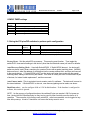
Use a normal RS-232 pass through cable from PC passing ASCII characters through the terminal to the
FireFly. The communications settings should match the settings used when FireFly connects, for
example: the default is 115,200bps, 8 bits, No Parity, 1 stop bit, and hardware flow control enabled.
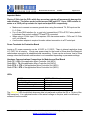
Local configuration works at any time when the device does NOT have a Bluetooth connection, and also
works under certain conditions when the device is connected (see the table below). If the device is in
configuration mode and a connection occurs, the device will exit configuration mode, and data will pass
back and forth from the remote device.
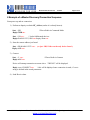
Run your favorite terminal emulator, HyperTerminal or other program. Type “$$$” on your screen. You
should see “CMD” returned to you. This will verify that your cable and comm. settings are correct. Valid
commands will return an “AOK”, response, and invalid ones will return “ERR “. Commands that are not
recognized will return a “?”.
To exit command mode, type “---“<cr>. (three minus signs).
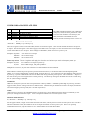
NOTE1 : You can enter command mode locally over the serial port at any time when not connected.
Once a connection is made, you can only enter command mode if the config timer has not expired.
To enable continuous configuration, set the config timer to 255. Also, if the device is in Auto Master
mode 3, you will NOT be able to enter command mode when connected over Bluetooth.
3.2 REMOTE CONFIGURATION (via Bluetooth)
It is often useful to be able to perform configuration remotely over a Bluetooth connection. To do this,
connect to the device over Bluetooth, and using your terminal emulator, perform the same steps as you
would for local configuration above. When finished configuring, be sure to either reset the device, or
Send the “---“command, which will exit configuration mode and allow data to pass normally.
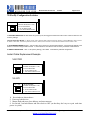
NOTE 2: You can only enter command mode remotely over Bluetooth if you have made a connection
and sent the $$$ within the “config timer” window after powerup. This can be modified, the default
config timer expires 60 seconds after powerup. Once the timer has expired, any data sent to the device
will pass unmodified and unrecognized by the command interpreter. The timer can be set to any value
from 0 (disable remote configuration) to 255 decimal , which allows continuous (no timeout)
configuration. WARNING: Configuration (local or remote) is NEVER enabled when the device is in
auto-mode and is connected over Bluetooth.
809 University Avenue
• Los Gatos, CA 95032 • 1-(408) 395-6539 • [email protected]
www.rovingnetworks.com