1
Charging the Batteries
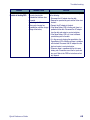
Table 3. Battery Charging Methods and Indications
PDT
Charge
LED
PDT Charge LEDSpare
Battery
Charge
LED
Charge Indicator LEDs
Charging Location:
Falcon seated
Falcon
Charging slot of
in a Dock
connected to an
Dock (Single or
(Single or Four- external power
Four-Slot)
Slot)
supply
Charging Duration
4-6 hours
Battery Pack Charge
Indication
Charging: RED
Fully Charged:
GREEN
Falcon Charge LED
Dock or Charger
Battery Charge LED(s)
No effect
Simultaneously Charges
YES
Backup Battery?
* Refer to page 45 for more information.
14
Four-Slot Battery
Charger
4-6 hours
3-5 hours
> 3 hours
Charging: RED
Fully Charged:
GREEN
N/A
N/A
No effect
Charging:
Solid RED
Fully charged:
GREEN
*Fault:
Flashing RED
Charging: Charging
LEDs are AMBER
Fully charged: Ready
LEDs are GREEN
YES
NO
NO
Falcon® 4400 Series with Windows Mobile®