1
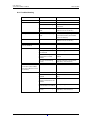
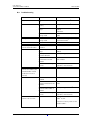
User Manual Ascom d81 DECT Handset 10 TD 92644EN Advanced Functions 10.1 Admin Menu The handset has a hidden menu for system administrators. See the handset’s Configuration Manual. The Admin menu contains: • • • • • • • • • • Software, hardware and license information, IPEI/IPDI, and user ID DECT information DECT location information21 and/or LF location information22 Centralized Management showing online information Site Survey Tool for indication of radio signal and base station listing Fault logging License upgrade menu Frequency band selection23 System menu with ability to alter protection Factory reset option For quick access to the Device Information (DI) menu in idle mode, press the keys containing *#DI# (that is *#34#). For quick access to IPEI/IPDI, press *#06# in idle mode. See the table below. Information Code Software version *#34# Hardware version *#34# License *#34# IPEI/IPDI *#34# or *#06# User ID *#34# 10.2 Clear Lists in Charger A parameter can be set using the PDM/Device Manager to clear the messaging and call lists that have been stored in the handset. When the parameter is activated and the function has been downloaded to the handset, the lists are deleted when placed in a charger. This can be useful during administration of handsets for new users. See also the handset’s Configuration Manual. 21.This is a license dependent feature. 22.Requires a handset that supports LF location. 23.This option is removed when the frequency band has been set. 31 October 2013 / Ver. G 77