1
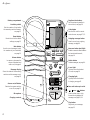
At a glance
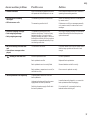
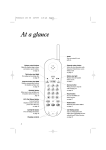
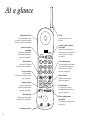
Day/hour/min buttons
Sets the answering machine’s
internal clock, see page 20.
Battery compartment
Ans delay switch
Sets the number of rings before
the answering machine answers,
see page 21.
Code button
Sets the PIN code for remote
control access, see page 17, 25.
Reset button
Resets the unit to the default
settings, see page 22.
Note button
Used to record messages (notes)
for members of your household,
see page 22.
Outgoing message button
Used to record your outgoing
message, see page 20.
DAY
TS
HOUR
MIN
6
2
ANS DELAY CODE OUTGOING MESSAGE
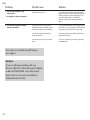
Volume button
Increases or decreases the
volume of playback and
audio cues, see page 9.
Message display
Shows the status of the answering
machine and the message count,
see page 19.
RESET
DELETE
VOLUME
IN USE
Answer on/off button
Switches the answer machine
on or off, see page 21.
Microphone
Charging contacts
Delete button
Deletes messages, see page 24.
INTERCOM
NOTE
Intercom button (and light)
Enables communication between
the handset and base unit,
see page 16.
In use light
Lights up when the handset
is in use, see page 10.
Charging light
Lights up when the handset
is charging, see page 11.
CHARGING
Base unit telescopic aerial
STOP
ANSWER
ON/OFF
PLAY
STOP
buttons
Used to review, stop or skip
forward during playback of
messages, see page 23, 24.
Play button
Plays back your messages,
see page 23.
2