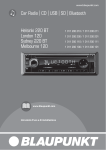
1
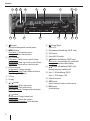
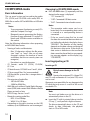
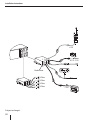
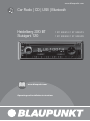
Controls
1
2
3
17 16
1
4
5
15
6
14
button
Unlock the detachable control panel
2 MENU button
Short press: Call up/close menu
Long press: Start scan function
3 On/Off button
Short press: Switch on car sound system
In operation: Mute car sound system (Mute)
Long press: Switch off car sound system
4 Volume control
In the menu: Change settings
Fast-Browse mode: Select folder and track
(Heidelberg 220 BT only)
5 CD tray
6 Display
7
/ button
In the menu: Select menu item
Radio mode: Start seek tuning
MP3/WMA mode: Change to next/previous
folder
/ button
In the menu: Change menu level
Radio mode: Adjust the stations
Other operating modes: Track selection
2
7
13
8
12
8
9
11
10
button (Eject)
Eject a CD
9 Microphone (Heidelberg 220 BT only)
: USB socket
; Front AUX-IN socket
<
button (Heidelberg 220 BT only)
Short press: Answering a call, speed dial
Long press: Activate voice dialing
=
button (Heidelberg 220 BT only)
Ending/rejecting a phone call
> Keys 1 - 5 (Heidelberg 220 BT)
Keys 1 - 7 (Stuttgart 120)
? Infrared receiver
@ SRC button
Select memory bank or audio source
A DIS button
Switch display