1
Placing the device in operation
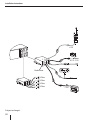
Attaching the control panel
쏅 Push the control panel into the bracket at the
right edge of the device.
쏅 Push the control panel carefully into the left
bracket until it clicks into place.
Note:
If you switch on the car sound system while
the vehicle ignition is switched off, it automatically switches off after 1 hour to preserve
the vehicle battery.
Removing the control panel
쏅 Press the
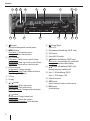
button 1 to unlock the control
panel.
The left side of the control panel detaches
from the device and is secured by the bracket
against falling out.
쏅 Move the control panel slightly to the left
until it disengages from the right bracket.
쏅 Carefully remove the control panel from the
left bracket.
Switching on/off via vehicle ignition
The car sound system will switch off/on simultaneously with the ignition if the device is correctly
connected to the vehicle’s ignition as shown in the
installation instructions and you did not switch
the device off by pressing the On/Off button 3.
Note:
The car sound system automatically switches
off as soon as the control panel is removed.
Setting the reception area
This car sound system is designed for operation in
different regions with different frequency ranges
and station technologies. The factory default of
the reception area is "EUROPE". In addition, the reception areas "USA", "S-AMERICA" and "THAILAND"
are available.
Note:
If you operate the car sound system outside of
Europe, you may first have to set a suitable reception area in the user menu (see the chapter "User settings", section "Making settings in
the "TUNER" menu", menu item "AREA").
Switching on/off
Switching on/off with the On/Off button
쏅 For switch-on, press the On/Off button 3.
The car sound system switches on.
쏅 To switch off the device, press and hold down
the On/Off button 3 for longer than 2 seconds.
The car sound system switches off.
6
Volume
Adjusting the volume
You can adjust the volume in steps from 0 (off ) to
50 (maximum).
쏅 Turn the volume control 4 to change the
volume.
Note (Stuttgart 120):
If a telephone is connected with the car sound
system as described in the installation instructions, the car sound system is muted in case
of a phone call. During muting, the display
shows "TELEPHONE".
Muting the car sound system (Mute)
쏅 Briefly press the On/Off button 3 to mute
the car sound system or to reactivate the previous volume.
During muting, the display shows "MUTE".
Switching demo mode on/off
The demo mode shows the functions of the car
sound system as scrolling text on the display. You
can turn the demo mode on or off:
쏅 Switch off the car sound system if it is not
already turned off.
Stuttgart 120
쏅 Press and hold the buttons 7 and 6 >
at the same time and press the On/Off button 3.