1
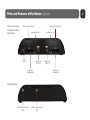
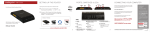
LED Information
EC
EC
EC
WiFi BROADCAST Indicates activity on the WiFi broadcast for either the 2.4 GHz or 5 GHz band.
Green = 2.4 GHz WiFi is on and operating normally.
Blue = 5 GHz WiFi is on and operating normally.
Blinking Red = Error with 2.4 GHz or 5 GHz connection.
No Light = WiFi is off.
USB MODEMS Indicates the status of any USB or Business-Grade modems connected to the MBR1400.
A connected CradlePoint Business Grade Modem LED information will be shown on LED #1 or #2.
Green = Modem has established an active connection. Blinking Green = Modem is connecting.
Amber = Modem is not active. Blinking Amber = Data connection error. No modem connection possible.
Blinking Red = Modem is in the process of resetting.
EXPRESS CARD MODEMS Indicates the status of any ExpressCard modems connected to the MBR1400.
Green = Modem has established an active connection. Blinking Green = Modem is connecting.
Amber = Modem is not active. Blinking Amber = Data connection error. No modem connection possible.
Blinking Red = Modem is in the process of resetting.
12