1
3 Hardware Setup
4
• Normally, the factory default settings should be used.
• Certain BIOS screen items may differ from those shown here due
to new versions or the PS-A unit you are using.
All the following explanation screens use the PS-A unit's factory settings (default
settings).
1)
2)
3)
Connect a keyboard to the PS-A unit.
Turn the PS-A unit’s power ON.
When the start-up screen appears, press your PC’s [DEL] key.
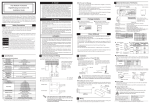
The Setup utility will start. Select [Standard CMOS Features], then, [IDE Primary Master] or [IDE Primary Slave] depending on the settings of the jumper
plug to Master/Slave. The following screen will appear. (When selecting [IDE
Primary Master].)
4)
Confirm whether "AUTO" is selected for IDE Primary Master/IDE Primary
Slave. Also, confirm whether "AUTO" is selected for [Access Mode]. If AUTO
is not selected, change these settings to AUTO. If AUTO is selected in both,
disk parameters will be automatically read when the PS-A is turned ON. The
factory setting is AUTO and recommended for most users.
After all changes are made, press the [ESC] key and select [Save & Exit Setup]
to save the settings.
5)
E-6