1
l
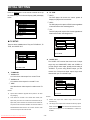
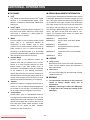
< GENERAL SETUP
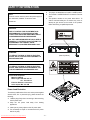
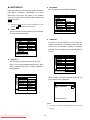
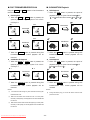
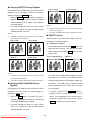
There are four available selections: ANGLE MARK, OSD
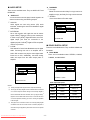
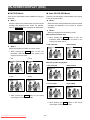
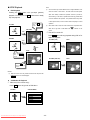
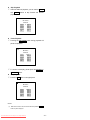
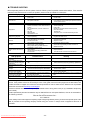
encoding text into an NTSC television signal. A TV can
LANG, CAPTIONS, and SCR SAVER.
display the text with a built-in decoder. Closed Caption
ANGLE MARK
l
can be carried on DVD. If a DVD title contains a CC
During playback of a title with multiple angle sections,
the message "
mark on the rear of the box, then you can set Captions
" will appear on the upper corner of
to “ON” and read written captions on the TV screen.
the screen.
?
CAPTIONS
Closed Caption (CC) is a standardized method of
Default is set to “OFF”.
When ANGLE MARK is set to "ON", the angle mark
OSD will stay on the screen until the end of the
- - GENERAL PAGE - -
playback title or chapter.
?
ANGLE MARK
OSD LANG
CAPTIONS
SCR SAVER
When ANGLE MARK is set to "OFF", the angle mark
OSD will stay on the screen for 3 sec and then
disappear.
ON
OFF
MAIN PAGE
- - GENERAL PAGE - ANGLE MARK
OSD LANG
CAPTIONS
SCR SAVER
CLOSED CAPTION
ON
OFF
l
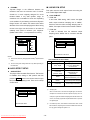
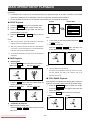
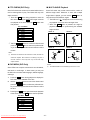
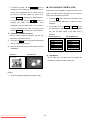
When this DVD player is idle (after about 5 minutes of
MAIN PAGE
inactivity), the screen saver can be activated to prolong
the TV monitor’s life.
ANGLE MARK ON/OFF
l
SCREEN SAVER
- - GENERAL PAGE - -
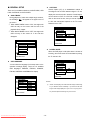
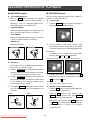
OSD LANGUAGE
ANGLE MARK
OSD LANG
CAPTIONS
SCR SAVER
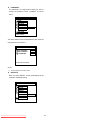
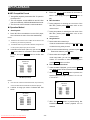
You can select the language for the setup menu or the
operation message display. There are six available
OSD languages: ENGLISH, FRENCH, SPANISH,
ITALIAN, SWEDISH and GERMAN for display.
MAIN PAGE
SCREEN SAVER
- - GENERAL PAGE - ANGLE MARK
OSD LANG
CAPTIONS
SCR SAVER
MAIN PAGE
ENGLISH
FRENCH
ITALIAN
GERMAN
SWEDISH
SPANISH
ON
OFF
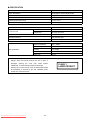
NOTES:
i
Caution: The DVD player can hold a still video image or OSD image
on your television screen indefinitely. If you leave the still video
image or OSD image displayed on your TV for a very long time. It
may cause the permanent damage to your TV screen.
SET OSD LANGUAGE
Downloaded From Disc-Player.com Sharp Manuals
- 19 -