1
Configuring the Controller
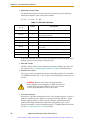
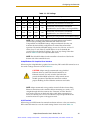
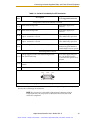
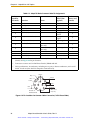
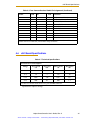
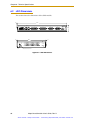
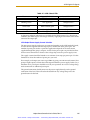
Table 3-3. SW1 Settings
Row #
SW1-1
SW1-2
SW1-3
SW1-4
Interpretation
1
ON
ON
ON
ON
No auto boot, all other settings per CompactFlash
2
OFF
ON
ON
ON
No auto boot, user interface via serial port
3
ON
ON
OFF
ON
No auto boot, user interface via Ethernet
AdeptWindows (use IP address in CompactFlash)
4
OFF
ON
OFF
ON
No auto boot, user interface via Ethernet
AdeptWindows (use default IP address)
5
OFF
OFF
OFF
OFF
Operation per CompactFlash and NVRAM settings
NOTE: SW1 is configured by Adept to a default configuration listed in
row #5 of the preceding table (OFF-OFF-OFF-OFF) to use the
CompactFlash and NVRAM settings. Adept recommends that the user
maintain this default SW1 configuration for normal SmartController
operation. The default NVRAM settings are auto boot, Ethernet, and use IP
address from CF card. If the CF card IP address is not set (0.0.0.0), the
system will use the default IP address. The use of any settings other than
those in Table 3-3 will cause unpredictable results.
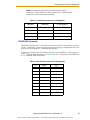
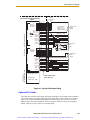
NOTE: The default IP address for the controller is located on a label on the
bottom side of the controller chassis.
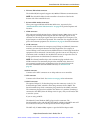
AdeptWindows PC Graphical User Interface
When using the AdeptWindows graphical user interface, DIP switch SW1 cannot be set to
the switch settings shown in row #2 of Table 3-3.
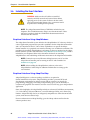
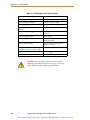
CAUTION: Adept strongly recommends using shielded
Ethernet cables to connect the SmartController to an
Ethernet network. Use only switches (not hubs) that
provide shielded RJ-45 connectors. Adept cannot ensure
reliable operation of the Ethernet connection without
proper shielding of all the Ethernet connectors and cables.
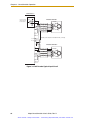
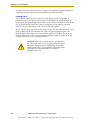
NOTE: Adept recommends using switches instead of hubs when making
Ethernet connections to the controller. When connecting to a switch, use a
straight-through cable that connects the “Transmit” and the “Receive”
pairs to the same pins on both ends of the cable. When connecting to a
server/PC directly, use a cross-over cable that swaps the placement of the
transmit and receive pairs on the opposite ends.
ASCII Terminal
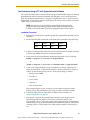
When using an ASCII Terminal or terminal-emulation software as the user interface,
DIP-switch SW1 must be set to the switch settings shown in row #2 of Table 3-3.
Adept SmartController User’s Guide, Rev. H
Artisan Scientific - Quality Instrumentation ... Guaranteed | (888) 88-SOURCE | www.artisan-scientific.com
43