1
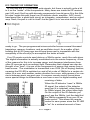
Typically a remote control will send data in a format consisting of time slices.
To send a zero, the IR LED will be off for one time slice, and then toggled at a
rate of 38kHz for the second time slice. To send a one, the IR remote will use
three time slices. Off for two time slices, and on for one. This makes things
easy on the receiver side, because we just have to look from the edge of the
first on-to-off transition to the middle of the second time slice (1 1/2 time slices
from the start) to determine the bit that was sent.
It’s important to note, however is that most remote controls send a unique
first code that can be identified for each and every button, as well as each and
every remote control. Some remotes will send a full data stream over and over
as long as you hold the button down, up to 48 bits per data stream. Other remotes will only send this full data stream once for the first depression, and
then a very short repeat code usually of only one bit, to save on batteries.
The ICI1 recognizes the full codes, and discards the short repeat codes
unless you are holding a relay in position. If we didn’t do this, we couldn’t tell
one button from another! You will find that with some remotes, you need to
press the button twice to train the ICI1 to remember a certain button. This
means the remote you are using is using repeat codes. Other remotes just
require you to press and hold the button, so these are the ones that send the
same code over and over.
One other variance is the data rate from the remote. Generally most remotes
send at a rate of 2400 Hz time slices, but others send at only 1200 Hz time
slices. This presents a problem on slower remotes since the sample period
will always lie in a high or low portion of the subsequent data, meaning we will
receive nothing but ones or zeros. There is a speed jumper you can install to
allow the ICI1 to work with these remotes. If an incorrect speed remote control
is detected, the micro controller emits a special beep to let you know the format is wrong. Then you can switch the jumper over to the other speed and try
again, then you will get either a recognized beep if you have trained the button, or an unrecognized beep if you have not.
When you train the ICI1, the micro controller looks at the IR data stream and
rejects those codes it sees as useless or unverified. The ICI1 looks at the data
from the remote sensor, makes sure it is not a repeat code, checks that it is
not the wrong speed, and then compares it to a previous send before saving
the new value in the Flash memory of the controller. That is why you have to
press the button twice on some remotes; so you can get the same code for
verification before saving.
When the ICI1 is normally receiving, it looks at the data stream, and compares it to what was saved. If there is a match, the corresponding relay is set
or cleared depending on the mode. If there are repeat codes within the allotted
time, the state of the relay is held until there are no more signals seen for that
time.
ICI1 Page 6