1
UT805 Computer Interface Software
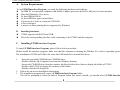
A. System Requirements
To use UT805 Interface Program, you need the following hardware and software:
z An IBM PC or equivalent computer with 80486 or higher processor and 600 x 800 pixel or better monitor.
z Microsoft Windows 95 or above.
z At least 8MB of RAM.
z At least 8MB free space in hard drive.
z Can access to a local or a network CD-ROM.
z A free serial port.
z A mouse or other pointing device supported by Windows.
B.
Installing hardware
z
UT805 support both RS232 and USB
z
Select the corresponding interface cable connecting to the UT805 and the computer
C.
Installing UT805 Interface Program
To install UT805 Interface Program, please follow below procedure:
Before install the interface program, make sure that the computer is running the Window 95 or above operating system.
The installation of COM and USB is the same but USB needs also to install the driver.
1.
2.
3.
-Insert the provided CD-ROM into CD-ROM drive.
-Double-click the My Computer icon from the Windows desktop.
-Locate the CD-ROM drive from the window, double-click the drive letter to display the folder of UT803.
-Double-click UT805 to display the contents of the folder.
-Double-click the file Setup.Exe.
Follow the on-screen installation instructions.
The installation program will create a UT805 Interface Program folder.
You will be prompted to select the kind of Program Folder you want to install; you should select “UT805 Interface
______________________________________1________________________________________
UT805 Computer Interface Software
Program”.
D. Installing USB Driver
1.
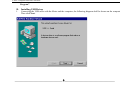
Connecting the USB cable with the Meter and the computer, the following diagram shall be shown on the computer.
Then click Next.
______________________________________2________________________________________
UT805 Computer Interface Software
2.
Then the following diagram will be shown, click Next
______________________________________3________________________________________
UT805 Computer Interface Software
3.
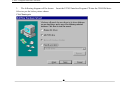
The following diagram will be shown. Insert the UT803 Interface Program CD into the CD-ROM drive.
Select as per the below picture shown
Click Next again
______________________________________4________________________________________
UT805 Computer Interface Software
4.
The following diagram will be shown, click Next again
______________________________________5________________________________________
UT805 Computer Interface Software
5.
The following diagram will be shown, click Next again
______________________________________6________________________________________
UT805 Computer Interface Software
6.
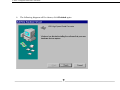
The following diagram will be shown, click Finished again
______________________________________7________________________________________
UT805 Computer Interface Software
7.
8.
The following diagram will be shown, click Yes.
The computer will be restarted and it will detect the USB serial port automatically.
The USB driver installation is completed.
______________________________________8________________________________________
UT805 Computer Interface Software
E.
Selecting USB Serial Port
Connecting the USB interface cable with the Meter and the computer and also finished installing the USB driver.
1.
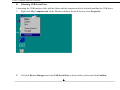
Right click My Computer icon on the Windows desktop, then left click to select Properties.
2.
Left click Device Manager and select USB Serial Port as shown below picture and click Confirm.
______________________________________9________________________________________
UT805 Computer Interface Software
______________________________________10________________________________________
UT805 Computer Interface Software
F.
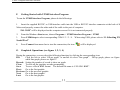
Getting Started with UT805 Interface Program
To run the UT805 Interface Program, please do the followings:
1.
Insert the supplied RS232C or USB interface cable into the USB or RS232C interface connector at the back of the
Meter and properly connect the other end of the cable to the port of computer.
“NO COM” will be displayed on the computer screen if it is not connected properly.
2.
From the Windows Start menu, choose Programs > UT805 Interface Program > UT805
3.
Press COMSetup to select corresponding COM 1/ 2 / 3 / 4. When using USB, please refer to “E. Selecting USB
Serial Port”
4.
Press Connect from menu bar to start the connection, the icon
G.
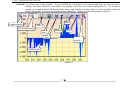
Graphical Operations (see figure 1, 2, 3, 4)
will be displayed.
During the connection, you can select the following functions by clicking the corresponding icon:
Fill:
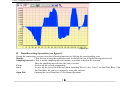
Click the box to select “fill-up graph” or unclick to select “line graph”. Fill-up graph, please see figure 1
while line graph, please see figure 2.
Record: Setting the number of record to show on graph.
Clear:
To clear all the graphics records permanently.
Save:
To save a file in BMP format. The default file name is C:\DATA1.BMP”.
First:
Go to the first graphic.
Previous: Go to the previous graphic.
Next:
Go to the next graphic.
Last:
Go to the last graphic.
______________________________________11________________________________________
UT805 Computer Interface Software
Zoom In: To enlarge part of the graphic. Press and hold the left button of the mouse and drag an area you want to
enlarge, and then release the left button, the display will show the selected enlarged area. To resume the
graphic, press and hold the left button of the mouse and drag an area you want to resume, and then release the
button, the display will show the graphic before enlarging. Figure 4 is the enlargement of figure 3.
Next
Graphic Selection
Clear
No. of records setting
Previous
Last
Save
First
Zoom In
Fill-Up Graph
(figure 1)
______________________________________12________________________________________
UT805 Computer Interface Software
(figure 2)
______________________________________13________________________________________
UT805 Computer Interface Software
(figure 3)
______________________________________14________________________________________
UT805 Computer Interface Software
(figure 4)
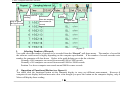
H. Data Recording Operations (see figure 5)
During the connection, you can select the following functions by clicking the corresponding icon:
Repeat:
Click the box to keep the repeated record, or unclick the box to ignore the repeated record.
Sampling Interval: Click to enable sampling interval function, or unclick to disable the function
Enter the sampling interval time, the unit is second.
Clear:
To clear all the records permanently.
Save:
To save all the record in different format including Excel (*.xls), Text (*.txt) and Data Base (*.db).
The Data Base file can be re-opened by using this software.
Open File:
Opening the saved Data Base (*.db) format document.
______________________________________15________________________________________
UT805 Computer Interface Software
Sampling interval
selecting
Clear
Enter the sampling
Keep or ignore
the repeat record
interval time (in
Save
Open File
second)
(figure 5)
I.
Selecting Number of Records
You could select the number of records to be recorded from the “Record” pull down menu. The number of record that
the software could record is highly depending on the computer specification. If the number of records exceeds certain
number, the computer will slow down. Below is the guide helping you to do the selection:
Normally a 486 computer can record from around 1000 to 5000 records
Normally a 586 computer can record from around 10000 to 50000 records
Pentium 2 or above computer can record around 50000 or more records.
J.
Operation of Functional Button (see figure 6)
You could click the functional button on the computer display to carry out different measurement. However the
computer do not display hold and max min value even thought you press the button on the computer display, only the
Meter will display those reading.
______________________________________16________________________________________
UT805 Computer Interface Software
Function Buttons
(figure 6)
______________________________________17________________________________________
UT805 Computer Interface Software
K. Remarks
1.
2.
3.
4.
Before you re-install the software, please remove the installed program as follows:
My Computer > Control Panel > Add/Remove Programs
If abnormal digits or symbols were found, please remove font ”UNIT-A2” and then install new font set
from ”FONT” directory on the provided CD-ROM.
The computer always displays the current measured value, it does not display Hold and Max Min reading.
Therefore whenever you have enable the Hold and Max Min feature, you may find the reading shown on the
computer display is different from the Meter.
Please go to our web site www.uni-trend.com to download the updated version when it is available.
**END**
* This operating manual is subject to change without notice. *
Manufacturer:
Uni-Trend Technology (Dongguan) Limited
Dong Fang Da Dao,
Bei Shan Dong Fang Industrial Development District,
Hu Men Town, Dong Guan City
Guang Dong Province
China
Postal Code: 523 925
Headquarters:
Uni-Trend International Limited
Rm901, 9/F, Nanyang Plaza
57 Hung To Road, Kwun Tong
Kowloon, Hong Kong
Tel.: (852) 2950 9168
Fax.: (852) 2950 9303
Email: [email protected]
http://www.uni-trend.com
______________________________________18________________________________________