1
Setup Modes
This document shows you the ideal approach on how to install and configure Avira
Server Security. It contains important and helpful settings and recommendations of
the Avira Support for the configuration of the program. Furthermore you find useful
hints, e.g. the procedure in case of a virus attack.
You can find all installation files and product manuals as PDF-documents on our
website:
http://www.avira.com/en/support-download
1. Setup Modes
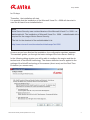
Once you have downloaded the installation file of Avira Server Security,
start the setup file “avira_server_security_en.exe”.
If you have downloaded the zip package, extract the files to a separate directory,
navigate to the directory “en-us” and start “setup.exe”.
Now the assistant appears. Then, click on Next. You have the option to choose the
setup type:
1.1. Complete
Avira Server Security is installed completely with the service Avira Server Security
and the console Server Security Consoles. You can’t select a target folder for the
program files.
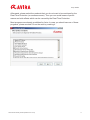
1.2 Custom
You can decide if you want to install the service Avira Server Security and/or the Server Security Console.
You can install the Server Security Console on a workstation so you have the option
to reach the server service by remote access.
Note
Installation of the service Avira Server Security: If you want to reach the protected
server with the Server Security Console by remote access, make sure that the following ports have been opened:
139 (NetBIOS SSN)
137 (NetBIOS NS)
138 (NetBIOS DGM)
You can choose a target folder for the program files that need to be installed.
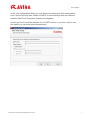
Then, the dialog window “Install license” appears. Choose the directory where you
have saved the license file (hbedv.key). You can also test the Avira Server Security
Avira Server Security HowTo (Status 2011-12-19)
3