1
9
6. Inserting and removing the iPhone
Inserting the iPhone
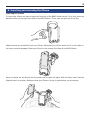
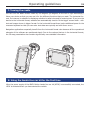
To insert your iPhone you have to open the front flap of the BURY Motion device. To do this, press the
ejection button on the right hand side of the BURY Motion. This is how you open the front flap.
Please remove any protective from your iPhone. Otherwise your iPhone does not fit in the holder or
the cover could be damaged. Place your iPhone in the opened front flap of the BURY Motion.
Using one hand, put the iPhone into the cradle until it snaps into place. With the other hand, hold the
Window Mount in position. Make sure that your iPhone is firmly in place before you drive away.