1
•
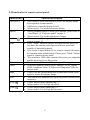
Press this button, then press right and left button to execute
keystone correction.
• Press button to correct a display image that is wider at the
bottom.
• Press button to correct a display image that is wider at the
top.(*)
• Do not activate when displaying text or spreadsheets to
eliminate text distortion.
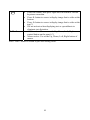
• OSD inactive: The same as the Up, Down, Left, Right
control button on the panel. (*)
• Mouse active: Use as the Up, Down, Left, Right button of
mouse.
Press “Auto” button to return to previous setting value.
10