1
loud in all three AUTO ZONES settings when the coil is lowered to the
ground, you’re not ground balanced. If this happens, lower your
GAIN to “3” and repeat the same procedure. In some highly
mineralized dirt you may need to lower your GAIN to or just under “1”
in order to achieve ground balance.
If you cannot get your BLISSTOOL to ground balance in GROUND
MODE AUTO, switch to GROUND MODE MAN (at this point the AUTO
ZONES toggle position has no effect).
Put your GAIN level back to 3 to start the MAN ground balance
procedure. Use the GROUND RUDELY control and adjust it while
pumping the coil as described above. In harsh ground, it may not
balance until the setting is up to “8” or “9”. In moderate ground, it
may balance between “5 – 8”. If you cannot achieve proper ground
balance lower the GAIN level in .5 increments and repeat the
procedure until the unit is mostly quiet. Then use GROUND FINELY
to fine tune, if necessary.
6. Now that you are ground balanced at the proper gain level for your
BLISSTOOL to run smoothly, raise your DISCR LEVEL to “5” and your
DISCR DEPTH according to where you set your gain. See below.
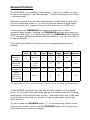
For Land: Gain setting relating to DISCR DEPTH (DD) setting
Gain
DD
0
1
1-2
2-3
3+
3-5
4-6
6-7.5
7-8
7-9
If your DD is set too high relative to the gain level, good deep targets may
“break up”. It is recommended to use the higher end of the DD range while
getting used to the sounds of iron and non-ferrous and use as little DD as
possible the more familiar you become with your Blisstool.
If you would like to get rid of surface iron yet still be able to hear deep iron,
keep your DD set lower than the suggested settings.
You are now ready to detect! Find a clean area and bury a coin at about 6”
and bury a rusty nail at about the same depth in a different hole. Swing
your coil over the nail and listen to how it “clicks and pops”. Now go over
the coin at different speeds and angles to hear how a good signal sounds.