1
Setting The Unit
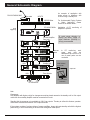
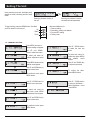
4. INFO
This menu provides information on
various parameters such as input and
output level.
Select Sub Menu 4
Output voltage from 100V line terminal
For service purpose : the voltage prior to
step up transformer
Signal input value
Output value in dB
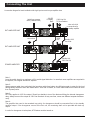
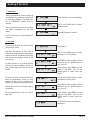
5. SYSTEM
This menu provides information such as
system firmware version and would
enable the unit to reset to factory setting,
erasing all previously set data.
Select Sub Menu 5, press MENU to enter
Firmware version
For resetting the unit to factory default.
For update Firmware to new version
Return
to main menu.
2
6. EXIT
Use this sub menu to exit setting mode.
Select Sub Menu 6, press MENU to enter
Use UP / DOWN button to toggle
between Yes and No and press MENU
button to exit.
PAGE 10
Quantum QP2000 Series Power Amplifiers