1
Setting The Unit
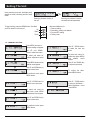
Upon powering up the unit, the display shall
appear as shown, Initialising and into ready
mode.
Displaying firmware version of
the unit
To begin setting, press the MENU button. Use Next
and Prev button to shift around.
Up
Menu
Down
UP
MENU
DOWN
Showing unit address in bracket,
volume level and temperature
Menus available are for :
1. Channel setting
2. Cascading / setting unit address
3. Fan and AFS setting
4. Factory reset
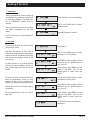
1.0 CHANNEL SETTING
Press MENU and menu 1
Channel setting will appear.
Use UP and DOWN
button to select sub menu
Use UP / DOWN button
to select the next sub
menu
To select sub menu for
volume adjustment, select
1.1
To select sub menu for
treble level, press MENU
and asterisk would
appear
Press MENU button and an
asterisk would appear
Use UP and DOWN key
to adjust volume level
Use UP and DOWN key to
adjust volume level
To confirm the value, press
MENU button.
Use UP / DOWN button to
select the next sub menu
To select sub menu for
bass level, press MENU
and asterisk would appear
To confirm the value,
press MENU button.
Use UP / DOWN button
to return to Sub Menu 1.
Select Sub Menu 1.4 and
press MENU.
Use UP and DOWN key to
adjust volume level
To confirm the value, press
MENU button.
PAGE 8
Quantum QP2000 Series Power Amplifiers