1
9651
Programming - Programming Commands
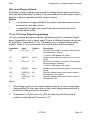
159: Invert Plug-by Outputs
By default, plug-by outputs have a positive voltage when inactive and this is
removed when the output is active. This command inverts that logic so that a
positive voltage is applied when the output is active.
Option
0
+ve removed to trigger (default): the output is positive when inactive
and goes to zero when active.
1
+ve applied to trigger: the output floats when inactive and goes
positive when active.
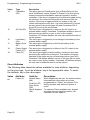
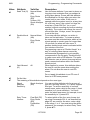
170 to 175: Pulse Output Programming
You can program the panel outputs to generate a pulse of a defined length
when triggered by a set or unset event. Pulses of different lengths can be set
for each level. Commands 170 to 175 enable you to configure these pulse
outputs. Press y to move between the outputs within each command.
Command
170
Value
00* to 12
Default
01
171
A/B/C/D
abcd
172
00* to 12
01
173
A/B/C/D
abcd
174
0 (Off) or 1
(On)
0 (Off) or 1
(On)
On
175
On
Description
Specifies the length in seconds of the pulse to
be generated on setting.
* A value of 00 latches the output.
Assigns each pulse set output to one or more
levels.
Specifies the length in seconds of the pulse to
be generated on unsetting.
* A value of 00 latches the output.
Assigns each pulse unset output to one or more
levels.
Specifies whether each pulse unset output is
activated for a Fire alarm.
Specifies whether each pulse unset output is
activated for a PA.
Notes:
1.
Generating a pulse on an output depends both on a set or unset pulse
being defined for the output and on the output being associated with a
level that is being armed or disarmed.
2.
Commands 174 (Fire) and 175 (PA) activate only the Pulse Unset
outputs configured with Command 172.
11772232
Page 63