1
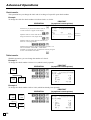
Registering returned goods in the REF mode
REF
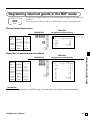
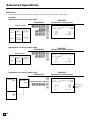
The following examples show how to use the REF mode to register goods returned by
customers.
First of all, press the ° key and press <REF MODE> icon to turn the REF mode.
Mode
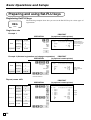
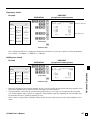
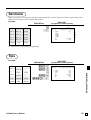
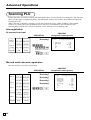
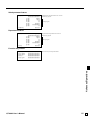
Normal refund transaction
OPERATION
Unit price $1.50
Returned ––––––––––––––––––
Item 1 Quantity
2
––––––––––––––––––––––––––
Unit price ($1.20)preset
Returned ––––––––––––––––––
Item 2 Quantity
6
––––––––––––––––––––––––––
Payment Cash
$10.20
150(
(
6|
*
F
PRINTOUT
(by optional remote printer)
——————————————————
REF mode symbol
MC #01
RF C01
1
1
6
PLU001
PLU001
PLU003
TL
CASH
31-10-2008 11:00 AM 000026
•1.50
•1.50
•7.20
•10.20
•10.20
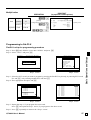
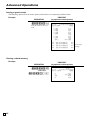
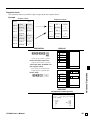
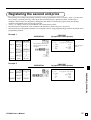
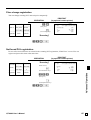
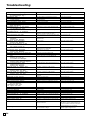
Reduction of amounts paid on refund
Unit price $4.00
Returned ––––––––––––––––––
Item 1 Quantity
1
––––––––––––––––––––––––––
Reduction Amount
$0.15
––––––––––––––––––––––––––
Unit price ($1.20)preset
Returned ––––––––––––––––––
IItem 2 Quantity
1
––––––––––––––––––––––––––
Discount Rate
(5%)preset
––––––––––––––––––––––––––
Payment Cash
$5.20
4-*
15m
)
p
s
F
PRINTOUT
(by optional remote printer)
RF C01
1
PLU003
1 PLU002
5%
%TA1
TX1
TA2
TX2
TL
CASH
Basic Operations and Setups
OPERATION
MC #01
31-10-2008 11:10 AM 000027
•4.00 T1
-0.15 T1
•1.20 T2
-0.06 T2
•3.85
•0.15
•1.14
•0.06
•5.20
•5.20
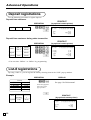
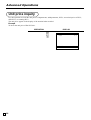
Important!
• To avoid miss registrations in the REF mode, return the mode to the former position immediately.
QT-6600 User’s Manual
33
E