1
3PXCCXX Serial Card
RS-485 Two Wire Device
TD(A-) Pin 3
DATA (-)
TD(B+) Pin 2
DATA(+)
If you are unable to communicate with the card from your software:
1. Consult your software manual to make sure it supports the
address and interrupt that you have configured.
RD(A-) Pin 1
RD(B+) Pin 9
GND Pin 5
Troubleshooting
2. Double check that the address and interrupt are properly set.
GND
3. Try another software package for troubleshooting. Download
SimpTerm (DOS Terminal Emulator) or Comtest (Windows
Terminal Emulator) from B&B Electronics’ web site. SimpTerm
and Comtest are shareware Simple Terminal Emulators that can
be used to vary the setup of any serial card. Both can be
downloaded from the following site location.
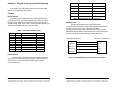
Figure 6. RS-485 (Two-Wire) Pinout Description
Communication Cable Data
The 3PXCC Serial Card communicates using RS-232, RS-422,
and RS-485 communications. The communication cable
specifications are 24AWG (wire gauge) and 30pF/ft. (capacitance
rating). Twisted pairs are ideal for the RS-422/RS-485 Cable in
order to suppress noise on the data line. B&B Electronics can
provide this communication cable for RS-232 or RS-422/RS-485
Applications. The Model ETC8195 is a cable style that can be used
for RS-232 Applications, and Model ETC8506 can be used for RS422/RS-485 Applications.
http://www.bb-elec.com/support.asp
4. Troubleshooting with a Loopback Test
Load Simpterm or Comtest on the test PC. When loading
Simpterm you must set up the port address and IRQ you have set
on the B&B Electronics serial card.
Jumper TD to RD on the DB9 male connector located on the
serial card. You may have to make a “loopback connector” in order
to do this. This is done by jumping pin 2 and pin 3 of a DB9 female
connector and plugging it into the DB9 male port on the serial card.
To test the RS-232 handshake lines you can also jumper RTS to
CTS and DTR to DSR. When you raise the RTS line you should see
CTS also go high. When you raise the DTR line you should see
DSR also go high.
Send data from the Serial Port (B&B Electronics serial card) and
see if the data is echoed back to the port. When a character is typed
on the keyboard you must see a duplicate character after the first
character to verify that the same character was received. Perform
this test on all ports of your serial card to verify the ports can (or
cannot) transmit and receive data.
5. Call B&B Electronics' Technical Support at the number/s shown
below:
International/USA Office:
(815) 433-5100, 8a.m. - 5:00 p.m. weekdays (Central USA Time).
European Office:
+353 91-792444, 8a.m. – 4:30 p.m. weekdays (UK).
Documentation No.3PXCC1x-2x-3903
41
B&B Electronics Mfg Co – 707 Dayton Rd - PO Box 1040 - Ottawa IL 61350 - Ph 815-433-5100 - Fax 815-433-5104
B&B Electronics Ltd – Westlink Comm. Pk – Oranmore, Galway, Ireland – Ph +353 91-792444 – Fax +353 91-792445
42
Documentation No.3PXCC1x-2x-3903
B&B Electronics Mfg Co – 707 Dayton Rd - PO Box 1040 - Ottawa IL 61350 - Ph 815-433-5100 - Fax 815-433-5104
B&B Electronics Ltd – Westlink Comm. Pk – Oranmore, Galway, Ireland – Ph +353 91-792444 – Fax +353 91-792445