1
Mounting the SCOPIA 400 Chassis in a 19-inch Rack
MOUNTING THE
SCOPIA 400
CHASSIS IN A
19-INCH RACK
You can optionally mount the SCOPIA 400 chassis in a standard 19-inch rack.
Two mounting brackets and a set of screws are included in the SCOPIA 400
chassis shipping box.
Procedure
1
Disconnect all cables including the power cables.
2
Place the SCOPIA 400 chassis right-side up on a hard flat
surface, with the front panel facing you.
3
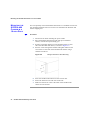
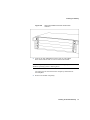
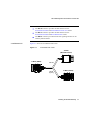
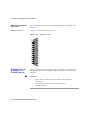
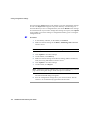
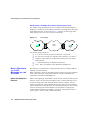
Position a mounting bracket over the mounting holes on each
side of the SCOPIA 400 chassis, as shown in Figure 2-4.
4
Pass the screws through the brackets and tighten them into the
screw holes on each side of the SCOPIA 400 chassis using a
suitable screwdriver.
Figure 2-4
26
Fitting a Bracket for Rack Mounting
5
Insert the SCOPIA 400 chassis into the 19-inch rack.
6
Fasten the brackets to the side rails of the rack.
7
Make sure that the air vents at the sides of the SCOPIA 400
chassis are not blocked.
SCOPIA 400/1000 Gateway User Guide