1
English
Special Commands to access FREE service in USA
You can say “Call Information” to search for local and business listings with
Bing™ 411. Find news, directions, restaurant locations, weather forecasts,
movie showtimes, and more.
You can say “Traffic Conditions” to connect to local 511 services to check
traffic condition in USA. For example, road work, traffic jam, accident
information etc...
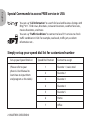
Simply set up your speed dial list for customized number
Set up your Speed Dial List
Speed Dial Position
(Please refer to your
phone’s User Manual to
learn how to input them
and program as this table.)
1
Favorite 1 / voice mail
2
Favorite 2
3
Favorite 3
4
Favorite 4
5
Favorite 5
6
Home
7
Office
2 I BLUETREK CRESCENDO
Contact to assign