1
Freestyle 610 – Edition 3 – 07.04.06 – 7332
Getting to know your phone
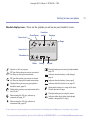
Handset display icons – These are the symbols you will see on your handset’s screen.
Phone/Person
Envelope
External call
Range
Internal call
Phonebook
Menus
Indicates a call is in progress.
EXT icon flashes when you receive an external
call. Stays on during the conversation.
EXT
Battery
INT
EXT
INT
EXT
INT
EXT
INT
Displayed when you are using your phone in
handsfree mode, page 15.
EXT
INT
Flashes when you have new unanswered calls in
the Calls list.*
When viewing the Calls list, indicates an
answered call, page 23.*
Key lock
Displayed when you are viewing the phonebook,
page 19.
Indicates when the battery is fully charged,
page 8.
INT icon flashes when you receive an internal
call. Stays on during the internal conversation.
XT
XT
Handsfree
speaker
Indicates when the battery is low, page 8.
EXT
INT
Indicates when the Key lock is on, page 31.
Steady when handset is in range
EXT
INT Flashes when out of range.
of the base.
Displayed when you are using the menus.
Indicates hidden digits (when the displayed
number is longer than 12 digits).
When viewing the Calls list, indicates an
unanswered call, page 23.*
* For these features to work you must subscribe to your Network Provider’s Caller Display and/or Call Waiting service. A quarterly fee may be payable.
If you experience any problems, please call the Helpline on 0870 605 8047 or email [email protected]
11