1
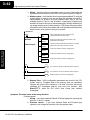
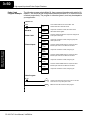
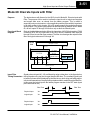
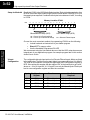
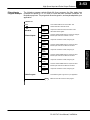
High-Speed Input and
Pulse Output Features
In This Chapter. . . .
— Introduction
— Choosing the HSIO Operating Mode
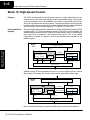
— Mode 10: High-Speed Counter
— Mode 20: Quadrature Counter
— Mode 30: Pulse Output
— Mode 40: High-Speed Interrupt
— Mode 50: Pulse Catch Input
— Mode 60: Filtered Inputs
13
3--2
High-speed Input and Pulse Output Features
Introduction
High-Speed Input and
Pulse Output Features
Built-in Motion
Control Solution
Availability of
HSIO Features
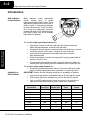
Many machine control applications
require various types of simple
high-speed monitoring and control. These
applications usually involve some type of
motion control, or high-speed interrupts
for time-critical events. The DL105 Micro
PLC solves this traditionally expensive
problem with built-in CPU enhancements.
Let’s take a closer look at the available
high-speed I/O features.
The available high-speed input features are:
S High Speed Counter (5 kHz max.) with up to 24 counter presets and
built-in interrupt subroutine, counts up only, with reset
S Quadrature encoder inputs to measure counts and clockwise or counter
clockwise direction (5 kHz max.), counts up or down, with reset
S High-speed interrupt input for immediate response to critical or
time-sensitive tasks
S Pulse catch feature to monitor one input point, having a pulse width as
small as 100μS (0.1ms)
S Programmable discrete filtering (both on and off delay up to 99ms) to
ensure input signal integrity (this is the default mode for inputs X0--X3)
The available pulse output features are:
S Single-axis programmable pulse output (7 kHz max.) with three profile
types, including trapezoidal moves, registration, and velocity control
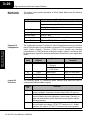
IMPORTANT: Please note the following restrictions on availability of features:
S High-speed input options are available only on DL105s with DC inputs.
S Pulse output options are available only on DL105s with DC outputs.
S Only one HSIO feature may be in use at one time. You cannot use a
high--speed input feature and the pulse output at the same time.
DL105
Part Number
Discrete
Input Type
Discrete
Output Type
High-Speed
Input
Pulse
Output
F1--130AR
AC
Relay
No
No
F1--130DR
DC
Relay
Yes
No
F1--130AD
AC
DC
No
Yes
F1--130DD
DC
DC
Yes
Yes
F1--130AA
AC
AC
No
No
F1--130DA
DC
AC
Yes
No
F1--130DR--D
DC
Relay
Yes
No
F1--130DD--D
DC
DC
Yes
Yes
DL105 PLC User Manual, 3rd Edition
High-Speed Input and Pulse Output Features
Dedicated HighSpeed I/O Circuit
3--3
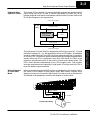
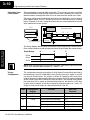
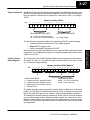
The internal CPU’s main task is to execute the ladder program and read/write all I/O
points during each scan. In order to service high-speed I/O events, the DL105
includes a special circuit which is dedicated to a portion of the I/O points. Refer to the
DL105 block diagram in the figure below.
8 Discrete Outputs
DL105
PLC
Output Circuit
Y0, Y1
High-Speed
I/O Circuit
Y2 -- Y7
CPU
X0 -- X3
X4-- X11
Input Circuit
10 Discrete Inputs
Wiring Diagrams
for Each HSIO
Mode
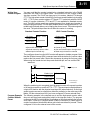
After choosing the appropriate HSIO mode for your application, you’ll need to refer to
the section in this chapter for that specific mode. Each section includes wiring
diagram(s) to help you connect the High-Speed I/O points correctly to field devices.
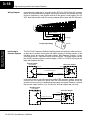
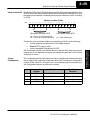
An example of the quadrature counter mode diagram is shown below.
Signal Common
Phase B
+
Phase A
--
Encoder Input Wiring
12 -- 24 VDC
Encoder
DL105 PLC User Manual, 3rd Edition
High-Speed Input and
Pulse Output Features
The high-speed I/O circuit (HSIO) is dedicated to the first four inputs (X0 -- X3) and
the first two outputs (Y0 -- Y1). We might think of this as a “CPU helper”. In the default
operation (called “Mode 60”) the HSIO circuit just passes through the I/O signals to
or from the CPU, so that all ten inputs behave equally and all eight outputs behave
equally. When the CPU is configured in any other HSIO Mode, the HSIO circuit
imposes a specialized function on the portion of inputs and outputs shown. The
HSIO circuit operates independently of the CPU program scan. This provides
accurate measurement and capturing of high-speed I/O activity while the CPU is
busy with ladder program execution.
3--4
High-speed Input and Pulse Output Features
Choosing the HSIO Operating Mode
High-Speed Input and
Pulse Output Features
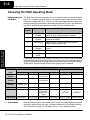
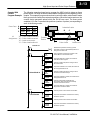
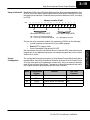
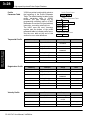
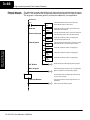
Understanding the The High-Speed I/O circuit operates in one of 6 basic modes as listed in the table
below. The number in the left column is the mode number (later, we’ll use these
Six Modes
numbers to configure the PLC). Choose one of the following modes according to the
primary function you want from the dedicated High-Speed I/O circuit. You can simply
use all ten inputs and eight outputs as regular I/O points with Mode 60.
Mode
Number
Mode Name
10
High-Speed
Counter
5 kHz counter with 24 presets and reset input,
counts up only, causes interrupt on preset
20
Quadrature
Counter
Channel A / Channel B 5 kHz quadrature input,
counts up and down
30
Pulse Output
Stepper control -- pulse and direction signals,
programmable motion profile
40
High-Speed
Interrupt
Generates an interrupt based on input transition
or time
50
Pulse Catch
Captures narrow pulses on a selected input
60
Mode Features
Discrete/Filtered Rejects narrow pulses on selected inputs
Input
In choosing one of the six high-speed I/O modes, the I/O points listed in the table
below operate only as the function listed. If an input point is not specifically used to
support a particular mode, it usually operates as a filtered input by default. Similarly,
output points operate normally unless Pulse Output mode is selected.
Physical I/O Point Usage
DC Input Points
DC Output Points
Mode
X0
X1
X2
X3
Y0
Y1
High-Speed
Counter
Counter clock
Filtered Input
Filtered Input
or Reset Cnt
Filtered Input
Regular Output
Regular Output
Quadrature
Counter
Phase A Input
Phase B Input
FIltered Input
or Reset Cnt
Filtered Input
Regular Output
Regular Output
High-Speed
Interrupt
Interrupt Input,
or Filtered Input
Filtered Input
Filtered Input
Filtered Input
Regular Output
Regular Output
Pulse Catch
Pulse Input
Filtered Input
Filtered Input
Filtered Input
Regular Output
Regular Output
Pulse Output
Not available
Filtered Input
Filtered Input,
or Interrupt to
trigger pulse
output
Filtered Input
Pulse
or
CW Pulse
Direction
or
CCW Pulse
Filtered Input
Filtered Input
Filtered Input
Filtered Input
Filtered Input
Regular Output
Regular Output
Default Mode
Mode 60 (Filtered Inputs) is the default mode. The DL105 is initialized to this mode at
the factory, and any time you clear V-memory scratchpad. In the default condition,
X0--X3 are filtered inputs (10 mS delay) and Y0--Y1 are standard outputs.
DL105 PLC User Manual, 3rd Edition
High-Speed Input and Pulse Output Features
Configuring the
HSIO Mode
3--5
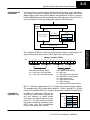
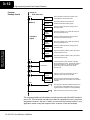
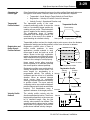
If you have chosen a mode suited to the high-speed I/O needs of your application,
we’re ready to proceed to configure the PLC to operate accordingly. In the block
diagram below, notice the V-memory detail in the expanded CPU block. V-memory
location V7633 determines the functional mode of the high-speed I/O circuit. This is
the most important V-memory configuration value for HSIO functions!
Output Circuit
DL105
PLC
Y0, Y1
Y2 -- Y7
CPU
I/O data
High-Speed
I/O Circuit
V-memory
Mode Select
V7633
X0 -- X3
xxxx
X4-- X11
Input Circuit
Memory Location V7633
Bits
15
14
13
12 11
10
9
8
7
6
5
4
3
2
1
0
0
0
1
0
0
0
0
0
1
0
1
0
0
0
0
2
0
0
5
0
Miscellaneous Setup (BCD)
HSIO Mode Setup (BCD)
00 = Power Up in Previous Mode
20 = Power Up in Run Mode Always
00 = Not Used
10 = High-Speed Counting Mode
20 = Quadrature Counting Mode
30 = Pulse Output Train
40 = High-Speed Interrupts
50 = Pulse Catching
60 = Discrete Filtered Inputs (default)
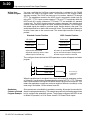
Bits 0 -- 7 define the mode number 00, 10.. 60 previously referenced in this chapter.
The example data “2050” shown selects Mode 50 -- Pulse Catch (BCD = 50) and
Power Up in Run Mode (BCD=20). Together they form the 4-digit BCD number 2050.
Configuring
Inputs X0 -- X3
In addition to configuring V7633 for the
HSIO mode, you’ll need to program the
next four locations in certain modes
according to the desired function of input
points X0 -- X3. Other memory locations
may require configuring, depending on the
HSIO mode (see the corresponding
section for particular HSIO modes).
V-memory
Mode
X0
X1
X2
X3
V7633
V7634
V7635
V7636
V7637
xxxx
xxxx
xxxx
xxxx
xxxx
DL105 PLC User Manual, 3rd Edition
High-Speed Input and
Pulse Output Features
The contents of V7633 is a 16-bit word, to be entered in binary--coded decimal. The
figure below defines what each 4-bit BCD digit of the word represents.
3--6
High-speed Input and Pulse Output Features
Mode 10: High-Speed Counter
Purpose
Functional Block
Diagram
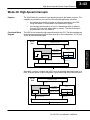
The HSIO circuit contains one high-speed counter. A single pulse train from an
external source (X0) clocks the counter on each signal leading edge. The counter
counts only upwards, from 0 to 99999999. The counter compares the current count
with up to 24 preset values, which you define. The purpose of the presets is to quickly
cause an action upon arrival at specific counts, making it ideal for such applications
as cut-to-length. It uses counter registers CT76 and CT77 in the CPU.
Refer to the block diagram below. When the lower byte of HSIO Mode register V7633
contains a BCD “10”, the high-speed up counter in the HSIO circuit is enabled. X0
automatically becomes the “clock” input for the high-speed counter, incrementing it
upon each off-to-on transition. The external reset input on X2 is the default
configuration for Mode 10. Inputs X1 and X3 are filtered inputs, available to the
ladder program.
DL105
PLC
Output Circuit
Y0, Y1
High-Speed Input and
Pulse Output Features
HSIO
I/O data
COUNTER
CLK
Reset
X0
X2
Y2 -- Y7
FILTER
Mode Select
X1, X3
CPU
V-memory
V7633
xx10
X4-- X11
Input Circuit
Instead of using X2 as a dedicated reset input, you can configure X2 as a normal
filtered input. In this way, the counter reset must be generated in ladder logic.
DL105
PLC
Output Circuit
Y0, Y1
HSIO
I/O data
COUNTER
CLK
X0
Reset
Y2 -- Y7
FILTER
Mode Select
X1, X2, X3
CPU
V-memory
V7633
xx10
X4-- X11
Input Circuit
Next, we will discuss how to program the high-speed counter and its presets.
DL105 PLC User Manual, 3rd Edition
High-Speed Input and Pulse Output Features
Wiring Diagram
3--7
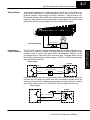
A general wiring diagram for counters/encoders to the DL105 in HSIO Mode 10 is
shown below. Many types of pulse-generating devices may be used, such as
proximity switches, single-channel encoders, magnetic or optical sensors, etc.
Devices with sinking outputs (NPN open collector) are probably the best choice for
interfacing. If the counter sources to the inputs, it must output 12 to 24 VDC. Note
that devices with 5V sourcing outputs will not work with DL105 inputs.
Signal Common
Counter Input Wiring
Signal
The DL105’s DC inputs are flexible in that they detect current flow in either direction,
so they can be wired to a counter with either sourcing or sinking outputs. In the
following circuit, a counter has open-collector NPN transistor outputs. It sinks
current from the PLC input point, which sources current. The power supply can be
the +24VDC auxiliary supply or another supply (+12VDC or +24VDC), as long as the
input specifications are met.
Counter Output
X0 Input
Input
(sourcing)
Output
(sinking)
12-24 VDC Supply
Ground
--
+
Common
In the next circuit, an encoder has open-emitter PNP transistor outputs. It sources
current to the PLC input point, which sinks the current back to ground. Since the
encoder sources current, no additional power supply is required. However, note that
the encoder output must be 12 to 24 volts (5V encoder outputs will not work).
Counter Output
X0 Input
+12 to 24VDC
Input
Output (sourcing)
Ground
(sinking)
Common
DL105 PLC User Manual, 3rd Edition
High-Speed Input and
Pulse Output Features
Interfacing to
Counter Outputs
3--8
High-speed Input and Pulse Output Features
Setup for Mode 10
Recall that V7633 is the HSIO Mode Select register. Refer to the diagram below. Use
BCD 10 in the lower byte to select High-Speed Counter Mode. Use BCD 00 or 20 in
the upper byte as required. Combine the two bytes into a data word “xx10”, for writing
to V7633.
Memory Location V7633
Bits
15
14
13
12 11
10
9
8
7
6
5
4
3
2
1
0
0
0
1
0
0
0
0
0
0
0
1
0
0
0
0
0
High-Speed Input and
Pulse Output Features
2
Presets and
Special Relays
0
1
0
Miscellaneous Setup (BCD)
HSIO Mode Setup (BCD)
00 = Power Up in Previous Mode
20 = Power Up in Run Mode Always
10 = High-Speed Counter
Choose the most convenient method of programming V7633 from the following:
S Include load and out instructions in your ladder program
S DirectSOFT’s memory editor
S Use the Handheld Programmer D2--HPP
We recommend using the first method above so that the HSIO setup becomes an
integral part of your application program. An example program later in this section
shows how to to this.
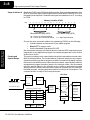
The goal of counting is to do a special action when the count reaches a preset value.
Refer to the figure below. The counter features 24 presets, which you can program.
A preset is a number you derive and store so that the counter will constantly compare
the current count with the preset. When the two are equal, a special relay contact is
energized and program execution jumps to the interrupt routine. We recommend
using the special relay(s) in the interrupt service routine to cause any immediate
action you desire. After the interrupt service routine is complete, the CPU returns to
the ladder program, resuming program execution from the point of interruption. The
compare function is ready for the next preset event.
CPU Scan
Counter
Input
Update
Current
Value
X0, counter clock
X2, external reset
Reset
V-memory Preset Data
V2320
V2322
V2324
V2326
0000
0000
0000
0000
1000
2000
2500
3175
V2376
0921
0000
DL105 PLC User Manual, 3rd Edition
Does
Count =
Preset?
=
Ladder
Program
Execution
Current
instruction
Output
Update
INT
HSIO
Interrupt
Routine
Program
SPxxx
IRT
3--9
High-Speed Input and Pulse Output Features
Preset Data
Starting Location
Using Fewer than
24 Presets
V7630 is a pointer location which points to
the beginning of the Preset Data Table.
The default starting location for the Preset
Data Table is V2320 (default after
initializing
scratchpad
V-memory).
However, you may change this by
programming a different value in V7630.
Use the LDA and OUT instructions as
shown:
Preset Table Pointer
V7630
2000
Preset Data
LDA
O2000
Load the octal address,
convert to hex, leave
result in accumulator.
OUT
V7630
Output this address to
V7630, the location of the
pointer to the Preset data.
When using fewer than 24 preset
registers, the HSIO looks for “0000 FFFF”
(use LDD Kffff) in the next preset location
to indicate the last preset has been
reached. The example to the right uses
four presets. The 0000 FFFF in
V2331-V2330 indicates the previous
preset was the last.
V2000
V2002
V2004
V2006
0000
0000
0000
0000
1000
2000
2500
3175
V2076
0000
0000
Preset Data
0000
0000
0000
0000
0000
1000
2000
2500
3175
FFFF
NOTE: Each successive preset must be greater than the previous preset value. If a
preset value is less than a lower-numbered preset value, the CPU cannot compare
for that value, since the counter can only count upwards.
Equal Relay
Numbers
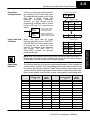
The following table lists all 24 preset register default locations. Each occupies two
16-bit V-memory registers. The corresponding special relay contact number is in the
next column. We might also call these “equal” relay contacts, because they are true
(closed) when the present high-speed counter value is equal to the preset value.
Each contact remains closed until the counter value equals the next preset value.
Preset
Preset
V-memory Register
Special
Relay
Number
Preset
Preset
V-memory Register
Special
Relay
Number
1
V2321 / V2320
SP540
13
V2351 / V2350
SP554
2
V2323 / V2322
SP541
14
V2353 / V2352
SP555
3
V2325 / V2324
SP542
15
V2355 / V2354
SP556
4
V2327 / V2326
SP543
16
V2357 / V2356
SP557
5
V2331 / V2330
SP544
17
V2361 / V2360
SP560
6
V2333 / V2332
SP545
18
V2363 / V2362
SP561
7
V2335 / V2334
SP546
19
V2365 / V2364
SP562
8
V2337 / V2336
SP547
20
V2367 / V2366
SP563
9
V2341 / V2340
SP550
21
V2371 / V2370
SP564
10
V2343 / V2342
SP551
22
V2373 / V2372
SP565
11
V2345 / V2344
SP552
23
V2375 / V2374
SP566
12
V2347 / V2346
SP553
24
V2377 / V2376
SP567
DL105 PLC User Manual, 3rd Edition
High-Speed Input and
Pulse Output Features
V2320
V2322
V2324
V2326
V2330
3--10
High-speed Input and Pulse Output Features
Calculating Your
Preset Values
The preset values occupy two data words each. They can range in value from 0000
0000 to 9999 9999, just like the high-speed counter value. All twenty-four values are
absolute values, meaning that each one is an offset from the counter zero value.
The preset values must be individually derived for each application. In the industrial
lathe diagram below, the PLC monitors the position of the lead screw by counting
pulses. At points A, B, and C along the linear travel, the cutter head pushes into the
work material and cuts a groove.
PLC
Industrial Lathe
A
B
C
Counter
Device
X0, counter clock
Motor
Start
The timing diagram below shows the duration of each equal relay contact closure.
Each contact remains on until the next one closes. All go off when the counter resets.
High-Speed Input and
Pulse Output Features
Equal Relays
A
B
C
SP540
SP541
SP542
NOTE: Each successive preset must have a greater value than the previous preset
value. In the industrial lathe example, B > A and C > B.
X Input
Configuration
The configurable discrete input options for High-Speed Counter Mode are listed in
the table below. Input X0 is dedicated for the counter clock input. Inputs X1 and X3
can only be filtered inputs. The section on Mode 60 operation at the end of this
chapter describes programming the filter time constants. Input X2 can be configured
as the counter reset, with or without the interrupt option. The interrupt option allows
the reset input (X2) to cause an interrupt like presets do, but there is no SP relay
contact closure (instead, X2 will be on during the interrupt routine, for 1 scan). Or
finally, X2 may be left simply as a filtered input like X1 and X3.
Input
Configuration
Register
X0
V7634
Counter Clock
0001
X1
V7635
Filtered Input
xx06 (xx = filter time)
X2
V7636
Counter Reset (no interrupt)
0007
Counter Reset (with interrupt)
0107
FIltered Input
xx06 (xx = filter time)
FIltered Input
xx06 (xx = filter time)
X3
V7637
DL105 PLC User Manual, 3rd Edition
Function
Hex Code
Required
High-Speed Input and Pulse Output Features
Writing Your
Control Program
3--11
You may recall that the counter instruction is a standard instruction in the DL105
instruction set. Refer to the figure below. The mnemonic for the counter is UDC
(up-down counter).The DL105 can have up to 64 counters, labeled CT0 through
CT77. The high speed counter in the HSIO circuit is accessed in ladder logic by using
UDC CT76. It uses counter registers CT76 and CT77 exclusively when the HSIO
mode 10 is active (otherwise, CT76 and CT77 are available for standard counter
use). The HSIO counter needs two registers because it is a double-word counter. It
has three inputs as shown. The first input (Enable) allows counting when active. The
middle input (Preload) allows you to change the current count. The bottom signal is
the reset. The preload input must be off while the counter is counting.
Standard Counter Function
UP Count
UDC
DOWN Count
Reset Input
HSIO Counter Function
Enable Input
CTxx
Preload Input
Kxxxxxxxx
Reset Input
CT76
Kxxxxxxxx
D Counts UP only
D Can use Preload input to change count
D Reset may be internal or external
The next figure shows how the HSIO counter will appear in a ladder program. Note
that the Enable Interrupt (ENI) command must execute before the counter value
reaches the first preset value. We do this at powerup by using the first scan relay.
When using the counter but not the presets and interrupt, we can omit the ENI.
DirectSOFT
SP0
ENI
Enable Input
Preload Input
Reset Input
UDC
Required
CT76
Kxxxxxxxx
Preset Range:
1--99999999
When the enable input is energized, the high-speed counter will respond to pulses
on X0 and increment the counter at CT76 -- CT77. The reset input contact behaves in
a logical OR fashion with the physical reset input X2 (when selected). So,the high
speed counter can receive a reset form either the contact(s) on the reset rung in the
ladder, OR the external reset X2 if you have configured X2 as an external reset.
Program Example: The following example is the simplest way to use the high-speed counter, which
does not use the presets and special relays in the interrupt routine. The program
Counter Without
configures the HSIO circuit for Mode 10 operation, so X0 is automatically the counter
Preset
clock input. It uses the Compare-double (CMPD) instruction to cause action at
certain count values. Note that this allows you to have more than 24 “presets”.Then it
configures X2 to be the external reset of the counter.
DL105 PLC User Manual, 3rd Edition
High-Speed Input and
Pulse Output Features
D Counts UP and DOWN
D Preload counter by write to value
D Reset input is internal only
UDC
3--12
High-speed Input and Pulse Output Features
Program
Example Cont’d
DirectSOFT
First Scan Only
SP0
Load constant K10 into the accumulator. This
selects Mode 10 as the HSIO mode.
LD
K10
Mode 10
OUT
V7633
Load the constant required to configure X0 as
the counter clock.
LD
K1
OUT
V7634
Configure
Inputs
OUT
V7636
High-Speed Input and
Pulse Output Features
LD
K1006
OUT
V7635
OUT
V7637
UDC
SP1
CT76
Kxxxxxxxx
SP1
SP1
SP62
Output the constant K1 to V7634, the location of
the setup parameter for X0.
Load the constant required to configure X2 as
an external reset without interrupt.
LD
K7
SP1
Output the constant K10 to V7633, the
location of HSIO Mode select register.
Output the constant K7 to V7636, the location of
the setup parameter for X2.
Load the constant required to configure inputs
as filtered inputs.
Output the constant K1006 to V7635, the location
of setup parameter for X1.
Output the constant K1006 to V7637, the location
of setup parameter for X3.
CT76 is the HSIO counter. The first rung’s SP1
always enables the counter. The preload contact in
the middle is always off. The third rung’s Reset
input is always off, because we will use the
external reset.
LDD
V1076
Load the current count of the HSIO counter in
V1076 and V1077 into the accumulator
CMPD
K309482
Use the Compare-double instruction to compare
the double word in the accumulator to the constant
K309482
Y0
OUT
END
The execution of the above CMPD instruction turns
on special relay contact SP62 if the current count
is greater than the comparison number (K309482).
END coil marks the end of the main program.
The compare double instruction above uses the current count of the HSIO counter to
turn on Y0. This technique can make more than 24 comparisons, but it is scan-time
dependent. However, use the 24 built-in presets with the interrupt routine if your
application needs a very fast response time, as shown in the next example.
DL105 PLC User Manual, 3rd Edition
High-Speed Input and Pulse Output Features
Counter With
Presets
Program Example
Preset Data
3--13
The following example shows how to program the HSIO circuit to trigger on three
preset values. You may recall the industrial lathe example from the beginning of this
chapter. This example program shows how to control the lathe cutter head to make
three grooves in the work-piece at precise positions. When the lead screw turns, the
counter device generates pulses which the DL105 can count. The three preset
variables A, B, and C represent the positions (number of pulses) corresponding to
each of the three grooves.
A V2320 0000
B V2322 0000
C V2324 0000
V2326
0000
1500
3780
4850
FFFF
X4 -- Cutter head extended
I/O
Assignments X5 -- Cutter head retracted
Y0 -- Lead screw motor
Y1 -- Cutter head solenoid
SP0
Industrial Lathe
A
Counter
Device
Start
B
Cutter head
C
Lead screw
DirectSOFT
ENI
LD
K10
Load constant K10 into the accumulator. This
selects Mode 10 as the HSIO mode.
OUT
V7633
Output this address to V7633, the location of
HSIO Mode select register.
LD
K1
OUT
V7634
Select Mode 10
SP0
Load Presets
LD
K107
Load the constant required to configure X0 as
the counter clock.
Output the constant K1 to V7634, the location of
the setup parameter for X0.
Load the constant required to configure X2 as
an external reset with interrupt.
OUT
V7636
Output the constant to V7636, the location of the
setup parameter for X2.
LDA
O2320
Load the octal address O2320 into the
accumulator. This instruction automatically
converts the address into hex.
OUT
V7630
Output this address to V7630, the location of
the pointer to the Preset Table.
LDD
K1500
OUTD
V2320
LDD
K3780
OUTD
V2322
Load the preset A value into the accumulator.
Output the accumulator contents to the memory
location for preset 1.
Load the preset B value into the accumulator.
Output the accumulator contents to the memory
location for preset 2.
DL105 PLC User Manual, 3rd Edition
High-Speed Input and
Pulse Output Features
SP0
Enable Interrupts before reaching a preset
generates an interrupt. Special Relay SP0 is on
during the first CPU scan.
3--14
High-speed Input and Pulse Output Features
Load the preset C value into the accumulator.
LDD
K4850
Output the accumulator contents to the memory
location for preset 3.
OUTD
V2324
Load the constant Kffff into the accumulator. This
value represents the end of the preset list.
LDD
Kffff
Output the accumulator contents to the memory
location for preset 4 (end of preset marker).
OUTD
V2326
SP1
UDC
SP1
CT76
Kxxxxxxxx
CT76 is the HSIO counter. The first rung’s SP1
always enables the counter. The preload contact in
the middle is off (unused in this example).
SP1
The third rung’s Reset input is normally off,
because we will use the external reset. You can
optionally reset the counter value on each powerup
using the SP0 contact.
High-Speed Input and
Pulse Output Features
SP0
X4
Y1
RST
X5
Y0
SET
END
INT
SP541
SP542
X2
Turn lead screw on again, after cutter head has
retracted.
END coil marks the end of the main program.
The INT label marks the beginning of the interrupt
service routine program.
O0
SP540
Input X4 energizes when the groove has finished
cutting. So, we retract the cutter head.
Preset 1
Preset 2
Y0
RST
Inside the interrupt service routine, we turn OFF the
lead screw motor immediately.
Y1
SET
These special “equal” relays turn on individually as
the corresponding preset is reached. In this
application, each results in the cutting of a groove
(Y1), so they are logically ORed together.
Preset 3
C10
SET
IRT
Input X2 will be energized inside the interrupt
routine if X2 external interrupt was the source.
Return from the interrupt service routine.
Some applications will require a different type of action at each preset. It is possible
for the interrupt routine to distinguish one preset event from another, by turning on a
unique output for each equal relay contact SPxxx. We can determine the source of
the interrupt by examining the equal relay contacts individually, as well as X2. The X2
contact will be on (inside the interrupt routine only) if the interrupt was caused by the
external reset, X2 input.
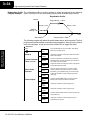
DL105 PLC User Manual, 3rd Edition
High-Speed Input and Pulse Output Features
Counter With
Preload
Program Example
3--15
The following example shows how you can preload the current count with another
value. When the preload command input (X4 in this example) is energized, we
disable the counter from counting with C0. Then we write the value K3000 to the
count register (V1076-V1077). By pulsing C1 on, we preload the current count of the
counter with K3000. When the preload command (X4) is turned off, the counter
resumes counting any pulses, but now starting from K3000.
DirectSOFT
SP0
Select Mode 10
LD
K10
Load constant K10 into the accumulator. This
selects Mode 10 as the HSIO mode.
OUT
V7633
Output this address to V7633, the location of
HSIO Mode select register.
Load the constant required to configure X0 as
the counter clock.
LD
K1
Output the constant K1 to V7634, the location of
the setup parameter for X0.
OUT
V7634
Load the constant required to configure X2 as
an external reset with interrupt.
LD
K107
C0
SET
C0
UDC
C1
CT76
K99999999
Set C0 on at powerup to enable counting.
CT76 is the HSIO counter. The first rung’s C0
contact enables the counter. The preload contact
in the middle is off until the logic near the end of
this program turns it on.
C2
The third rung’s Reset input is normally off,
because we will use the external reset. You can
optionally reset the counter value on each powerup
using the SP0 contact.
SP0
X4
C0
RST
Load the BCD value K3000 into the
accumulator.
LDD
K3000
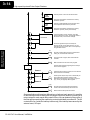
Output the constant to V1076/V1077, the location
of the accumulated count for CT76.
OUTD
V1076
C1
PD
C0
C1
When the preload request is made, the user turns
on X4. First we disable counting by resetting C0,
the counter’s enable input.
Generate a preload counter input pulse, which
causes the counter to preload from V1076-V1077.
C0
SET
Enable the counter by setting C0, when the
preolad pulse on C1 has occurred (C1 is off).
END
END coil marks the end of the main program.
DL105 PLC User Manual, 3rd Edition
High-Speed Input and
Pulse Output Features
Output the constant to V7636, the location of the
setup parameter for X2.
OUT
V7636
3--16
High-speed Input and Pulse Output Features
High-Speed Input and
Pulse Output Features
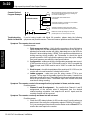
Troubleshooting
Guide for Mode 10
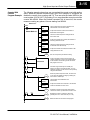
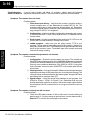
If you’re having trouble with Mode 10 operation, please study the following
symptoms and possible causes. The most common problems are listed below.
Symptom: The counter does not count.
Possible causes:
1. Field sensor and wiring -- Verify that the encoder, proximity switch,or
counter actually turns on and illuminates the status LED for X0. The
problem could be due to sinking-sourcing wiring problem, etc. Remember
to check the signal ground connection. Also verify that the pulse on-time is
long enough for the PLC to recognize it.
2. Configuration -- make sure all of the configuration parameters are correct.
V7633 must be set to 10, and V7634 must be set to 1 to enable the HSIO
counter mode.
3. Stuck in reset -- check the input status of the reset input, X2. If X2 is on, the
counter will not count because it is being held in reset.
4. Ladder program -- make sure you are using counter CT76 in your
program. The top input is the enable signal for the counter. It must be on
before the counter will count. The middle input is the preload input and must
be off for the counter to count. The bottom input is the counter reset, and
must be off during counting.
Symptom: The counter counts but the presets do not function.
Possible causes:
1. Configuration -- Ensure the preset values are correct. The presets are
32-bit BCD values having a range of 0 to 99999999. Make sure you write all
32 bits to the reserved locations by using the LDD and OUTD instructions.
Use only even--numbered addresses, from V2320 to V2376. If using less
than 24 presets, be sure to place “0000FFFF” in the location after the last
preset used.
2. Interrupt routine -- Only use Interrupt #0. Make sure the interrupt has been
enabled by executing an ENI instruction prior to needing the interrupt. The
interrupt routine must be placed after the main program, using the INT label
and ending with an interrupt return IRT.
3. Special relays -- Check the special relay numbers in your program. Use
SP540 for Preset 1, SP541 for Preset 2, etc. Remember that only one
special equal relay contact is on at a time. When the counter value reaches
the next preset, the SP contact which is on now goes off and the next one
turns on.
Symptom: The counter counts up but will not reset.
Possible causes:
1. Check the LED status indicator for X2 to make sure it is active when you
want a reset. Or, if you are using an internal reset, use the status mode of
DirectSOFT to monitor the reset input to the counter.
DL105 PLC User Manual, 3rd Edition
High-Speed Input and Pulse Output Features
3--17
Mode 20: Quadrature Counter
Purpose
Functional Block
Diagram
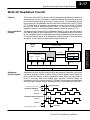
The counter in the HSIO circuit can count two quadrature signal pulses instead of a
single pulse train (mode 10 operation). Quadrature signals are commonly generated
from incremental encoders, which may be rotary or linear. The quadrature counter
has a range from 0 to 99999999, and can count at up to a 5 kHz rate, using CT76 and
CT77. Unlike Mode 10 operation, the quadrature counter can count UP or DOWN,
but does not feature automated preset values or “interrupt on external reset”
capability. However, you have the standard ladder instruction preset of CT76.
The diagram below shows HSIO functionality in Mode 20. When the lower byte of
HSIO Mode register V7633 contains a BCD “20”, the quadrature counter in the HSIO
circuit is enabled. Input X0 is dedicated to the Phase A quadrature signal, and input
X1 receives Phase B signal. X2 is dedicated to reset the counter to zero value when
energized. X3 can only be a regular filtered input in Mode 20.
DL105
PLC
Output Circuit
Y0, Y1
I/O data
COUNTER
Phase
A
Phase
Reset
B
X0
X1
X2
Mode Select
FILTER
X3
CPU
V-memory
V7633
xx20
X4-- X11
Input Circuit
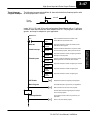
Quadrature
Encoder Signals
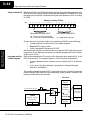
Quadrature encoder signals contain position and direction information, while their
frequency represents speed of motion. Phase A and B signals shown below are
phase-shifted 90 degrees, thus the quadrature name. When the rising edge of
Phase A precedes Phase B’s leading edge (indicates clockwise motion by
convention), the HSIO counter counts UP. If Phase B’s rising edge precedes Phase
A’s rising edge (indicates counter-clockwise motion), the counter counts DOWN.
Leading Edge Signal
90° phase shift
Clockwise sequence
Phase A
Phase B
Counterclockwise sequence
Phase A
Phase B
Leading Edge Signal
one cycle
DL105 PLC User Manual, 3rd Edition
High-Speed Input and
Pulse Output Features
HSIO
Y2 -- Y7
3--18
High-speed Input and Pulse Output Features
Wiring Diagram
A general wiring diagram for encoders to the DL105 in HSIO Mode 20 is shown
below. Encoders with sinking outputs (NPN open collector) are probably the best
choice for interfacing. If the encoder sources to the inputs, it must output 12 to 24
VDC. Note that encoders with 5V sourcing outputs will not work with DL105 inputs.
Signal Common
Phase B
+
Phase A
--
High-Speed Input and
Pulse Output Features
Encoder Input Wiring
Interfacing to
Encoder Outputs
DC Supply
Encoder
The DL105’s DC inputs are flexible in that they detect current flow in either direction,
so they can be wired to an encoder with either sourcing or sinking outputs. In the
following circuit, an encoder has open-collector NPN transistor outputs. It sinks
current from the PLC input point, which sources current. The power supply can be
the +24VDC auxiliary supply or another supply (+12VDC or +24VDC), as long as the
input specifications are met.
Encoder Output,
(one phase)
Phase A or B Input
Input
(sourcing)
Output
(sinking)
12-24 VDC Supply
Ground
--
+
Common
In the next circuit, an encoder has open-emitter PNP transistor outputs. It sources
current to the PLC input point, which sinks the current back to ground. Since the
encoder sources current, no additional power supply is required. However, note that
the encoder output must be 12 to 24 volts (5V encoder outputs will not work).
Encoder Output,
(one phase)
Phase A or B Input
+12 to 24VDC
Input
Output (sourcing)
Ground
DL105 PLC User Manual, 3rd Edition
(sinking)
Common
High-Speed Input and Pulse Output Features
Setup for Mode 20
3--19
Recall that V7633 is the HSIO Mode Select register. Refer to the diagram below. Use
BCD 20 in the lower byte to select High-Speed Counter Mode. Use BCD 00 or 20 in
the upper byte as required. Combine the two bytes into a data word “xx20”, for writing
to V7633.
Memory Location V7633
Bits
15
14
13
12 11
10
9
8
7
6
5
4
3
2
1
0
0
0
1
0
0
0
0
0
0
1
0
0
0
0
0
0
2
0
2
0
Miscellaneous Setup (BCD)
HSIO Mode Setup (BCD)
00 = Power Up in Previous Mode
20 = Power Up in Run Mode Always
20 = Quadrature Counter
X Input
Configuration
The configurable discrete input options for High-Speed Counter Mode are listed in
the table below. Input X0 is dedicated for Phase A, and input X1 is for Phase B. Input
X2 is the reset input to the quadrature counter, but it does not cause an interrupt.
Input X3 can only be a filtered input. The section on Mode 60 operation at the end of
this chapter describes programming the filter time constants.
Input
Configuration
Register
Function
Hex Code
Required
X0
V7634
Phase A
0012
X1
V7635
Phase B
0000
X2
V7636
Counter Reset (no interrupt)
0007
X3
V7637
Filtered Input
xx06 (xx = filter time)
DL105 PLC User Manual, 3rd Edition
High-Speed Input and
Pulse Output Features
Choose the most convenient method of programming V7633 from the following:
S Include load and out instructions in your ladder program
S DirectSOFT’s memory editor
S Use the Handheld Programmer D2--HPP
We recommend using the first method above so that the HSIO setup becomes an
integral part of your application program. An example program later in this section
shows how to to this.
3--20
High-speed Input and Pulse Output Features
Writing Your
Control Program
You may recall that the Up-Down counter instruction is standard in the DL105
instruction set. Refer to the figure below. The mnemonic for the counter is UDC
(up-down counter).The DL105 can have up to 64 counters, labeled CT0 through
CT77. The quadrature counter in the HSIO circuit is accessed in ladder logic by
using UDC CT76. It uses counter registers CT76 and CT77 exclusively when the
HSIO mode 20 is active (otherwise, CT76 and CT77 are available for standard
counter use). The HSIO counter needs two registers because it is a double-word
counter. It also has three inputs as shown, but they are redefined. The first input is
the enable signal, the middle is a preload (write), and the bottom is the reset. The
enable input must be on before the counter will count. The preload input allows you
to write a new value to the current count. The enable input must be off during a
preload.
Standard Counter Function
UP Count
DOWN Count
High-Speed Input and
Pulse Output Features
Reset Input
UDC
HSIO Counter Function
Enable Input
CTxx
Preload Input
Kxxxxxxxx
D Counts UP and DOWN
D Preload counter by write to value
D Reset input is internal only
Reset Input
UDC
CT76
Kxxxxxxxx
D Counts UP and DOWN (from X0, X1)
D Can use Preload input to change count
D Reset may be internal or external
The next figure shows the how the HSIO quadrature counter will appear in a ladder
program.
Enable Input
Preload Input
Reset Input
UDC
CT76
Kxxxxxxxx
Preset Range:
--8,388,608 to
+8,388,607
When the enable input is energized, the counter will respond to quadrature pulses
on X0 and X1, incrementing or decrementing the counter at CT76 -- CT77. The reset
input contact behaves in a logical OR fashion with the physical reset input X2. This
means the quadrature counter can receive a reset from either the contact(s) on the
reset rung in the ladder, OR the external reset X2.
Since presets are not available in quadrature counting, this mode is best suited for
Quadrature
Counter w/Preload simple counting and measuring. The example program on the following page shows
Program Example how to configure the quadrature counter. The program configures the HSIO circuit
for Mode 20 operation, so X0 is Phase A and X1 is Phase B clock inputs.
DL105 PLC User Manual, 3rd Edition
High-Speed Input and Pulse Output Features
Program
Example Cont’d
DirectSOFT
SP0
Load constant K20 into the accumulator. This selects
Mode 20 as the HSIO mode.
LD
K20
Select Mode 20
OUT
V7633
OUT
V7634
OUT
V7635
Output the constant to V7635, the location of the setup
register for X1.
Load the constant required to configure X2 as an external
reset.
LD
K7
LD
K1006
OUT
V7637
C0
SET
CT76
Kxxxxxxxx
Output the constant to V7636, the location of the setup
register for X2.
Load the constant required to configure X3 as a filtered
discrete input with a 10 mS time constant.
Output the constant to V7637, the location of the setup
register for X3.
Set C0 on at powerup to enable counting.
CT76 is the HSIO quadrature counter. The first rung’s SP1
always enables the counter. The preload contact in the
middle is controlled by the logic below this counter
instruction.
C2
The third rung’s Reset input is normally off,
because we will use the external reset. You can
optionally reset the counter value on each powerup
using the SP0 contact.
SP0
SP1
Select Mode 20
SP61
LDD
V1076
CMPD
K44292
Load the current value of the counter into the accumulator
on each scan.
Compare the value in the accumulator with the constant
K44292. If they are equal, the SP61 contact will be
turned on.
Y0
SET
Set Y1 to ON when the counter reaches our
comparison value.
END
END coil marks the end of the main program..
To preload the counter, just add the following example rungs to the program above.
DL105 PLC User Manual, 3rd Edition
High-Speed Input and
Pulse Output Features
OUT
V7636
UDC
Output the constant to V7634, the location of the setup
register for X0.
Load the constant required to configure X1 as Phase B
input.
LD
K0
C1
Output this address to V7633, the location of the HSIO
Mode select register.
Load the constant required to configure X0 as Phase A
input.
LD
K12
C0
3--21
3--22
High-speed Input and Pulse Output Features
Counter Preload
Program Example
X4
C0
RST
Preload counter
Load the BCD value K3000 into the
accumulator.
LDD
K3000
Output the constant to V1076/V1077, the location
of the accumulated pulse count.
OUTD
V1076
C1
PD
C0
High-Speed Input and
Pulse Output Features
Troubleshooting
Guide for Mode 20
C1
When the preload request is made, the user turns
on X4. First we disable counting by resetting C0,
the counter’s enable input.
C0
SET
Generate a preload counter input pulse, which
causes the counter to preload from V1076-V1077.
Enable the counter by setting C0, when the
preolad pulse on C1 has occurred (C1 is off).
If you’re having trouble with Mode 20 operation, please study the following
symptoms and possible causes. The most common problems are listed below.
Symptom: The counter does not count.
Possible causes:
1. Field sensor and wiring -- Verify that the encoder or other field device
inputs actually turn on and illuminates the status LEDs for X0 and X1. A
standard incremental encoder will visibly, alternately turn on the LEDs for
X0 and X1 when rotating slowly (1 RPM). Or, the problem could be due to a
sinking-sourcing wiring problem, etc. Remember to check the signal
ground connection. Also verify that the pulse on-time, duty cycle, voltage
level, and frequency are within the input specifications.
2. Configuration -- make sure all of the configuration parameters are correct.
V7633 must be set to 20, and V7634 must be set to “0012” to enable the
Phase A input, and V7635 must be set to “0000” to enable the Phase B
input.
3. Stuck in reset -- check the input status of the reset input, X2. If X2 is on, the
counter will not count because it is being held in reset.
4. Ladder program -- make sure you are using counter CT76 in your
program. The top input is the enable signal for the counter. It must be on
before the counter will count. The middle input is the preload input and must
be off for the counter to count. The bottom input is the counter reset, and
must be off during counting.
Symptom: The counter counts in the wrong direction (up instead of down, and visa-versa).
Possible causes:
1. Channel A and B assignment -- It’s possible that Channel A and B
assignments of the encoder wires is backwards from the desired
rotation/counting orientation. Just swap the X0 and X1 inputs, and the
counting direction will be reversed.
Symptom: The counter counts up and down but will not reset.
Possible causes:
1. Check the LED status indicator for X2 to make sure it is active when you
want a reset. Also verify the configuration register V7636 for X2 is set to 7.
Or, if you are using an internal reset, use the status mode of DirectSOFT to
monitor the reset input to the counter.
DL105 PLC User Manual, 3rd Edition
3--23
High-Speed Input and Pulse Output Features
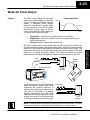
Mode 30: Pulse Output
Purpose
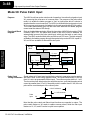
The HSIO circuit in Mode 30 generates
output pulse trains suitable for open-loop
control of a single-axis motion positioning
system. It generates pulse (stepper
increment) and direction signals which
you can connect to motor drive systems
and perform various types of motion
control. Using Mode 30 Pulse Output, you
can select from three profile types:
Velocity
Trapezoidal Profile
Accel
Decel
Time
Trapezoidal -- Accel Slope to Target Velocity to Decel Slope
Registration -- Velocity to Position Control on Interrupt (also used for
home search moves)
S Velocity Control -- Speed and Direction only
The HSIO circuit becomes a high-speed pulse generator (up to 7 kHz) in Mode 30.
By programming acceleration and deceleration values, position and velocity target
values, the HSIO function automatically calculates the entire motion profile. The
figure below shows the DL105 generating pulse and direction signals to the drive
amplifier of a stepper positioning system. The pulses accomplish the profile
independently and without interruption to ladder program execution in the CPU.
S
S
Stepper
Motor
Direction
DL105 Micro PLC
In the figure above, the DL105 generates
pulse and direction signals. Each pulse
represents the smallest increment of
motion to the positioning system (such as
one step or micro-step to a stepper
system). Alternatively, the HSIO Pulse
Output Mode may be configured to deliver
counter clock-wise (CCW) and clock-wise
(CW) pulse signals as shown to the right.
Drive
Amplifier
CCW Pulse
CW Pulse
Drive
Amplifier
NOTE: The pulse output is designed for open loop stepper motor systems. This, plus
its minimum velocity of 40 pps make it unsuitable for servo motor control.
DL105 PLC User Manual, 3rd Edition
High-Speed Input and
Pulse Output Features
Pulse
3--24
High-speed Input and Pulse Output Features
Functional Block
Diagram
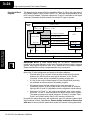
The diagram below shows HSIO functionality in Mode 30. When the lower byte of
HSIO Mode register V7633 contains a BCD “30”, the pulse output capability in the
HSIO circuit is enabled. The pulse outputs use Y0 and Y1 terminals on the output
connector. Remember that the outputs can only be DC type to operate.
Output Circuit
DL105
PLC
Y0
(Pulse / CW)
Y1
(Direction / CCW)
Y2 -- Y7
HSIO
X0 Profile Complete
Y0 Start Profile
PULSE GEN.
CPU
Y1 Preload Position Value
Interrupt
FILTER
X1, X3 Filtered Inputs
Mode Select
V-memory
V7633
xx30
High-Speed Input and
Pulse Output Features
not used
X0
X2
X1, X3
X4-- X11
Input Circuit
IMPORTANT NOTE: In Pulse Output Mode, X0, Y0, and Y1 references are
redefined or are used differently in two ways. Physical references refer to terminal
screws, while logical references refer to I/O references in the ladder program.
Please read the items below to understand this very crucial point.
Notice the I/O point assignment and usage in the above diagram:
S Physical input X0 is not used, so the terminal screw will not be wired.
However, the HSIO function uses logical reference X0 for “Profile
Complete” contact, which is available for ladder program use.
S X1 and X3 can only be filtered inputs in Pulse Output Mode, and they
are available as input contacts to the ladder program.
S X2 behaves as an external interrupt to the pulse generator for
registration profiles. In other profile modes, it can be used as a filtered
input just like X1 and X3 (registration mode configuration shown above).
S References “Y0” and “Y1” are used in two different ways. At the output
connector, Y0 and Y1 terminals deliver the pulses to the motion system.
The ladder program uses logical references Y0 and Y1 to initiate “Start
Profile” and “Load Position Value” HSIO functions in Mode 30.
Hopefully, the above discussion will explain why some I/O reference names have
dual meanings in Pulse Output Mode. Please read the remainder of this section
with care, to avoid confusion about which actual I/O function is being discussed.
DL105 PLC User Manual, 3rd Edition
High-Speed Input and Pulse Output Features
Wiring Diagram
3--25
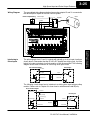
The generalized wiring diagram below shows pulse outputs Y0 and Y1 connected to
the drive amplifier inputs of a motion control system.
Pulse Output Wiring
Power Input
+
Motor
Amplifier
Pulse
Signal Common
--
Direction
The pulse signals from Y0 and Y1 outputs will typically go to drive input circuits as
shown above. Remember that the DL105’s DC outputs are sinking-only. It will be
helpful to locate equivalent circuit schematics of the drive amplifier. The following
diagram shows how to interface to a sourcing drive input circuit.
Y0, Y1 Pulse Output
Power
+DC pwr
Drive Input
+V
Output
(sinking)
+
Input
(sourcing)
Common
--
Ground
The following circuit shows how to interface to a sinking drive input using a pullup
resistor. Please refer to Chapter 2 to learn how to calculate and install Rpullup.
Y0, Y1 Pulse Output
+DC pwr
Power
Drive Input
R pullup
(sourcing)
(sinking)
Output
Supply
Common
+
Input
(sinking)
--
Ground
R input
DL105 PLC User Manual, 3rd Edition
High-Speed Input and
Pulse Output Features
Interfacing to
Drive Inputs
3--26
High-speed Input and Pulse Output Features
Motion Profile
Specifications
The motion control profiles generated in Pulse Output Mode have the following
specifications:
Parameter
Specification
Profiles
Trapezoidal -- Accel Slope / Target Velocity / Decel Slope
Registration -- Velocity to Position Control on Interrupt
Velocity Control -- Speed and Direction only
High-Speed Input and
Pulse Output Features
Physical I/O
Configuration
Logical I/O
Functions
Position Range
--88388608 to 88388607
Positioning
Absolute / relative command
Velocity Range
40 Hz to 7 kHz
V-memory registers
V2320 to V2325 (Profile Parameter Table)
Current Position
CT76 and CT77 (V1076 and V1077)
The configurable discrete I/O options for Pulse Output Mode are listed in the table
below. Physical input X0 is not available, because the CPU uses logical X0 contact to
sense “profile complete”. Therefore, V7634 is put to another use: selecting
pulse/direction or CCW/CW modes for the pulse outputs. Inputs X1 and X3 can only
be filtered inputs. Input X2 is dedicated as the external interrupt for use in registration
mode.
Physical
Input
Configuration
Register
--
V7634
Function
Hex Code
Required
Y0 = Pulse
Y1 = Direction
0103
Y0 = CW Pulse
Y1 = CCW Pulse
0003
X1
V7635
Filtered Input
xx06 (xx = filter time)
X2
V7636
External Interrupt
1006
X3
V7637
Filtered Input
xx06 (xx = filter time)
The following logical I/O references define functions that allow the HSIO to
communicate with the ladder program.
Logical
I/O
Function
X0
Profile Complete -- the HSIO turns on X0 to the CPU when the
profile completes. Goes back off when Start Profile (Y0) turns on.
Y0
Start Profile -- the ladder program turns on Y0 to start motion. If
turned off before the move completes, motion stops. Turning it on
again will start another profile, unless the current position equals
the target position.
Y1
Preload Position Value -- if motion is stopped and Start Profile is off,
you can load a new value in CT76/CT77, and turn on Y1. At that
transition, the value in CT76/CT77 becomes the current position.
DL105 PLC User Manual, 3rd Edition
3--27
High-Speed Input and Pulse Output Features
Setup for Mode 30
Recall that V7633 is the HSIO Mode Select register. Refer to the diagram below. Use
BCD 30 in the lower byte to select Pulse Output Mode. Use BCD 00 or 20 in the upper
byte as required. Combine the two bytes into a data word “xx30”, for writing to
V7633.
Memory Location V7633
Bits
15
14
13
12 11
10
9
8
7
6
5
4
3
2
1
0
0
0
1
0
0
0
0
0
0
1
1
0
0
0
0
0
2
0
3
0
Miscellaneous Setup (BCD)
HSIO Mode Setup (BCD)
00 = Power Up in Previous Mode
20 = Power Up in Run Mode Always
30 = Pulse Output
Profile / Velocity
Select Register
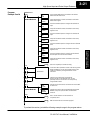
The first location in the Profile Parameter Table stores two key pieces of information.
The upper four bits (12--15) select the type of profile required. The lower 12 bits
(0--11) select the Target Velocity.
Memory Location V2320 (default)
Bits
15
14
13
12 11
10
9
8
7
6
5
4
3
2
1
0
0
0
0
0
1
1
1
0
0
0
0
0
0
0
0
0
0
7
0
0
Profile Select (BCD)
Target Velocity Value
0 = Trapezoidal Profile, Absolute Position
8 = Trapezoidal Profile, Relative Position
9 = Registration Profile, Relative Position
2 = Velocity Profile
Range = 4 to 700, representing
40 Hz to 7 kHz pulse rate
The ladder program must program this location before initiating any of the three
profiles. The LD and OUT instruction will write all 16 bits, so be sure to fully specify
the full four-digit BCD value for the Position / Velocity Select Register each time.
The absolute and relative selection determines how the HSIO circuit will interpret
your specified target position. Absolute position targets are referenced to zero.
Relative position targets are referenced to the current position (previous target
position). You may choose whichever reference method that is most convenient for
your application.
DL105 PLC User Manual, 3rd Edition
High-Speed Input and
Pulse Output Features
Choose the most convenient method of programming V7633 from the following:
S Include load and out instructions in your ladder program
S DirectSOFT’s memory editor
S Use the Handheld Programmer D2--HPP
We recommend using the first method above so that the HSIO setup becomes an
integral part of your application program. An example program later in this section
shows how to to this.
3--28
High-speed Input and Pulse Output Features
Profile
Parameter Table
Trapezoidal Profile
V7630 is a pointer location which points to
the beginning of the Profile Parameter
Table. The default starting location for the
profile parameter table is V2320.
However, you may change this by
programming a different value in V7630.
Remember to use the LDA (load address)
instruction, converting octal into hex.
The HSIO uses the next V-memory
register past the bottom of the profile
parameter table to indicate profile errors.
See the error table at the end of this
section for error code definitions.
V-Memory
High-Speed Input and
Pulse Output Features
V2320, bits 12--15
Registration Profile
Trapezoidal Profile
V7630
V2320
V2321
V2323
V2324
V2325
2320
Profile Parameter Table
xxxx
xxxx
xxxx
xxxx
xxxx
xxxx
Pulse Output Error Code
V2326
00xx
Range
Units
0=absolute,
8=relative
--
V2320, bits 0--11
Target Velocity Value
4 to 700
x 10 pps
V2321/ 2322
Target Position Value
--88388608 to
88388607
Pulses
V2323
Starting Velocity
4 to 100
x 10 pps
V2324
Acceleration Time
1 to 100
x 100 mS
V2325
Deceleration Time
1 to 100
x 100 mS
V2326
Error Code
(see end of section)
--
Range
Units
9=relative
--
V-Memory
V2320, bits 12--15
Velocity Profile
Function
Profile Table Pointer
Function
Registration Profile
V2320, bits 0--11
Target Velocity Value
4 to 700
x 10 pps
V2321/ 2322
Target Position Value
--88388608 to
88388607
Pulses
V2323
Starting Velocity
4 to 100
x 10 pps
V2324
Acceleration Time
1 to 100
x 100 mS
V2325
Deceleration Time
1 to 100
x 100 mS
V2326
Error Code
(see end of section)
--
Range
Units
V-Memory
Function
V2320
Velocity Profile
2000 only
--
V2321/ 2322
Direction Select
80000000=CCW,
0=CW
Pulses
4 to 700
x 10 pps
(see end of section)
--
V2323
Velocity
V2326
Error Code
DL105 PLC User Manual, 3rd Edition
High-Speed Input and Pulse Output Features
3--29
Choosing the
Profile Type
Pulse Output Mode generates three types of motion profiles. Most applications use
one type for most moves. However, each move can be different if required.
S Trapezoidal -- Accel Slope to Target Velocity to Decel Slope
S Registration -- Velocity to Position Control on Interrupt
S Velocity Control -- Speed and Direction only
Trapezoidal
Profile Defined
The trapezoidal profile is the most
Trapezoidal Profile
common positioning profile. It moves the Velocity
load to a pre-defined target position by
Fixed Velocity
creating a move profile. The acceleration
slope is applied at the starting position.
Accel
Decel
The deceleration slope is applied
backwards from the target position. The
remainder of the move in the middle is
Time
spent traveling at a defined velocity.
Start position Target position
Trapezoidal profiles are best for simple point-to-point moves, when the distance
between the starting and ending positions of the move is known in advance.
Registration profiles solve a class of
motion control problems. In some
applications, product material in work
Scrap
moves past a work tool such as a drill
Finished part area Area
station. Shown to the right, registration
marks on the scrap area of the work-piece
allow a machine tool to register its position
relative to the rectangle, to drill properly.
Home search moves allow open-loop
direction of motion
motion systems to re-calibrate (preload)
Registration marks
the current position value at powerup.
Registration profiles are a combination of
Registration Profile
velocity and position control modes. The
Velocity
Position
move begins by accelerating to a
Control
Control
programmed velocity. The velocity is Velocity
sustained and the move is of indefinite
duration. When an external interrupt
Accel
Decel
signal occurs (due to registration
sensing), the profile switches from velocity
to position control. The move ends by
continuing motion a pre-defined distance
past the interrupt point (such as a drill hole
Target position
location). The deceleration ramp is
applied in advance of the target position. Interrupt
Velocity Profile
Defined
The velocity profile controls only the
direction and speed of motion. There is no
target position specified, so the move can
be of indefinite length. Only the first
velocity value needs to be defined. The
remaining velocity values can be created
while motion in in progress. Arrows in the
profile shown indicate velocity changes.
Velocity
Velocity Profile
DL105 PLC User Manual, 3rd Edition
Time
High-Speed Input and
Pulse Output Features
Registration and
Home Search
Profiles Defined
3--30
High-speed Input and Pulse Output Features
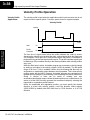
Trapezoidal Profile Operation
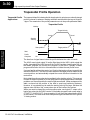
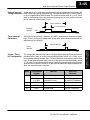
Trapezoidal Profile The trapezoidal profile is best suited for simple point-to-point moves, when the target
position is known in advance. Starting velocities must be within the rage of 40 pps to
Applications
1 kpps. The remainder of the profile parameters are in the profile parameter table.
Trapezoidal Profile
Velocity
Target Velocity
Accel
Decel
Starting
Velocity
Time
High-Speed Input and
Pulse Output Features
Start position
Start
Y0
Profile
Complete
X0
Target position
The time line of signal traces below the profile indicates the order of events.
The HSIO uses logical output Y0 as the Start input to the HSIO, which starts the
profile. Immediately the HSIO turns off the Profile Complete signal (logical X0), so
the ladder program can monitor the progress of the move. Typically a ladder
program will monitor this bit so it knows when to initiate the next profile move.
If you are familiar with motion control, you’ll notice that we do not have to specify the
direction of the move. The HSIO function examines the target position relative to the
current position, and automatically outputs the correct direction information to the
motor drive.
Notice that the motion accelerates immediately to the starting velocity. This segment
is useful in stepper systems so we can jump past low speed areas when low-torque
problems or a resonant point in the motor might cause a stall. (When a stepper motor
stalls, we have lost the position of the load in open-loop positioning systems).
However, is is preferable not to make the starting velocity too large, because the
stepper motor will also “slip” some pulses due to the inertia of the system.
When you need to change the current position value, use logical Y1 output coil to
load a new value into the HSIO counter. If the ladder program loads a new value in
CT76/CT77 (V1076/V1077), then energizing Y1 will copy that value into the HSIO
circuit counter. This must occur before the profile begins, because the HSIO ignores
Y1 during motion.
DL105 PLC User Manual, 3rd Edition
3--31
High-Speed Input and Pulse Output Features
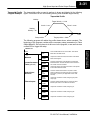
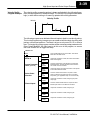
Trapezoidal Profile The trapezoidal profile we want to perform is drawn and labeled in the following
Program Example figure. It consists of a non-zero starting velocity, and moderate target velocity.
Trapezoidal Profile
Velocity
Target Velocity = 1 kHz
Accel = 2 sec
Decel = 4 sec
Starting
Velocity = 40
Time
Start position
Target position = 5000
The following program will realize the profile drawn above, when executed. The
beginning of the program contains all the necessary setup parameters for Pulse
Output Mode 30. We only have to do this once in the program, so we use first-scan
contact SP0 to trigger the setup.
DirectSOFT
LD
K30
Mode 30
OUT
V7633
Locate Parameter
Table (optional)
LDA
O2320
OUT
V7630
Select Pulse /
Direction
Filtered Inputs
Load constant K30 into the accumulator. This selects
Mode 30 as the HSIO mode.
Output the constant to V7633, the location of the HSIO
Mode select register.
Load the octal address of the beginning of the Profile
Parameter Table. The LDA instruction converts this to a
hex number in the accumulator.
Output this address to V7630, the location of the pointer
to the Profile Parameter Table.
LD
K103
Load the constant K103 which is required to select
pulse and direction for physical Y0 and Y1 functions,
respectively (use K3 if your application needs CCW
and CW).
OUT
V7634
Output this constant to V7634, configuring the pulse
output type.
LD
K1006
Load the constant K1006 which is required to select
filtered inputs with a 10 mS filter time constant.
OUT
V7635
Output this constant to V7635, configuring X1.
OUT
V7636
Output this constant to V7636, configuring X2.
OUT
V7637
Output this constant to V7637, configuring X3.
DL105 PLC User Manual, 3rd Edition
High-Speed Input and
Pulse Output Features
SP0
3--32
High-speed Input and Pulse Output Features
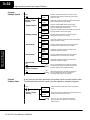
Program
Example Cont’d
SP0
Profile / Target
Velocity
Target Position
Load the constant K100 which is required to select
Trapzoidal Profile, absolute positioning, and a target
velocity of 1 kHz.
LD
K100
Output this constant to V2320, the location of the Profile
Select / Starting Velocity setup register.
OUT
V2320
Load the constant K5000 which selects a target
position of 5000 pulses. Don’t forget to use double
word size (8-digit BCD position value).
LDD
K5000
Output this constant to V2321 and V2322, the location of
the Target Position double-word register.
OUTD
V2321
Starting Velocity
Load the constant K4 which is required to select a
starting velocity of 40 Hz (4 x 10 pps).
LD
K4
Output this constant to V2323, the location of the starting
velocity parameter register.
OUT
V2323
Acceleration
Load the constant K20 which is required to select an
acceleration time of 2 seconds (20 x 100 mS).
LD
K20
Output this constant to V2324, the location of the
acceleration parameter register.
High-Speed Input and
Pulse Output Features
OUT
V2324
Deceleration
Start Profile
X3
Load the constant K40 which is required to select a
deceleration time of 4 seconds (40 x 100 mS).
LD
K40
Output this constant to V2325, the location of the
deceleration parameter register.
OUT
V2325
Y0
OUT
Profile Complete
X0
Preload
Position Value
Y2
OUT
We use a spare filtered input to allow the operator
to start the profile. When the operator turns X3 ON,
then OFF, logical output Y0 starts the profile.
X0 is the logical output of the HSIO to indicate the
move is complete. We use Y2 to energize an
annunciator that the profile has finished.
At any time you can write (preload) a new position into the current position value.
This often done after a home search (see the registration example programs).
SP0
Profile / Target
Velocity
Load the constant K1000 as the new current position
value.
LDD
K1000
Output this constant to V1076/V1077 (CTA76/CTA77). the
location of the current position value.
OUTD
V1076
Y1
PD
DL105 PLC User Manual, 3rd Edition
Turn on Y1 for 1 scan. The off-to-on transition
causes the HSIO to preload the current position
with the value in
3--33
High-Speed Input and Pulse Output Features
Registration Profile Operation
Registration
Applications
1.
In a typical application shown to the
right, product material in work moves past
a work tool such as a drill. Registration
marks on the scrap area of the work-piece
allow a machine tool to register its position
relative to the rectangle, to drill properly.
2. In other examples of registration, the
work piece is stationary and the tool
moves. A drill bit may approach the
surface of a part in work, preparing to drill
a hole of precise depth. However, the drill
bit length gradually decreases due to tool
wear. A method to overcome this is to
detect the moment of contact with the part
surface on each drill, moving the bit into
the part a constant distance after contact.
Finished part area
Scrap
Area
direction of motion
Registration marks
Detect contact
Registration Profile
Velocity
Target Velocity
Accel
Starting
Velocity
Decel
Start
position
Start
Target
position
Time
Y0
External Interrupt X2
Profile Complete
X0
The time line of signal traces below the profile indicates the order of events. The
CPU uses logical output Y0 to start the profile. Immediately the HSIO turns off the
Profile Complete signal (logical X0), so the ladder program can monitor the move’s
completion by sensing the signal’s on state.
DL105 PLC User Manual, 3rd Edition
High-Speed Input and
Pulse Output Features
3. The home search move allows a motion system to calibrate its position on
startup. In this case, the positioning system makes an indefinite move and waits for
the load to pass by a home limit switch. This creates an interrupt at the moment when
the load is in a known position. We then stop motion and preload the position value
with a number which equates to the physical “home position”.
The registration profile begins with only velocity control. When an interrupt pulse
occurs on physical input X2, the starting position is declared to be the present count
(current load position). The velocity control switches to position control, moving the
load to the target position. Note that the minimum starting velocity is 40 pps. This
instantaneous velocity accommodates stepper motors that can stall at low speeds.
3--34
High-speed Input and Pulse Output Features
Registration Profile The registration profile we want to perform is drawn and labeled in the following
Program Example figure. It consists of a non-zero starting velocity, and moderate target velocity.
Registration Profile
Velocity
Target Velocity = 1 kHz
Accel = 2 sec
Decel = 4 sec
Starting
Velocity = 40
Time
Start position
Target position = 5000
The following program will realize the profile drawn above, when executed. The first
program rung contains all the necessary setup parameters. We only have to do this
once in the program, so we use first-scan contact SP0 to trigger the setup.
DirectSOFT
High-Speed Input and
Pulse Output Features
SP0
LD
K30
Mode 30
OUT
V7633
Locate Parameter
Table (optional)
LDA
O2320
OUT
V7630
Select Pulse /
Direction
LD
K103
OUT
V7634
Filtered Inputs
LD
K2006
OUT
V7635
OUT
V7637
LD
K1006
OUT
V7636
DL105 PLC User Manual, 3rd Edition
Load constant K30 into the accumulator. This selects
Mode 30 as the HSIO mode.
Output this constant to V7633, the location of the HSIO
Mode select register.
Load the octal address of the beginning of the Profile
Parameter Table. The LDA instruction converts this to a
hex number in the accumulator.
Output this address to V7630, the location of the pointer
to the Profile Parameter Table.
Load the constant K103 which is required to select
pulse and direction for physical Y0 and Y1 functions,
respectively (your application may use CCW and CW).
Output this constant to V7634, configuring the pulse
output type.
Load the constant K2006 which is required to select
filtered inputs with a 20 mS filter time constant.
Output this constant to V7635, configuring X1.
Output this constant to V7637, configuring X3.
Load the constant K1006 which is required to select the
external interrupt.
Output this constant to V7636, configuring X2, the
registration interrupt input.
High-Speed Input and Pulse Output Features
3--35
Program
Example Cont’d
SP0
Profile / Target
Velocity
Target Position
LD
K9100
OUT
V2320
LDD
K5000
OUTD
V2321
Starting Velocity
Load the constant K5000 which selects a target
position of 5000 pulses. Don’t forget to use double
word size (8-digit BCD position value).
Output this constant to V2321 and V2322, the location of
the Target Position double-word register.
Output this constant to V2323, the location of the starting
velocity parameter register.
Load the constant K20 which is required to select an
acceleration time of 2 seconds (20 x 100 mS).
LD
K20
Output this constant to V2324, the location of the
acceleration parameter register.
Load the constant K40 which is required to select a
deceleration time of 4 seconds (40 x 100 mS).
LD
K40
OUT
V2325
Output this constant to V2325, the location of the
deceleration parameter register.
Start Profile
X3
Y0
SET
Profile Complete
X0
Y2
OUT
C0
PD
C0
We use a spare filtered input to allow the operator
to start the profile. X3 is a momentary Start switch.
When the operator turns X3 ON, logical output Y0
starts the profile.
X0 is the logical output of the HSIO to indicate the
move is complete. We use Y2 to energize an
annunciator that the profile has finished. This won’t
occur until after the interrupt from X2 has occurred
and the profile is complete.
Y0
RST
The profile will begin when the start input (X3) is given. Then the motion begins an
indefinite move, which lasts until an external interrupt on X2 occurs. Then the motion
continues on for 5000 more pulses before stopping.
DL105 PLC User Manual, 3rd Edition
High-Speed Input and
Pulse Output Features
OUT
V2324
Deceleration
Output this constant to V2320, the location of the Profile
Select / Starting Velocity setup register.
Load the constant K4 which is required to select a
starting velocity of 40 Hz (4 x 10 pps).
LD
K4
OUT
V2323
Acceleration
Load the constant K9100 which is required to select
Registration Profile, relative positioning, and a target
velocity of 1 kHz (9xxx times 10 pps).
3--36
High-speed Input and Pulse Output Features
Home Search
Program Example
One of the more challenging aspects of motion control is the establishment of actual
position at powerup. This is especially true for open-loop systems which do not have
a position feedback device. However, a simple limit switch located at an exact
location on the positioning mechanism can provide “position feedback” at one point.
For most stepper control systems, this method is a good and economical solution.
Load
Positioning System
Limit Switches
Motion
Numbering System
Motor
CCW limit (X1)
--3000
--2000
Home limit (X2)
--1000
0
1000
CW limit (X3)
2000
3000
High-Speed Input and
Pulse Output Features
In the drawing above, the load moves left or right depending on the CCW/CW
direction of motor rotation. The PLC ladder program senses the CCW and CW limit
switches to stop the motor, before the load moves out-of-bounds and damages the
machine. The home limit switch is used at powerup to establish the actual position.
The numbering system is arbitrary, depending on a machine’s engineering units.
At powerup, we do not know whether the load is located to the left or to the right of the
home limit switch. Therefore, we will initiate a home search profile, using the
registration mode. The home limit switch is wired to X2, causing the interrupt. We
choose an arbitrary initial search direction, moving in the CW (left-to-right) direction.
S If the home limit switch closes first, then we stop and initialize the
position (this value is typically “0”, but it may be different if preferred).
S However, if the CW limit switch closes first, we must reverse the motor
and move until the home limit switch closes, stopping just past it.
In the latter case, we repeat the first move, because we always need to make the
final approach to the home limit switch from the same direction, so that the final
physical position is the same in either case!
DirectSOFT
SP0
LD
K30
Mode 30
OUT
V7633
Locate
Parameter
Table (optional)
LDA
O2320
Selects Mode 30 as
the HSIO mode.
LD
K2006
Configure the address
of the parameter table.
LD
K103
OUT
V7634
DL105 PLC User Manual, 3rd Edition
OUT
V7635
OUT
V7637
OUT
V7630
Select Pulse /
Direction
Filtered Inputs
Configure the Y0 and Y1
pulse outputs for pulse
and direction, respectively.
The constant K2006
selects a 20 mS filter
time constant.
Output this constant to
V7635, configuring X1.
Output this constant to
V7637, configuring X3.
LD
K1006
The constant K1006
selects a 10 mS filter
time constant.
OUT
V7636
Output this constant to
V7636, configuring X2, the
registration interrupt input.
High-Speed Input and Pulse Output Features
Profile / Target Velocity
SP0
LD
K9100
Select Registration Profile,
relative positioning, and a
target velocity of 1000 pps
(9xxx times 10 pps).
OUT
V2320
Starting Velocity
OUT
V2323
Acceleration
TMR
T0
K5
T0
The constant K4 selects a
starting velocity of 40 Hz
(4 x 10 pps).
LD
K4
C1
CCW past home
C2
C3
X2
The constant K20 selects
an acceleration time of 2
seconds (20 x 100 mS).
LD
K20
Deceleration
OUT
V2325
X10
C0
We’ll choose the same for
the deceleration value.
Target Position
OUTD
V2321
Y0
SET
C0
SET
CW Limit found
C0
C1
X3
C3
X2
C4
LDD
K80000200
OUTD
V2321
C1
SET
C3
SET
CCW past home
Load a small
positive position
count (go CW).
T1
Turn on Start Profile,
searching for either the
home limit or the CW limit
(depends on our starting
position).
Set C0 to indicate the CW
home search has begun.
Turn off Start Profile.
The constant --K200
selects a target
position of --200
pulses, which is in
the CCW direction.
Y0
RST
Turn off Start Profile.
C4
SET
Go CW back to
home.
TMR
T1
K5
Add a timer to
create a slight
delay before
reversing motor.
C5
SET
CW delay done.
Y0
SET
Start profile again.
Home Limit found, CW search direction
C0 C1 C3 X2
Y0
RST
Start profile again.
Home Limit found, CW search direction
Start the home search
when X10 turns on.
The constant K50 selects
a target position of 50
pulses (CW direction).
LDD
K50
Y0
SET
OUTD
V2321
Search in CW direction
C10
CCW delay done.
C5
Y0
RST
Turn off Start Profile.
LDD
K0
Load the constant
K0 for our initialized
position.
OUTD
V1076
Output this constant
to C1076/V1077.
The CW limit has
been reached.
The home search profile will execute specific parts of the program, based on the
order of detection of the limit switches. Ladder logic sets C0 to initiate a home search
in the CW direction. If the CW limit is encountered, the program searches for home in
the CCW direction, passes it slightly, and does the final CW search for home. After
reaching home, the last ladder rung preloads the current position to “0”.
DL105 PLC User Manual, 3rd Edition
High-Speed Input and
Pulse Output Features
C10
SET
Add a timer to
create a slight
delay before
reversing motor.
C2
SET
LDD
K50
OUT
V2324
3--37
3--38
High-speed Input and Pulse Output Features
Velocity Profile Operation
Velocity Profile
Applications
The velocity profile is best suited for applications which involve motion but do not
require moves to specific points. Conveyor speed control is a typical example.
Velocity Profile
Velocity
High-Speed Input and
Pulse Output Features
Time
Start
Y0
Profile
Complete
X0
The time line of signal traces below the profile indicates the order of events.
Assuming the velocity is set greater than zero, motion begins when the Start input
(Y0) energizes. Since there is no end position target, the profile is considered in
progress as long as the Start input remains active. The profile complete logical input
to ladder logic (X0) correlates directly to the Start input status when velocity profiles
are in use.
While the Start input is active, the ladder program can command a velocity change
by writing a new value to the velocity register (V2323 by default). The full speed
range of 40 Hz to 7 kHz is available. Notice from the drawing that there are no
acceleration or deceleration ramps between velocity updates. This is how velocity
profiling works with the HSIO. However, the ladder program can command more
gradual velocity changes by incrementing or decrementing the velocity value more
slowly. A counter or timer can be useful in creating your own
acceleration/deceleration ramps. Unless the load must do a very complex move, it is
easier to let the HSIO function generate the accel/decel ramps by selecting the
trapezoidal or registration profiles instead.
Unlike the trapezoidal and registration profiles, you must specify the desired
direction of travel with velocity profiles. Load the direction select register
(V2321/V2322 by default) with 8000 0000 hex for CCW direction, or 0 for CW
direction.
DL105 PLC User Manual, 3rd Edition
High-Speed Input and Pulse Output Features
Velocity Profile
Program Example
3--39
The velocity profile we want to perform is drawn and labeled in the following figure.
Each velocity segment is of indefinite length. The velocity only changes when ladder
logic (or other device writing to V-memory) updates the velocity parameter.
Velocity Profile
Velocity
Time
The following program uses dedicated discrete inputs to load in new velocity values.
This is a fun program to try, because you can create an infinite variety of profiles with
just two or three input switches. The intent is to turn on only one of X1, X2, or X3 at a
time. The beginning of the program contains all the necessary setup parameters for
Pulse Output Mode 30. We only have to do this once in the program, so we use
first-scan contact SP0 to trigger the setup.
SP0
LD
K30
Mode 30
OUT
V7633
Locate Parameter
Table (optional)
LDA
O2320
OUT
V7630
Select Pulse /
Direction
LD
K103
OUT
V7634
Filtered Inputs
LD
K1006
OUT
V7635
OUT
V7636
OUT
V7637
Load constant K30 into the accumulator. This selects
Mode 30 as the HSIO mode.
Output this constant to V7633, the location of the HSIO
Mode select register.
Load the octal address of the beginning of the Profile
Parameter Table. The LDA instruction converts this to
hex number in the accumulator.
Output this address to V7630, the location of the pointer
to the Profile Parameter Table.
Load the constant K103 which is required to select
pulse and direction for physical Y0 and Y1 functions,
respectively (your application may use CCW and CW).
Output this constant to V7634, configuring the pulse
output type.
Load the constant K1006 which is required to select
filtered inputs with a 10 mS filter time constant.
Output this constant to V7635, configuring X1.
Output this constant to V7636, configuring X2.
Output this constant to V7637, configuring X3.
DL105 PLC User Manual, 3rd Edition
High-Speed Input and
Pulse Output Features
DirectSOFT
3--40
High-speed Input and Pulse Output Features
Program
Example Cont’d
SP0
Profile / Target
Velocity
Select Direction
LD
K2000
OUT
V2320
LDD
K80000000
OUTD
V2321
Set Velocity
Load the constant K2000 which is required to select
Velocity Profile. This data word contains no velocity
information in the case of velocity mode.
Output this constant to V2320, the location of the Profile
Select setup register.
Load the constant K80000000 which selects CCW
direction for Velocity Profiles. Don’t forget to use double
word size (8-digit BCD position value).
Output this constant to V2321 and V2322, the location of
the Target Position double-word register.
Load the constant K10 which is required to select an
initial velocity of 100 pps (uses x10 multiplier).
LD
K10
OUT
V2323
Output this constant to V2323, the location of the velocity
parameter register. After the program is running, we can
write here again, using discrete input switches.
Start Profile
High-Speed Input and
Pulse Output Features
X1
Y0
OUT
Go Slow
X2
We use a spare filtered input to allow the operator
to start the profile. When the operator turns X1 ON
and leaves it on, logical output Y0 starts the profile.
LD
K50
Load the constant K50 which is required to select a
velocity of 500 pps when the operator closes X2.
OUT
V2323
Output this constant to V2323, the location of the velocity
parameter register. The speed will change immediately.
LD
K200
Load the constant K200 which is required to select a
velocity of 2000 pps when the operator closes X3.
OUT
V2323
Output this constant to V2323, the location of the velocity
parameter register. The speed will change immediately.
LD
K600
Load the constant K600 which is required to select a
velocity of 6000 pps when the operator closes X4.
OUT
V2323
Output this constant to V2323, the location of the velocity
parameter register. The speed will change immediately.
Go Moderately
X3
Go Fast
X4
DL105 PLC User Manual, 3rd Edition
High-Speed Input and Pulse Output Features
3--41
Pulse Output Error The Profile Parameter Table starting at V2320 (default location) defines the profile.
Certain numbers will result in a error when the HSIO attempts to use the parameters
Codes
to execute a move profile. When an error occurs, the HSIO writes an error code in
V2326.
Error Code
Error Description
No error
0010
Requested profile type code is invalid (must use 0, 1, 2, 8, or 9)
0020
Target Velocity is not in BCD
0021
Target Velocity is specified to be less than 40 pps
0022
Target Velocity is specified to be greater than 7,000 pps
0030
Target Position value is not in BCD
0040
Starting Velocity is not in BCD
0041
Starting Velocity is specified to be less than 40 pps
0042
Starting Velocity is specified to be greater than 1,000 pps
0050
Acceleration Time is not in BCD
0051
Acceleration Time is zero
0052
Acceleration Time is greater than 10 seconds
0010
Deceleration Time is not in BCD
0010
Deceleration Time is zero
0010
Deceleration Time is greater than 10 seconds
Most errors can be corrected by rechecking the Profile Parameter Table values. The
error is automatically cleared at powerup and at Program-to-Run Mode transitions.
Troubleshooting
Guide for Mode 30
If you’re having trouble with Mode 30 operation, please study the following
symptoms and possible causes. The most common problems are listed below:
Symptom: The stepper motor does not rotate.
Possible causes:
1. Configuration -- Verify that the HSIO actually generates pulses on outputs
Y0 and Y1. Watch the status LEDs for Y0 and Y1 when you start a motion
profile. If the LEDs flicker on and off or are steadily on, the configuration is
probably correct.
2. Programming error -- If there are no pulses on Y0 or Y1 you may have a
programming error. Check the contents of V2326 for an error code that may
be generated when the PLC attempts to do the move profile. Error code
descriptions are given above.
DL105 PLC User Manual, 3rd Edition
High-Speed Input and
Pulse Output Features
0000
3--42
High-speed Input and Pulse Output Features
3. Wiring -- Verify the wiring to the stepper motor is correct. Remember the
signal ground connection from the PLC to the motion system is required.
4. Motion system -- Verify that the drive is powered and enabled. To verify the
motion system is working, you can use Mode 60 operation (normal PLC
inputs/outputs) as shown in the test program below. With it, you can
manually control Y0 and Y1 with X0 and X1, respectively. Using an input
simulator is ideal for this type of manual debugging. With the switches you
can single-step the motor in either direction. If the motor will not move with
this simple control, Mode 30 operation will not be possible until the problem
with the motor drive system or wiring is corrected.
DirectSOFT
High-Speed Input and
Pulse Output Features
SP0
Load constant K60 into the accumulator. This
selects Mode 60 as the HSIO mode.
LD
K60
Mode 60
OUT
V7633
Filtered Inputs
LD
K1006
OUT
V7634
OUT
V7635
OUT
V7636
X0
X1
Output the constant to V7633, the location of the
HSIO Mode select register.
Load the constant K1006 which is required to configure
filtered inputs with a time constant of 10 mS.
Output this constant to V7634, configuring X0.
Output this constant to V7635, configuring X1.
Output this constant to V7636, configuring X2.
Y0
OUT
Use a switch on X0 input to manually control output Y0.
Y1
OUT
Use a switch on X1 input to manually control output Y1.
END
END coil marks the end of the main program..
5. Memory Error -- HSIO configuration parameters are stored in the CPU
system memory. Corrupted data in this memory area can sometimes
interfere with proper HSIO operation. If all other corrective actions fail,
initializing the scratchpad memory may solve the problem. With
DirectSOFT5, select the PLC menu, then Setup, then Initialize
Scratchpad.
Symptom: The motor turns in the wrong direction.
Possible causes:
1. Wiring -- If you have selected CW and CCW type operation, just swap the
wires on Y0 and Y1 outputs.
2. Direction control -- If you have selected Pulse and Direction type
operation, just change the direction bit to the opposite state.
DL105 PLC User Manual, 3rd Edition
High-Speed Input and Pulse Output Features
3--43
Mode 40: High-Speed Interrupts
Purpose
Functional Block
Diagram
The HSIO Mode 40 provides a high-speed interrupt to the ladder program. This
capability is provided for your choice of the following application scenarios:
S An external event needs to trigger an interrupt subroutine in the CPU.
Using immediate I/O instructions in the subroutine is typical.
S An interrupt routine needs to occur on a timed basis which is different
from the CPU scan time (either faster or slower). The timed interrupt is
programmable, from 5 to 999 mS.
The HSIO circuit creates the high-speed interrupt to the CPU. The following diagram
shows the external interrupt option, which uses X0. In this configuration, X1, X2, and
X3 are all normal filtered inputs.
DL105
PLC
Output Circuit
Y0, Y1
Y2 -- Y7
HSIO
I/O data
Interrupt
Mode Select
FILTER
X0
X1, X2, X3
CPU
V-memory
V7633
xx40
X4-- X11
Input Circuit
Alternately, you may configure the HSIO circuit to generate interrupts based on a
timer, as shown below. In this configuration, inputs X0 through X3 are filtered inputs.
DL105
PLC
Output Circuit
Y0, Y1
HSIO
FILTER
Y2 -- Y7
I/O data
Interrupt
Interrupt
Timer
Mode Select
CPU
V-memory
V7633
xx40
X4-- X11
X0, X1, X2, X3
Input Circuit
DL105 PLC User Manual, 3rd Edition
High-Speed Input and
Pulse Output Features
Interrupt
3--44
High-speed Input and Pulse Output Features
Setup for Mode 40
Recall that V7633 is the HSIO Mode Select register. Refer to the diagram below. Use
BCD 40 in the lower byte to select High-Speed Interrupt Mode. Use BCD 00 or 20 in
the upper byte as required. Combine the two bytes into a data word “xx40”, for writing
to V7633.
Memory Location V7633
Bits
15
14
13
12 11
10
9
8
7
6
5
4
3
2
1
0
0
0
1
0
0
0
0
0
1
0
0
0
0
0
0
High-Speed Input and
Pulse Output Features
2
Interrupts and the
Ladder Program
0
0
4
0
Miscellaneous Setup (BCD)
HSIO Mode Setup (BCD)
00 = Power Up in Previous Mode
20 = Power Up in Run Mode Always
40 = High-Speed Interrupt
Choose the most convenient method of programming V7633 from the following:
S Include load and out instructions in your ladder program
S DirectSOFT’s memory editor
S Use the Handheld Programmer D2--HPP
We recommend using the first method above so that the HSIO setup becomes an
integral part of your application program. An example program later in this section
shows how to to this.
Refer to the drawing below. The source of the interrupt may be external (X0), or the
HSIO timer function. The setup parameter in V7634 serves a dual purpose:,
S It selects between the two interrupt sources, external (X0) or an internal
timer.
S In the case of the timer interrupt, it programs the interrupt timebase
between 5 and 999 mS.
The resulting interrupt uses label INT 0 in the ladder program. Be sure to include the
Enable Interrupt (ENI) instruction at the beginning of your program. Otherwise, the
interrupt routine will not be executed.
CPU Scan
Input
Update
X0, External Interrupt
TIMER
Interrupt source /
Time select
V7634
DL105 PLC User Manual, 3rd Edition
xxx4
Ladder
Program
Execution
current
instruction
Input
Update
INT
Interrupt
Routine
Program
IRT
3--45
High-Speed Input and Pulse Output Features
External Interrupt Signal pulses at X0 must meet certain timing criteria to guarantee an interrupt will
Timing Parameters result. Refer to the timing diagram below. The input characteristics of X0 are fixed (it
is not a programmable filtered input). The minimum pulse width is 0.1 mS. There
must be some delay before the next interrupt pulse arrives, such that the interrupt
period cannot be smaller than 0.5 mS.
0.5 mS minimum
0.1 mS minimum
External
Interrupt
X0
Time
Timed Interrupt
Parameters
When the timed interrupt is selected, the HSIO generates the interrupt to ladder
logic. There is no interrupt “pulse width” in this case, but the interrupt period can be
adjusted from 5 to 999 mS.
5 mS to 999 mS
Timed
Interrupt
X Input / Timed
INT Configuration
The configurable discrete input options for High-Speed Interrupt Mode are listed in
the table below. Input X0 is the external interrupt when “0004” is in V7634. If you
need a timed interrupt instead, then V7634 contains the interrupt time period, and
input X0 becomes a filtered input (uses X1’s filter time constant by default). Inputs
X1, X2, and X3 can only be filtered inputs, having individual configuration registers
and filter time constants. However, X0 will have the same filter time constant as X1
when the timed interrupt is selected.
Input
Configuration
Register
X0
V7634
Uses X1’s code
in V7635
Function
External Interrupt
Hex Code
Required
0004
Filtered Input (when timed 0054 to 9994, which is
interrupt is in use)
the timed INT timebase
X1
V7635
Filtered Input
xx06 (xx = filter time)
X2
V7636
Filtered Input
xx06 (xx = filter time)
X3
V7637
Filtered Input
xx06 (xx = filter time)
DL105 PLC User Manual, 3rd Edition
High-Speed Input and
Pulse Output Features
Time
3--46
High-speed Input and Pulse Output Features
External Interrupt
Program Example
The following program selects Mode 40, then selects the external interrupt option.
Inputs X1, X2, and X3 are all configured as filtered inputs with a 10 mS time constant.
The program is otherwise generic, and may be adapted to your application.
DirectSOFT
SP0
Load constant K40 into the accumulator. This
selects Mode 40 as the HSIO mode.
LD
K40
Mode 40
OUT
V7633
External Interrupt
LD
K4
Load the constant K4 which is required to select the
external interrupt option. X0 is the interrupt input.
OUT
V7634
Filtered Inputs
LD
K1006
High-Speed Input and
Pulse Output Features
OUT
V7635
OUT
V7636
OUT
V7637
INT Enable
ENI
Main Program
O0
Load the constant K1006 which is required to select
filtered inputs with a 10 mS filter time constant.
Output this constant to V7635, configuring X1.
Output this constant to V7636, configuring X2.
Output this constant to V7637, configuring X3.
Enable Interrupts at the beginning of the program.
END coil marks the end of the main program..
The INT label marks the beginning of the interrupt
service routine program.
Interrupt Routine
Insert interrupt service routine rungs here for your
application.
IRT
DL105 PLC User Manual, 3rd Edition
Output this constant to V7634, configuring the
external interrupt option for X0.
Insert Main Program rungs here for your application.
END
INT
Output this constant to V7633, the location of the
HSIO Mode select register.
Return to the main ladder program.
3--47
High-Speed Input and Pulse Output Features
Timed Interrupt
Program Example
The following program selects Mode 40, then selects the timed interrupt option, with
an interrupt period of 100 mS.
100 mS
Timed
Interrupt
Time
Inputs X0, X1, X2, and X3 are all configured as filtered inputs with a 10 mS time
constant. Note that X0 uses the time constant from X1. The program is otherwise
generic, and may be adapted to your application.
DirectSOFT
SP0
Load constant K40 into the accumulator. This
selects Mode 40 as the HSIO mode.
LD
K40
OUT
V7633
Timed Interrupt
LD
K1004
Output this constant to V7633, the location of the
HSIO Mode select register.
Load the constant K1004 which is required to select
the timed interrrupt option, with a period of 100 mS.
Output this constant to V7634, configuring the timed
interrupt for 100 mS period.
OUT
V7634
Filtered Inputs
Load the constant K1006 which is required to select
filtered inputs with a 10 mS filter time constant.
LD
K1006
Output this constant to V7635, configuring X1 and X0.
OUT
V7635
Output this constant to V7636, configuring X2.
OUT
V7636
Output this constant to V7637, configuring X3.
OUT
V7637
INT Enable
ENI
Main Program
Insert Main Program rungs here for your application.
END
INT
Enable Interrupts at the beginning of the program.
O0
END coil marks the end of the main program..
The INT label marks the beginning of the interrupt
service routine program.
Interrupt Routine
Insert interrupt service routine rungs here for your
application.
IRT
Return to the main ladder program.
DL105 PLC User Manual, 3rd Edition
High-Speed Input and
Pulse Output Features
Mode 40
3--48
High-speed Input and Pulse Output Features
Mode 50: Pulse Catch Input
Purpose
Functional Block
Diagram
The HSIO circuit has a pulse-catch mode of operation. It monitors the signal on input
X0, preserving the occurrence of a narrow pulse. The purpose of the pulse catch
mode is to enable the ladder program to “see” an input pulse which is shorter in
duration than the current scan time. The HSIO circuit latches the input event on input
X0 for one scan, and presents it to ladder logic through special relay SP100 contact.
This contact automatically goes off after one scan. Note that the ladder program
cannot read the status of X0 directly.
Refer to the block diagram below. When the lower byte of HSIO Mode register V7633
contains a BCD “50”, the pulse catch mode in the HSIO circuit is enabled. X0
automatically becomes the pulse catch input, which sets the latch on each rising
edge. The HSIO resets the latch at the end of the next CPU scan. The latch output is
available to the ladder program through the special relay contact SP100. Inputs X1,
X2, and X3 are available as filtered discrete inputs.
High-Speed Input and
Pulse Output Features
DL105
PLC
Output Circuit
Y0, Y1
Y2 -- Y7
HSIO
I/O data
LATCH
Set
Reset
X0
scan
SP100
FILTER
Mode Select
X1, X2, X3
CPU
V-memory
V7633
xx50
X4-- X11
Input Circuit
Pulse Catch
Signal pulses at X0 must meet certain timing criteria to guarantee a pulse capture
Timing Parameters will result. Refer to the timing diagram below. The input characteristics of X0 are
fixed (it is not a programmable filtered input). The minimum pulse width is 0.1 mS.
There must be some delay before the next pulse arrives, such that the pulse period
cannot be smaller than 0.5 mS. If the pulse period is smaller than 0.5 mS, the next
pulse will be considered part of the current pulse.
0.5 mS minimum
0.1 mS minimum
Pulse
Input
X0
Time
Note that the pulse catch and filtered input functions are opposite in nature. The
pulse catch feature on X0 seeks to capture narrow pulses, while the filter input
feature on X1, X2, and X3 seeks to reject narrow pulses.
DL105 PLC User Manual, 3rd Edition
High-Speed Input and Pulse Output Features
Setup for Mode 50
3--49
Recall that V7633 is the HSIO Mode Select register. Refer to the diagram below. Use
BCD 50 in the lower byte to select High-Speed Counter Mode. Use BCD 00 or 20 in
the upper byte as required. Combine the two bytes into a data word “xx50”, for writing
to V7633.
Memory Location V7633
Bits
15
14
13
12 11
10
9
8
7
6
5
4
3
2
1
0
0
0
1
0
0
0
0
0
1
0
1
0
0
0
0
0
2
0
5
0
Miscellaneous Setup (BCD)
HSIO Mode Setup (BCD)
00 = Power Up in Previous Mode
20 = Power Up in Run Mode Always
50 = Pulse Catch Input
X Input
Configuration
The configurable discrete input options for Pulse Catch Mode are listed in the table
below. Input X0 is the pulse input, and must have “0005” loaded into it configuration
register V7634. Inputs X1, X2, and X3 can only be filtered inputs. Each input has its
own configuration register and filter time constant.
Input
Configuration
Register
Function
Hex Code
Required
X0
V7634
Pulse Catch Input
0005
X1
V7635
Filtered Input
xx06 (xx = filter time)
X2
V7636
Filtered Input
xx06 (xx = filter time)
X3
V7637
Filtered Input
xx06 (xx = filter time)
DL105 PLC User Manual, 3rd Edition
High-Speed Input and
Pulse Output Features
Choose the most convenient method of programming V7633 from the following:
S Include load and out instructions in your ladder program
S DirectSOFT’s memory editor
S Use the Handheld Programmer D2--HPP
We recommend using the first method above so that the HSIO setup becomes an
integral part of your application program. An example program later in this section
shows how to to this.
3--50
High-speed Input and Pulse Output Features
Pulse Catch
Program Example
The following program selects Mode 50, then programs the pulse catch code for X0.
Inputs X1, X2, and X3 are all configured as filtered inputs with 10, 30, and 50 mS time
constants respectively. The program is otherwise generic, and may be adapted to
your application.
DirectSOFT
SP0
Load constant K50 into the accumulator. This
selects Mode 50 as the HSIO mode.
LD
K50
Mode 50
OUT
V7633
Pulse Catch
LD
K5
Load the constant K5 which is required to configure X0
as the pulse catch input.
OUT
V7634
Filtered Inputs
LD
K1006
OUT
V7635
High-Speed Input and
Pulse Output Features
Output this constant to V7633, the location of the
HSIO Mode select register.
LD
K3006
OUT
V7636
LD
K5006
OUT
V7637
Output this constant to V7634, configuring the pulse
catch option for X0.
Load the constant K1006 which is required to select
filtered inputs with a 10 mS filter time constant.
Output this constant to V7635, configuring X1.
Load the constant K3006 which is required to select
filtered inputs with a 30 mS filter time constant.
Output this constant to V7636, configuring X2.
Load the constant K5006 which is required to select
filtered inputs with a 50 mS filter time constant.
Output this constant to V7637, configuring X3.
Main Program
SP100
Y0
SET
END
DL105 PLC User Manual, 3rd Edition
Use the pulse catch input to set output Y0 on. This will
work even for a very short pulse on X0.
END coil marks the end of the main program..
High-Speed Input and Pulse Output Features
3--51
Mode 60: Discrete Inputs with Filter
Purpose
Functional Block
Diagram
The last mode we will discuss for the HSIO circuit is Mode 60, Discrete Inputs with
Filter. The purpose of this mode is to allow the input circuit to reject narrow pulses
and accept wide ones, as viewed from the ladder program. This is useful in
especially noisy environments or other applications where pulse width is important.
In all other modes in this chapter, X0 to X3 usually support the mode functions as
special inputs. Only spare inputs operate as filtered inputs by default. Now in Mode
60, all four inputs X0 through X3 function only as discrete filtered inputs.
Refer to the block diagram below. When the lower byte of HSIO Mode register V7633
contains a BCD “60”, the input filter in the HSIO circuit is enabled. Each input X0
through X3 has its own filter time constant. The filter circuit assigns the outputs of the
filters as logical references X0 through X3.
DL105
PLC
Output Circuit
Y0, Y1
Y2 -- Y7
I/O data
FILTERS
X0--X3
Mode Select
X0
X1
X2
X3
CPU
High-Speed Input and
Pulse Output Features
HSIO
V-memory
V7633
xx60
X4-- X11
Input Circuit
Input Filter
Signal pulses at inputs X0 -- X3 are filtered by using a delay time. In the figure below,
Timing Parameters the input pulse on the top line is longer than the filter time. The resultant logical input
to ladder is phase-shifted (delayed) by the filter time on both rising and falling edges.
In the bottom waveforms, the physical input pulse width is smaller than the filter time.
In this case, the logical input to the ladder program remains in the OFF state (input
pulse was filtered out).
Filter Time
Physical Input
X0
Logical Input
X0
Filter Time
Time
Physical Input
X0
Logical Input
X0
DL105 PLC User Manual, 3rd Edition
3--52
High-speed Input and Pulse Output Features
Setup for Mode 60
Recall that V7633 is the HSIO Mode Select register. Refer to the diagram below. Use
BCD 60 in the lower byte to select High-Speed Counter Mode. Use BCD 00 or 20 in
the upper byte as required. Combine the two bytes into a data word “xx60”, for writing
to V7633.
Memory Location V7633
Bits
15
14
13
12 11
10
9
8
7
6
5
4
3
2
1
0
0
0
1
0
0
0
0
0
1
1
0
0
0
0
0
0
High-Speed Input and
Pulse Output Features
2
0
6
0
Miscellaneous Setup (BCD)
HSIO Mode Setup (BCD)
00 = Power Up in Previous Mode
20 = Power Up in Run Mode Always
60 = Discrete Filtered Inputs
Choose the most convenient method of programming V7633 from the following:
S Include load and out instructions in your ladder program
S DirectSOFT’s memory editor
S Use the Handheld Programmer D2--HPP
We recommend using the first method above so that the HSIO setup becomes an
integral part of your application program. An example program later in this section
shows how to to this.
X Input
Configuration
The configurable discrete input options for Discrete Filtered Inputs Mode are listed
in the table below. The filter time constant (delay) is programmable from 10 to 99 mS.
The code for this selection occupies the upper byte of the configuration register in
BCD. We combine this number with the required “06” in the lower byte to get “xx06”,
where xx = 10 to 99. Input X0, X1, X2, and X3 can only be filtered inputs. Each input
has its own configuration register and filter time constant.
Input
Configuration
Register
Function
X0
V7634
Filtered Input
xx06 (xx = filter delay time)
X1
V7635
Filtered Input
xx06 (xx = filter delay time)
X2
V7636
Filtered Input
xx06 (xx = filter delay time)
X3
V7637
Filtered Input
xx06 (xx = filter delay time)
DL105 PLC User Manual, 3rd Edition
Hex Code
Required
High-Speed Input and Pulse Output Features
Filtered Inputs
Program Example
3--53
The following program selects Mode 60, then programs the filter delay time
constants for inputs X0, X1, X2, and X3. Each filter time constant is different, for
illustration purposes. The program is otherwise generic, and may be adapted to your
application.
DirectSOFT
SP0
Load constant K60 into the accumulator. This
selects Mode 60 as the HSIO mode.
LD
K60
Mode 60
OUT
V7633
Filtered Inputs
LD
K1006
OUT
V7634
LD
K2006
LD
K5006
OUT
V7636
LD
K9906
OUT
V7637
Main Program
Load the constant K1006 which is required to configure
filtered inputs with a time constant of 10 mS.
Output this constant to V7634, configuring X0.
Load the constant K2006 which is required to select
filtered inputs with a 20 mS filter time constant.
Output this constant to V7635, configuring X1.
Load the constant K5006 which is required to select
filtered inputs with a 50 mS filter time constant.
Output this constant to V7636, configuring X2.
Load the constant K9906 which is required to select
filtered inputs with a 99 mS filter time constant.
Output this constant to V7637, configuring X3.
Insert Main Program rungs here for your application.
END
END coil marks the end of the main program..
DL105 PLC User Manual, 3rd Edition
High-Speed Input and
Pulse Output Features
OUT
V7635
Output the constant to V7633, the location of the
HSIO Mode select register.