1
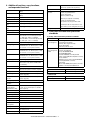
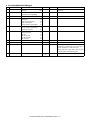
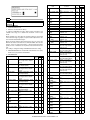
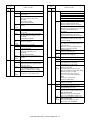
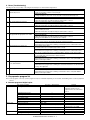
C. Others (Troubleshooting)
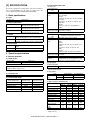
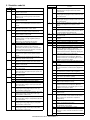
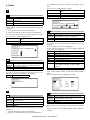
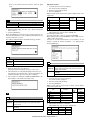
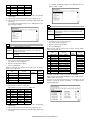
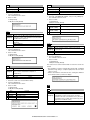
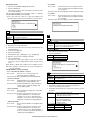
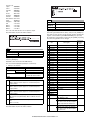
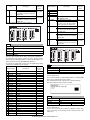
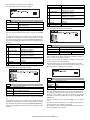
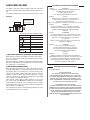
Followings are the error possibly occur during the download process and troubleshooting method.
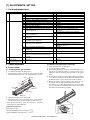
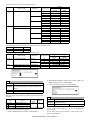
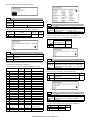
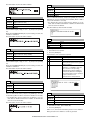
No
1
Warning/error message
Incorrect destination. Continue with the
download process?
2
Incorrect download file.
3
No downloadable data included.
4
This option not available.
5
The data size exceeds the Flash ROM size.
Try again with the appropriate size of data.
6
Time out error.
7
Communication (incoming) error.
8
Checksum error.
9
Error during the download process. Error
code: 0xXXXXXXXX
10
An error. [0xXXXXXXXX]
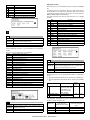
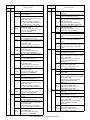
Detail
Destination of download file and copier doesn't match.
Possible to select either continue or cancel the job.
[TROUBLESHOOTING]
To change destination, select "Yes". If not, select "No" and cancel download process.
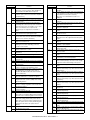
Invalid download file for the machine is selected, or the file format is not correct.
[TROUBLESHOOTING]
Confirm the download file. Possibly the improper download file is selected.
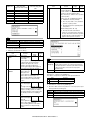
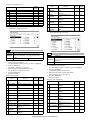
Unable to find appropriate data in selected download file.
[TROUBLESHOOTING]
Confirm the download file. Possibly the improper download file is selected.
Download procedure is executed on uninstalled optional kit.
[TROUBLESHOOTING]
Confirm installed optional kit.
Confirm the download file. Possibly the improper download file is selected.
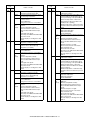
Panel flash ROM size is not enough to execute download procedure.
[TROUBLESHOOTING]
Confirm the download file. Possibly the improper download file is selected.
Exchange the flash ROM to the one which has more capacity.
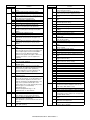
Transmission error
Unable to receive data from the machine among the certain period of time.
[TROUBLESHOOTING]
Restart maintenance program after confirming communication port or communication cable.
Incorrect download procedure.
The machine did not proceed download procedure correctly.
[TROUBLESHOOTING]
Restart maintenance program after confirming communication port or communication cable.
Make sure the communication device of PC(either COM or parallel) is under right condition.
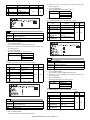
Transmission error
The check sum value of the transmission data is mismatch.
[TROUBLESHOOTING]
Restart maintenance program after confirming communication device of PC (either COM or
parallel) is under right condition.
Download data file operation error.
[TROUBLESHOOTING]
Restart maintenance program after confirming the selected download file is not abnormal and
not using other application.
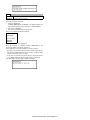
The error occurred except the above errors.
[TROUBLESHOOTING]
Restart maintenance program after confirming communication device of PC(either COM or
parallel) is under right condition.
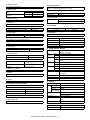
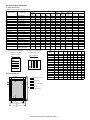
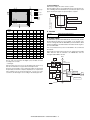
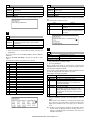
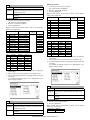
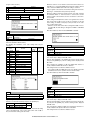
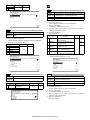
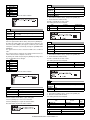
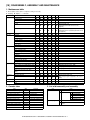
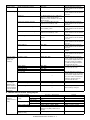
2. Key operator program list
Note: Some programs on the key operator program list may be unavailable depending on the machine and installing status of various peripheral
devices.
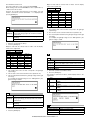
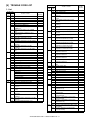
A. Common program of digital copier
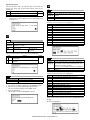
Account control
Energy save
Operation settings
Key operator programs
Auditing mode
Set value (∗: Default value)
ON / OFF∗
Total pages per account
Resetting account
Account number control
Account limit setting
Account number security
Cancel jobs of invalid accounts
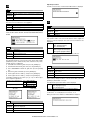
Auto power shut-off
Auto power shut-off timer
ON / OFF∗
ON / OFF∗
ON∗ / OFF
1 – 240 (Increment of 1min.) 60 (min.)∗
Preheat mode setting
Toner save mode
Auto clear setting
Message time setting
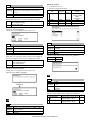
1 – 240 (Increment of 1min.) 15 (min.)∗
ON / OFF∗
10 – 240 (Increment of 10sec.) 60 (sec.)∗
1 – 12 (Increment of 1sec.) 6 (sec.)∗
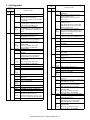
Remarks
When this is set to ON, the
department number must be
registered in the "Account number
control".
—
—
—
—
AR-M236/M276/M237/M277 OTHERS 11 - 3
Effective only when the "Auto
power shut-off" is set to ON.
This is not displayed for SUK.