1
How to Use It
As of version 2.2, IO numbering is the “native” numbering scheme for SNAPpy. Built‐in functions like setPinDir(), readPin(), writePin(), pulsePin(), etc. all accept raw IO numbers. To use IO numbering, you don’t have to do anything special. Assuming an LED is hooked up to your first usable IO pin, you could use something like pulsePin(0, 500, True) to blink that LED. However, we strongly recommend against using such “magic numbers” throughout your scripts. Instead define constants with meaningful names, such as: LED_PIN = 0
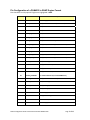
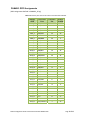
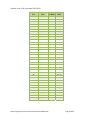
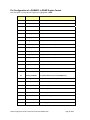
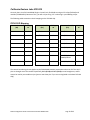
You can then script actions like pulsePin(LED_PIN, 500, True) You can find more details about the IO available on a particular SNAP Platform by looking in Section 6 of this document. GPIO Numbering
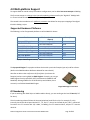
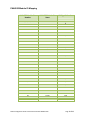
This is the second numbering scheme you might find yourself working with. You will notice this is what we use in the majority of the example scripts included with Portal. The footprint of all SNAP Engines defines 19 pin positions as General Purpose IO (GPIO) pins. Numbered from GPIO 0 to GPIO 18, these represent a somewhat abstract concept – they exist only in the context of the SNAP Engine headers. Synapse offers several “demo/prototyping” boards that accept SNAP Engines: •
•
•
•
•
SN163 Bridge Demonstration Board SN111 End Device Demonstration Board SN171 Proto Board SN132 SNAPstick SN170 Relay Board In addition, several OEMs have put sockets onto their own boards to directly accept Synapse RF Engines (or other pin compatible SNAP Engines). When writing scripts to run on these boards, it is helpful to think in terms of GPIO numbering. Prior to SNAP version 2.2, “GPIO numbering” was also the “native internal numbering”. In other words, in SNAP 2.0/2.1, saying readPin(0) was the same thing as saying readPin(GPIO_0). As of version 2.2, to use GPIO numbering in your scripts simply include the corresponding “platform include file”. For example, if you are writing a script to run on a Synapse SN171 Proto Board, equipped with a PAN4555 SNAP Engine, put the following line near the top of your script: from synapse.PAN4555_SE import *
This will correctly define named constants GPIO_0 through GPIO_18 so that you can script actions like: SNAP 2.2 Migration Guide‐v1.0 Document Number 600023‐01A Page 20 of 43